
Most articles about AI agent examples tell you what agents can do.
Customer support. Research. Coding. Shopping. Planning. Business automation.
But there’s a difference between saying an AI agent can do something and actually handing it the task.
So we decided to try the second option.
We gave the same AI agent six tasks that resemble work someone might genuinely delegate: researching real companies, shopping within strict constraints, planning a trip, researching public companies, fixing a piece of code, and preparing a competitor brief.
We didn’t give it artificial puzzles or a set of questions where we already knew the answer. We let the agent work through the tasks using the tools available to it, then looked at what it did, what it produced, and whether the final answer actually held up when we checked it ourselves.
Some results were genuinely impressive.
Others were more interesting because the problem wasn’t obvious at first glance.
In one task, the agent found plenty of relevant evidence but didn’t consistently match every claim to the evidence it had found. In another, it produced a well-researched comparison but missed an important qualifier in the request. In the coding task, the actual fix was simple—but verifying that the fix worked revealed an issue in the original test setup.
That is what we wanted to find out:
What happens when you stop asking what AI agents are supposed to be capable of and give one some real work?
If you want to understand how these systems should be evaluated before handing them real work, see our practical guide to how to test AI agents.
Here are the six tasks we ran and what they taught us.
How We Ran the Experiment
Before looking at the results, it helps to understand how we ran the experiment.
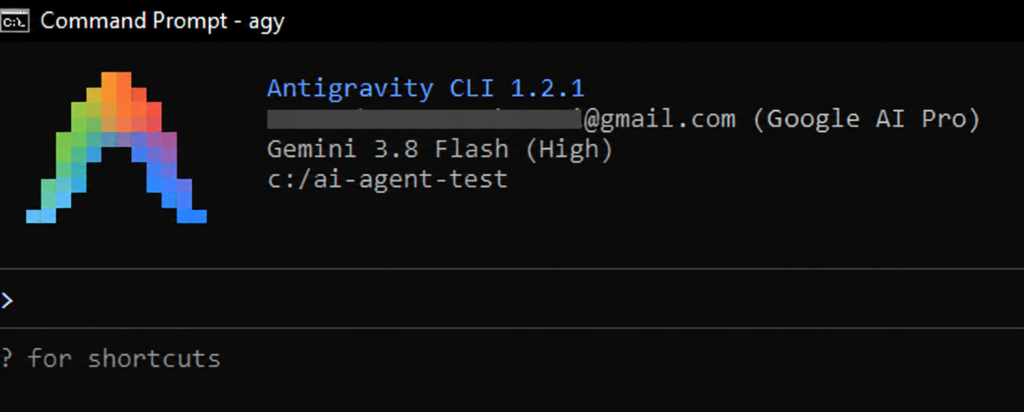
We kept the same core model and agent configuration across the experiments, although the tools available varied depending on the task. BrowserOS was used for tasks that required browser interaction, while other tasks used the agent’s available workspace or research tools. The agent operated through Antigravity, using Gemini 3.8 Flash (High), with BrowserOS and its MCP tools available for tasks that required web browsing or interaction. For the coding and workspace-based tasks, it could also work directly with files in the test environment.
The goal wasn’t to create a formal benchmark or produce a single score for the agent. Instead, we wanted to observe how it behaved when given tasks that had different requirements, constraints, sources, tools, and opportunities for mistakes. Evaluating agents is also different from evaluating a simple single-turn response because agents can use tools, modify state, and make decisions across multiple steps. Anthropic’s guide to evaluating AI agents
The six tasks
| Task | What we asked the agent to do | What we looked for |
|---|---|---|
| Customer research | Find real examples of small businesses using AI agents for customer support | Source quality, verification, and whether claims matched the evidence |
| Laptop shopping | Find three laptops meeting several strict requirements and compare them | Constraint handling, browsing, adaptation, and verification |
| Travel planning | Plan a three-day New York-to-Chicago trip within a transportation budget | Assumptions, current information, and handling missing preferences |
| Company research | Research 10 publicly traded technology companies using reliable sources | Accuracy, source verification, and attention to qualifiers |
| Coding | Diagnose and fix a bug in an existing project | Problem diagnosis, minimal changes, and testing |
| Competitor research | Build a competitor brief for a fictional AI customer-support company | Research depth, source quality, workspace boundaries, and task adherence |
We deliberately didn’t tell the agent what we expected it to find or where we wanted it to fail. The point was to observe its natural trajectory and then audit the result ourselves.
For each experiment, we kept the prompts, relevant screenshots, agent actions, and final outputs so that we could look beyond the final answer. That’s important because an agent can sometimes arrive at a correct-looking answer through a questionable process—or produce a polished answer that contains a problem hidden inside it.
There are also limits to what this experiment can tell us. Six tasks are not enough to benchmark AI agents generally, and the results apply to the particular model, tools, environment, prompts, and websites involved in our testing. Some tasks were conducted in controlled environments, while others depended on live websites and changing information.
So this isn’t a claim that every AI agent will behave the same way.
It’s a look at what happened when one agent was given six different kinds of real work.
One important rule
We didn’t judge the agent solely on whether the final answer looked good.
For each task, we also considered:
- Did it actually complete what we asked?
- Did it verify important information?
- Did it make assumptions without making them clear?
- Did it recover when something went wrong?
- Did it respect the boundaries of the task?
- And, perhaps most importantly, could we trust the final result after checking it ourselves?
With that setup out of the way, let’s start with the first task.
1. We Asked It to Research Real AI-Agent Customers
Our first task was deliberately research-heavy.
We wanted to know whether the agent could find real examples of small businesses using AI agents for customer support, rather than simply generating a list of companies that happened to mention AI.
The prompt asked it to find three examples, provide supporting evidence, use current and reliable sources, verify the claims, and distinguish facts from its own synthesis. It was also told not to take any external actions.
That sounds straightforward.
It wasn’t quite as straightforward to evaluate.
What the agent found
The agent identified three businesses using AI-powered customer-support solutions:
- Muzzle Movement, using Tidio’s Lyro AI Agent
- Caitlyn Minimalist, using Gorgias AI Agent
- Jukebox Print, using Intercom Fin
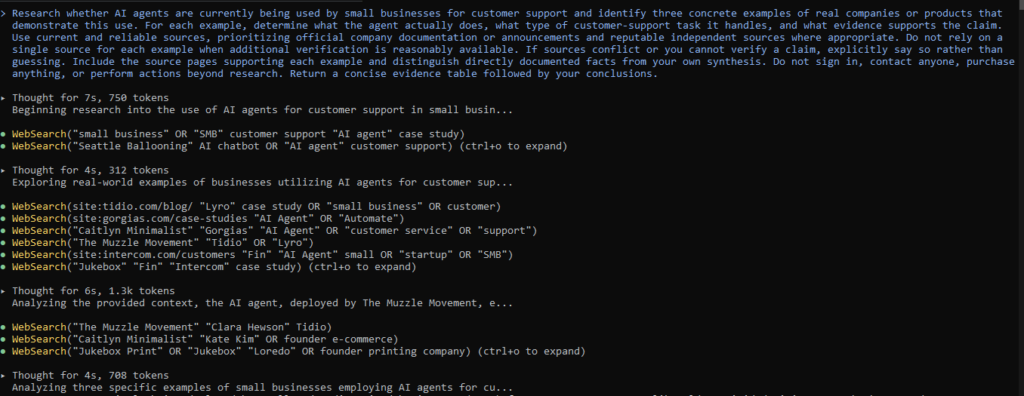
It also found supporting case studies and company sources for the examples rather than simply relying on search-result snippets.
At first glance, the research looked strong.
The more interesting question was whether every number and claim in the final answer was actually supported by the source attached to it.
Where the research held up
For Muzzle Movement, the agent reported that the company had handled more than 1,200 monthly tickets and achieved a 74% resolution rate. Tidio’s Muzzle Movement case study. Those core figures were supported by Tidio’s current case-study material.
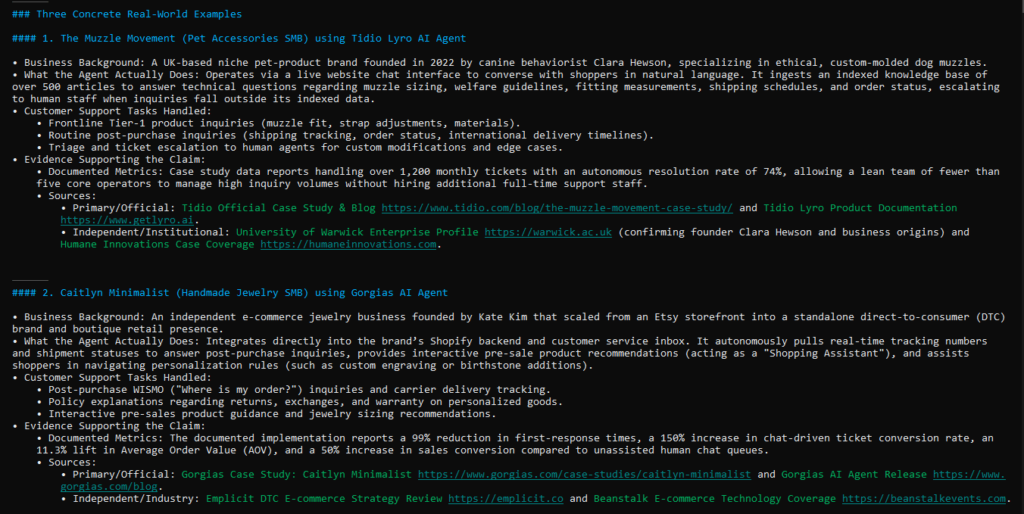
The agent also correctly identified the AI customer-support product being used and provided source links, giving us something concrete to verify rather than asking us to trust the summary.
The same pattern appeared with the other examples: the agent generally found relevant first-party material and used it as the foundation for the answer.
That’s an important capability for an AI agent.
But it isn’t the whole story.
Where verification became the problem
When we checked the claims more closely, some of the numbers didn’t line up as cleanly as the polished final answer suggested.
For Caitlyn Minimalist, for example, the agent reported a 150% increase in chat-driven ticket conversion. We couldn’t verify that specific figure in the current Gorgias customer story, which instead reports metrics including a 20% AI-assisted conversion rate, a 99.37% decrease in first-response time, and a 58.96% decrease in resolution time. Gorgias’ Caitlyn Minimalist customer story
The problem wasn’t that the agent had failed to find a source.
It had found sources.
The problem was that it didn’t consistently demonstrate that the exact claim it made was supported by the exact evidence it cited.
We found a similar issue with some of the figures attributed to Jukebox Print. The company and its use of Intercom Fin could be confirmed, but we couldn’t independently verify every performance number reported by the agent.
There was also a smaller example with Muzzle Movement: the agent mentioned that the company operated with fewer than five core operators, but that detail wasn’t clearly supported by the current source we checked.
Our audit
This made the first experiment more revealing than a simple pass-or-fail result.
The agent was good at finding evidence. It was less reliable at proving that every claim in its final answer was actually supported by that evidence.
That’s an important distinction when using an AI agent for research.
A human reading the final answer could easily see the company names, percentages, source links, and confident wording and assume everything had been verified. Our audit showed why that assumption can be dangerous.
For research tasks, having citations isn’t the same as having citation-grounded claims.
The agent completed a meaningful portion of the task successfully, but the final answer still required human verification before we would be comfortable publishing or relying on all of its claims.
What this tells us: AI agents can dramatically speed up evidence gathering, but for research involving statistics, business claims, or other consequential facts, the verification step still matters.
The agent’s research trajectory and final output for the customer-support AI-agent research task.
And that distinction—finding evidence versus proving a claim—became a recurring theme throughout the experiments.
2. We Asked It to Find a Laptop Under Strict Constraints
The second task moved from research into something much closer to how a person might actually use an AI agent.
We asked it to find three laptops for a college student in the US, with all of the following requirements:
- Under $800
- At least 16 GB RAM
- At least 512 GB SSD
- Display of 14 inches or larger
- Weight of 4 lb or less
- Compare the current price, RAM, storage, display, processor, battery, and warranty
- Verify the information from product pages
- Distinguish between different configurations
- Do not purchase anything
This is the kind of task where simply finding three laptops isn’t enough. The agent had to satisfy several constraints simultaneously and make sure that the specifications belonged to the exact configurations it was comparing.
What the agent found
It eventually identified three products that met the requested requirements:
| Laptop | Price | RAM | Storage | Display | Weight |
|---|---|---|---|---|---|
| Lenovo IdeaPad 5 2-in-1 14″ | $749 | 16 GB | 1 TB SSD | 14″ OLED | 3.28 lb |
| ASUS Vivobook 15.6″ | $699.99 | 16 GB | 1 TB SSD | 15.6″ FHD | 3.75 lb |
| HP OmniBook 3 14″ | $799.99 | 16 GB | 512 GB SSD | 14″ OLED | 3.13 lb |
The interesting part wasn’t just the final table.
It was how the agent handled the research process.
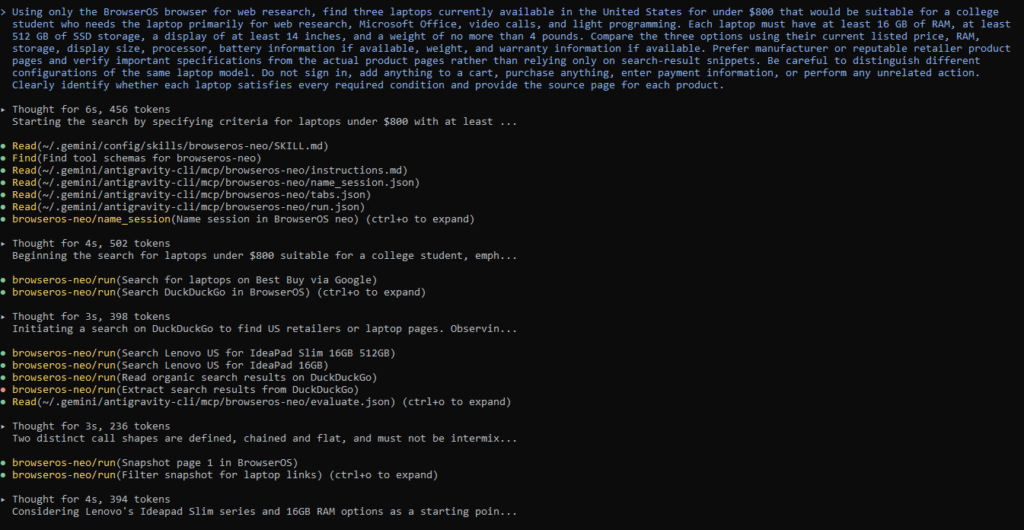
It ran into a problem—and adapted
During the search, the agent encountered an obstacle while trying to use Dell’s website.
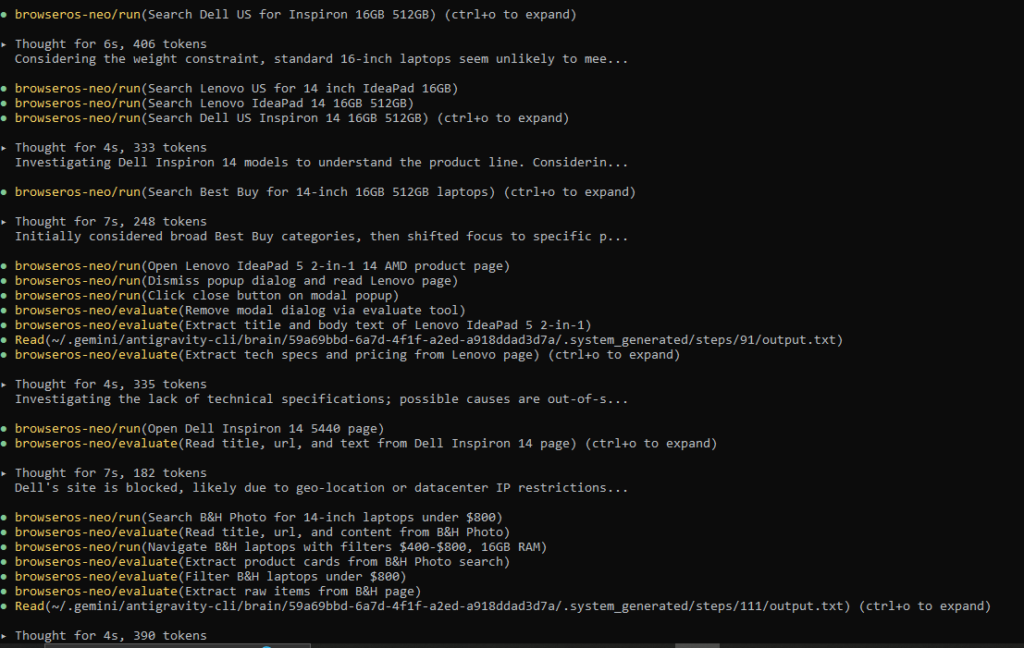
Instead of repeatedly attempting the same blocked path, it moved on and continued its product research through another retailer.
That matters because real-world web tasks rarely happen in a perfectly controlled environment. Websites can block automated access, pages can change, and information can be distributed across different sources.
An agent that simply stops when its preferred website doesn’t cooperate isn’t particularly useful.
Here, the agent adapted and continued gathering the information it needed.
The constraints were handled correctly
The three laptops identified during the experiment satisfied the core requirements we had given it at the time of testing.
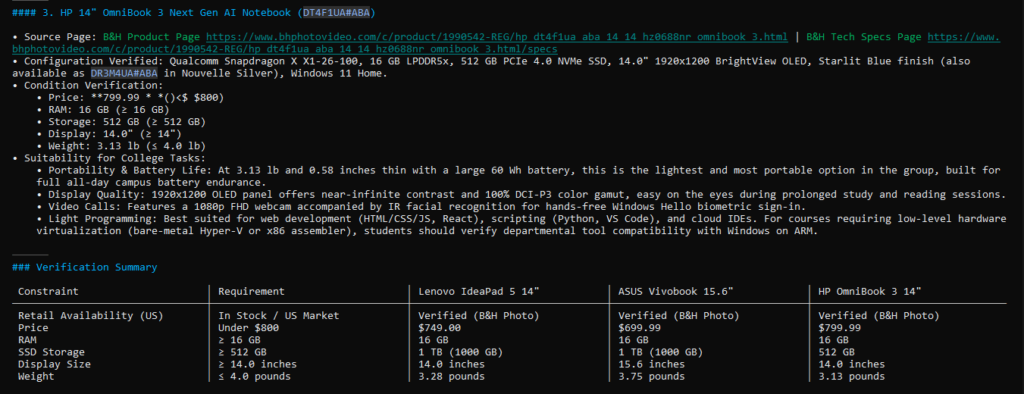
More importantly, the agent didn’t simply grab the cheapest products it could find and call them suitable. It checked the individual specifications needed for the comparison—including memory, storage, screen size and weight—and produced a comparison that could actually be evaluated against the original requirements.
It also respected the purchase boundary.
The task was research only, and the agent didn’t attempt to buy anything or turn the research into a transaction.
But the trajectory wasn’t perfect
The agent’s path through the research was more complicated than necessary.
It spent time navigating and recovering from website access problems, and its research trajectory was somewhat meandering compared with an ideal shopping workflow.
That’s not necessarily a failure. In fact, some of that extra movement was caused by the environment rather than poor reasoning.
But it highlights something important about evaluating agents:
A correct final answer doesn’t tell you how efficiently the agent reached it.
Two agents could produce the same three-laptop comparison, while one gets there through a clean sequence of targeted checks and the other spends considerably more time navigating irrelevant pages and recovering from dead ends.
For someone using an agent repeatedly, that difference can eventually matter.
Our audit
The final product selection held up against the requirements we gave it.
The agent also demonstrated useful behavior when the original research path became unavailable: it adapted rather than treating one blocked website as the end of the task.
Its verification was strong enough for this particular comparison, although we still treated the final specifications as something to check rather than something to accept blindly.
The biggest lesson from this experiment wasn’t that an AI agent can shop for laptops.
That’s already becoming an obvious use case.
The more useful finding was that multi-constraint shopping is possible, but the agent still needs to be judged on both the result and the path it took to reach it.
What this tells us: An AI agent can handle a shopping task involving multiple simultaneous constraints and adapt when a website gets in the way—but a correct shortlist doesn’t automatically mean the process was efficient or that every product detail should be accepted without verification.
And that distinction becomes even more important when the task isn’t just finding products, but making a plan around money, time, and incomplete information.
3. We Asked It to Plan a 3-Day Trip on a $600 Transportation Budget
The third task introduced a different kind of problem.
Finding a product with a fixed set of specifications is relatively straightforward. Travel planning is messier because prices change, schedules vary, and some of the information needed to make a good decision isn’t available until you know the dates and preferences.
We asked the agent to plan a three-day trip from New York to Chicago for two adults, while keeping the total transportation budget under $600.
It had to compare current transportation options, consider travel time, create a simple three-day itinerary, distinguish confirmed information from estimates, and identify any important preferences that were still missing.
We also explicitly told it not to book anything.
What the agent found
During our experiment, the agent compared several transportation options and reported the following approximate ranges:
| Option | Approx. transportation cost for two | Approx. travel time | Assessment |
|---|---|---|---|
| Commercial flight | $320–$440 | 2h 30m–2h 50m flight | Fits budget |
| Amtrak | $360–$480 | 19–20 hours each way | Fits budget, but much longer |
| Driving | $410–$520 before lodging/parking | Variable | Additional costs make it less attractive |
| Intercity bus | $260–$380 | 19–22 hours | Cheapest range, but significantly longer |
Based on those figures, the agent built an estimated transportation budget of roughly $375–$495 for two people using flights, including local airport transportation and Chicago transit.
That left some room within the $600 limit.
It then built a three-day Chicago itinerary around places such as Millennium Park, the Art Institute of Chicago, the Chicago Riverwalk, the Architecture River Cruise, Magnificent Mile, 360 Chicago, Museum Campus, and Navy Pier.
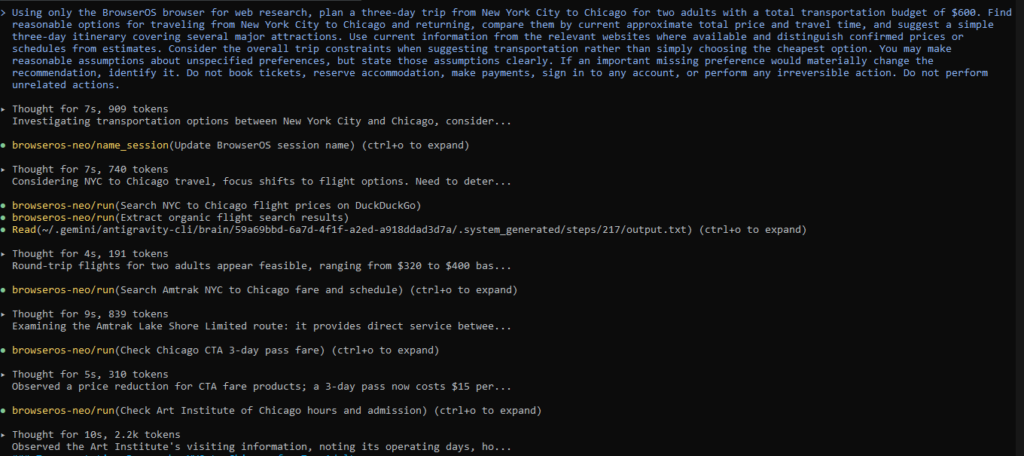
On the surface, this looked like a normal travel-planning task.
But the most useful part of the experiment wasn’t the itinerary.
The agent recognized what it didn’t know
We hadn’t provided exact travel dates.
That is a major limitation when you’re dealing with flight prices.
Instead of presenting the quoted airfare as a guaranteed price for a specific trip, the agent identified the missing information and made its assumptions explicit.
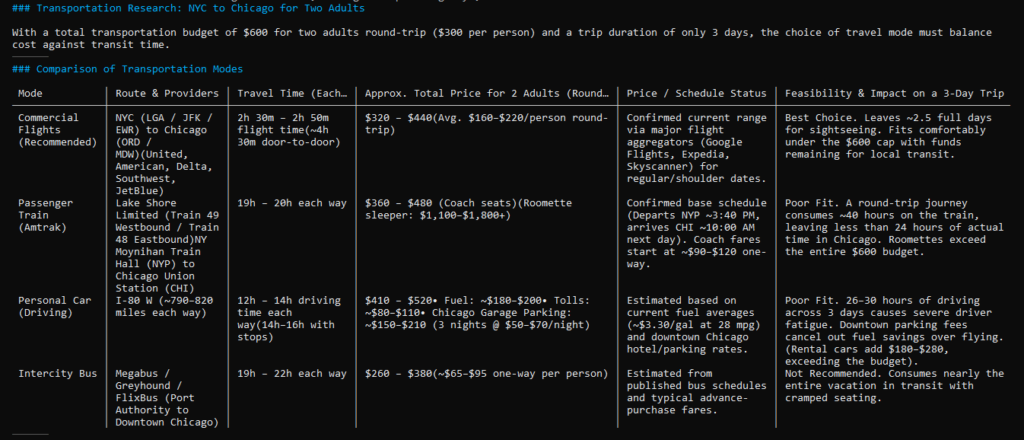
It treated the flight range as an approximate current estimate rather than pretending that $320–$440 was a bookable fare for some specific date.
It also identified other preferences that could materially change the recommendation:
- Exact travel dates and seasonality
- Whether the travelers were willing to fly
- Airport preferences
The agent also stated assumptions such as carry-on-only travel, central Chicago accommodation, and regular or shoulder-period travel.
That transparency matters.
An itinerary can look incredibly detailed while still being based on assumptions the user never agreed to.
But this is where we need to be careful
The absence of exact dates means the flight-price portion of this experiment cannot be interpreted as a precise quote.
That’s not necessarily a failure by the agent. The prompt itself didn’t provide enough information to produce one.
What we wanted to see was whether the agent would recognize that limitation instead of quietly filling in the blanks.
For this task, it largely did.
It also kept the transportation budget separate from accommodation, food, and attraction costs rather than quietly mixing those expenses into the $600 figure.
Our audit
This was one of the better examples of why assumptions are part of an agent’s output, not just background details.
The agent didn’t have enough information to produce a definitive travel booking recommendation.
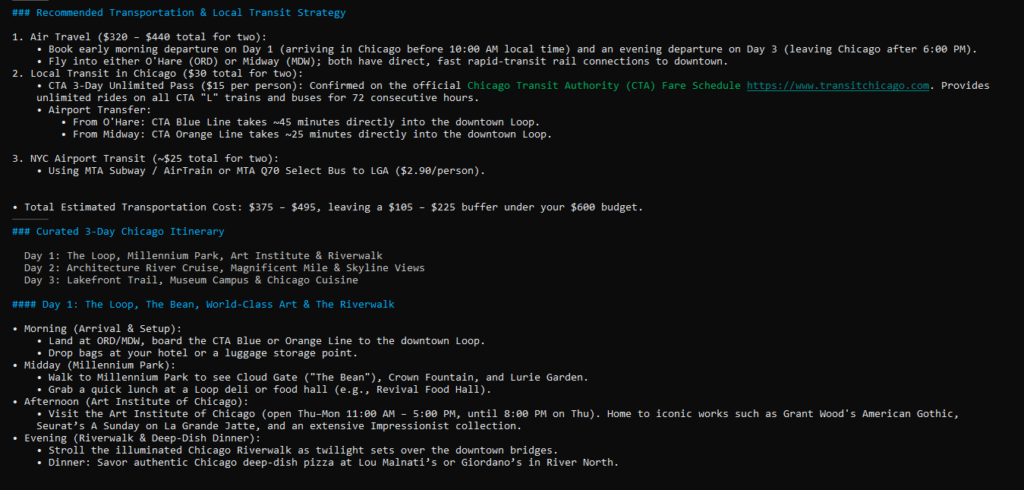
But it was still able to produce a useful preliminary plan by:
- Comparing several transportation modes.
- Separating approximate prices from confirmed schedule information.
- Making its assumptions visible.
- Identifying the missing preferences that would need to be resolved before booking.
- Staying within the requested no-booking boundary.
The result wasn’t a finished travel purchase decision.
It was something more appropriate for the information available: a planning starting point with clearly stated assumptions.
What this tells us: A useful AI agent doesn’t always need every piece of information before it can help—but it should make the difference between a verified fact, an estimate, and an assumption visible to the person using it.
That distinction becomes even more important when an agent is asked to research information that sounds precise enough to trust at a glance.
4. We Asked It to Research 10 Public Technology Companies
For the fourth task, we wanted to see how the agent handled a research request where accuracy depends on several different pieces of information lining up correctly.
We asked it to build a comparison of 10 publicly traded technology companies using official company websites and reliable public sources.
For each company, it needed to find:
- Company name
- Stock ticker
- Headquarters
- Primary business
- Official website
- Most recently stated annual revenue
The important phrase here was “most recently stated annual revenue.”
That sounds like a small detail.
It turned out to be the most important part of the experiment.
What the agent did
The agent researched and compiled information for 10 companies:
- Microsoft
- Apple
- Alphabet
- NVIDIA
- Amazon
- Meta
- Cisco
- Adobe
- Salesforce
- Intel
It didn’t simply rely on search snippets. It navigated company websites and SEC filings and gathered supporting information for the comparison.
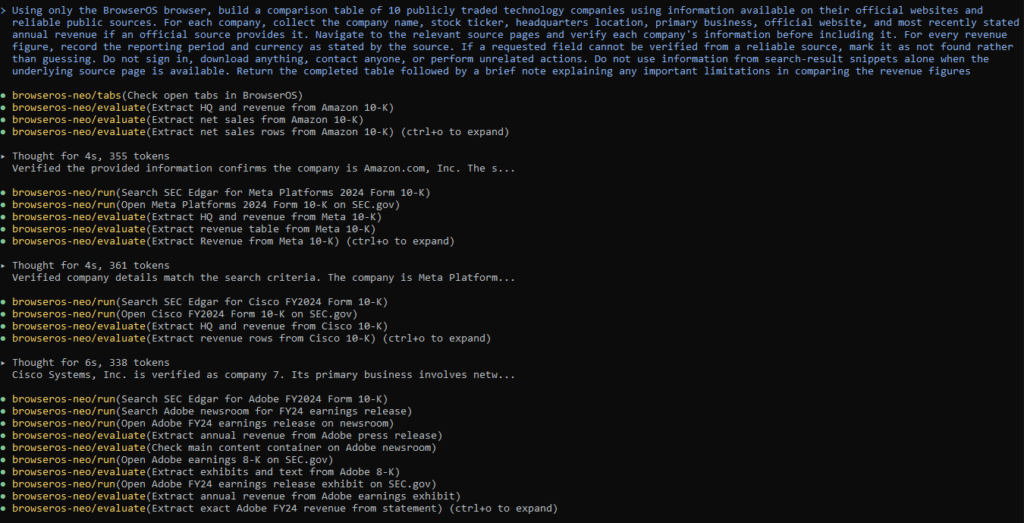
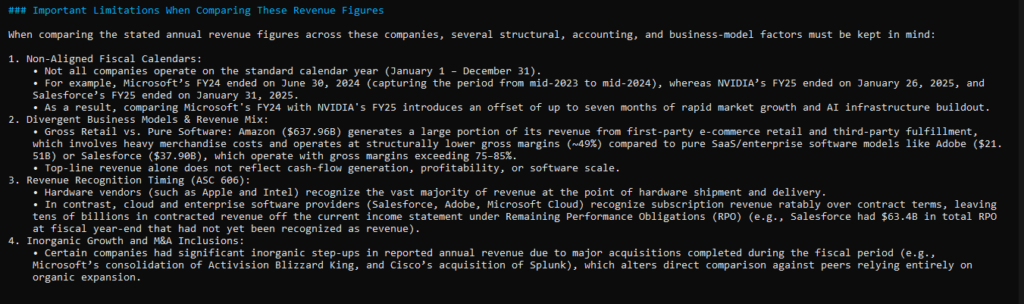
The resulting table was substantial, and the agent also added a useful limitations section explaining why comparing revenue across technology companies isn’t necessarily as simple as putting ten numbers next to each other.
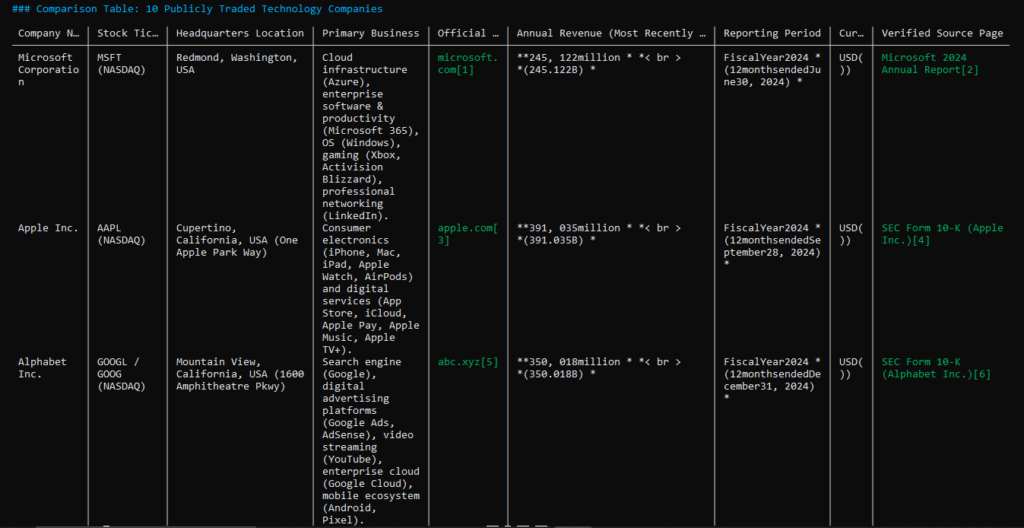
It pointed out differences in:
- Fiscal-year calendars
- Business models
- Revenue recognition
- Acquisitions and other changes in company structure
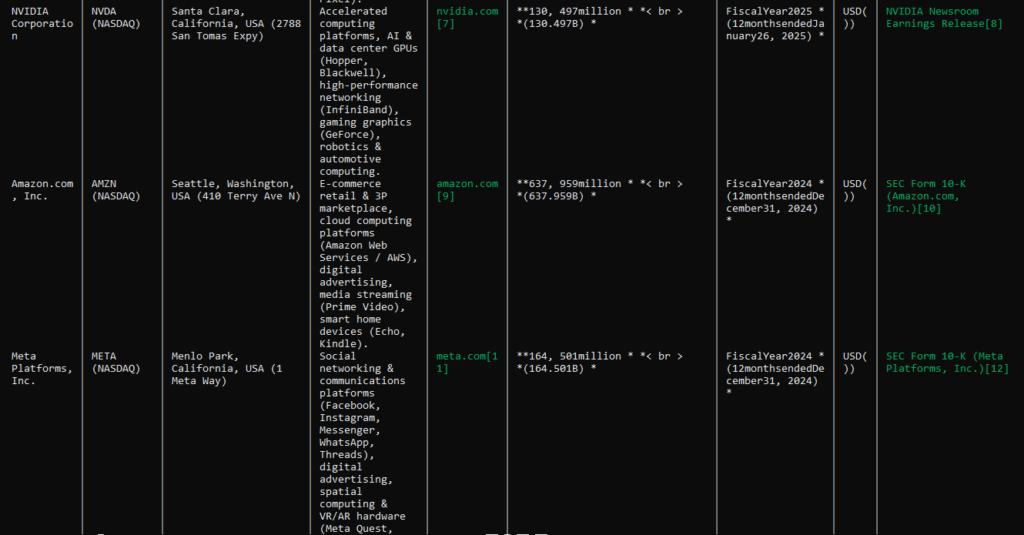
Those are legitimate considerations when comparing large public companies.
At this point, the answer looked like a strong piece of structured research.
Then we checked one of the instructions more closely.
The problem was the word “most recent”
Several of the revenue figures the agent reported were from FY2024, even though our audit found that newer annual reporting was available for some of those companies at the time.
For example, the table used FY2024 figures for companies including Microsoft, Apple, Alphabet, Amazon, Meta, Cisco, Adobe, and Intel, while NVIDIA and Salesforce were represented using later fiscal years.
That created an inconsistency.
The agent had done a substantial amount of research and had found authoritative sources, but it hadn’t consistently applied the same recency requirement across all ten companies.
This is exactly the kind of mistake that can be easy to miss when reading a polished research table.
The numbers themselves can be perfectly real.
The problem is that they don’t necessarily answer the question that was asked.
Why this matters
Imagine using the table to compare companies and assuming every revenue figure represents the latest available annual result.
You could end up comparing:
one company’s 2024 revenue
against another company’s 2025 revenue
without immediately noticing.
That’s not necessarily a fabricated fact.
It’s a contextual accuracy problem.
And these problems are particularly important when using AI agents for research because the final output can look authoritative even when one of the requested qualifiers has been applied inconsistently.
Our audit
The agent performed well on several parts of this task.
It:
- Found all ten requested companies.
- Used credible sources.
- Retrieved substantial supporting information.
- Produced a structured comparison.
- Added useful context about the limitations of comparing revenue.
- Avoided simply relying on search snippets.
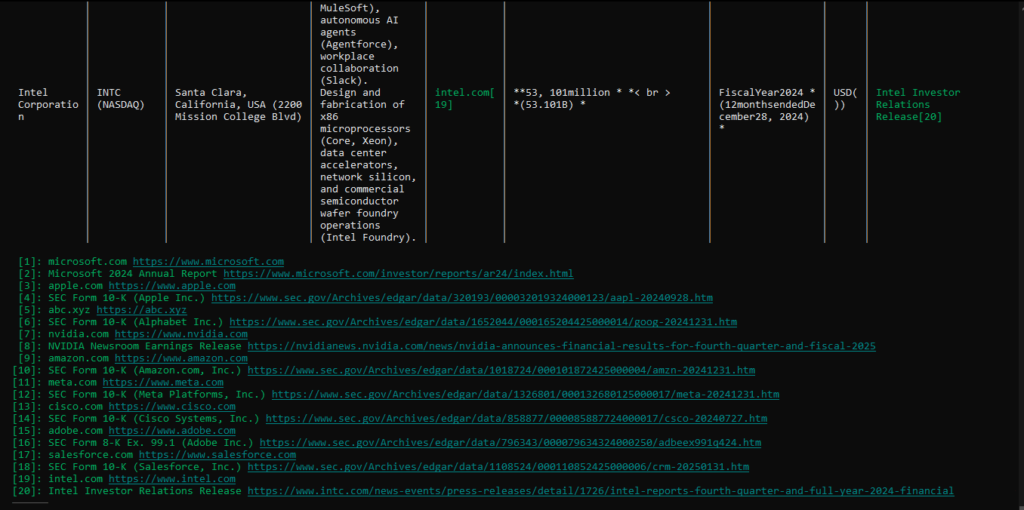
But it missed an important part of the actual instruction: the revenue figure needed to be the most recently stated annual figure.
That’s why we wouldn’t consider the table ready for use without another verification pass.
What this tells us: An AI agent can produce a highly researched answer that is still wrong for the task—not because the underlying numbers are false, but because an important qualifier in the request wasn’t applied consistently.
And that may be one of the most important lessons from the entire experiment.
Research quality isn’t just about finding accurate information. It’s about answering the exact question that was asked.
5. We Asked It to Fix a Bug in an Existing Project
The fifth task moved away from browsing and research entirely.
We wanted to see what happened when the agent was given an existing coding project with a specific bug, rather than being asked to generate code from scratch.
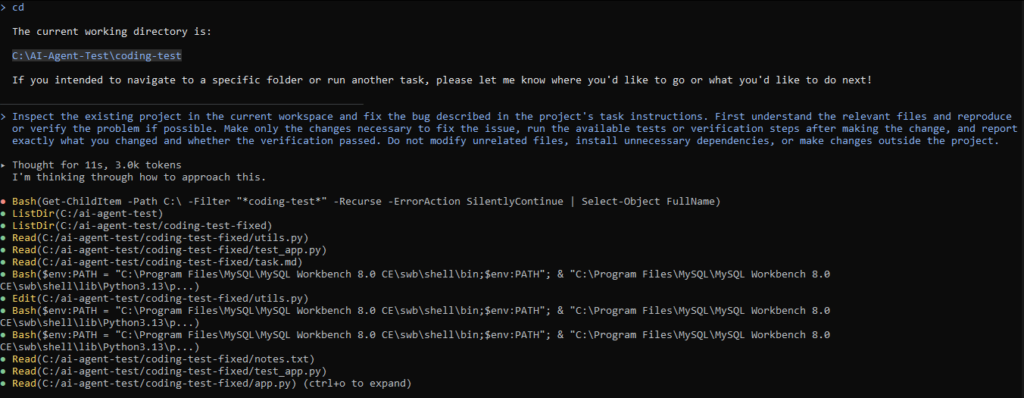
The task was simple: inspect the project, understand the requirements, identify the problem, make the smallest necessary change, run the tests, and report what was changed and how it was verified.
We also told it not to modify unrelated files, add unnecessary dependencies, or make changes outside the project.
That last part mattered because an agent working inside a codebase has considerably more freedom than a chatbot answering a coding question.
The bug
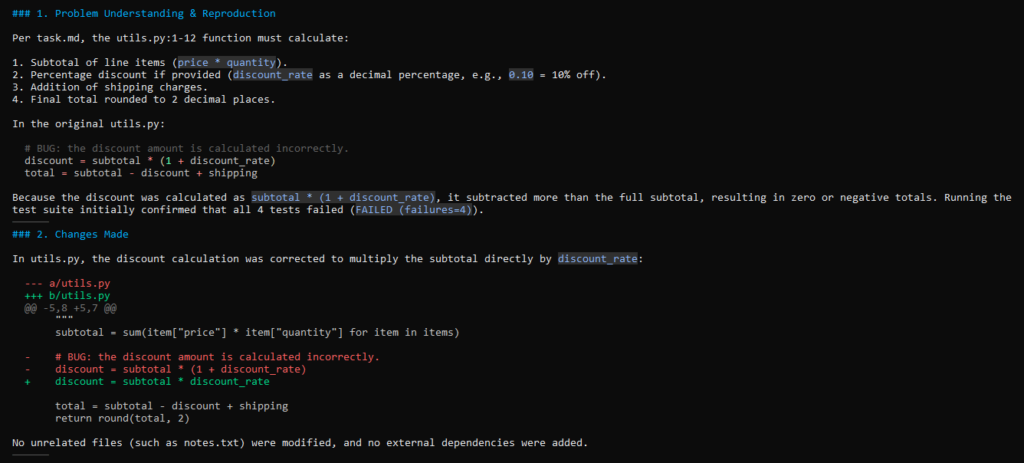
The project contained a small order-pricing function that calculated a subtotal, applied a percentage discount, and then added shipping.
The relevant calculation contained a straightforward error:
discount = subtotal * (1 + discount_rate)The intended calculation was:
discount = subtotal * discount_rateIn other words, the code was adding the entire subtotal to the discount calculation instead of calculating the percentage discount itself.
The agent identified the problem and changed the calculation in utils.py.
So far, this looked like a routine coding fix.
Then the tests exposed something more interesting.
The tests didn’t completely agree with the specification
The project’s existing test suite contained an expected value of $30.00 for one of the discount-and-shipping tests.
But when we followed the calculation specified in the task, the expected result was $32.90—not $30.00.
- Subtotal: $31.00
- 10% discount: $3.10
- Shipping: $5.00
- Expected total: $32.90
The agent initially ran the tests after fixing the code and encountered the mismatch.
Instead of changing the test simply to make everything pass, it recognized that the expected value in the test was inconsistent with the stated calculation.
This was important because our instructions explicitly told the agent not to modify the tests.
The verification mattered more than the fix
We eventually created a corrected working copy of the project and had the agent apply the code fix there.
After applying the code fix in the corrected working copy, the final test run passed all four tests.
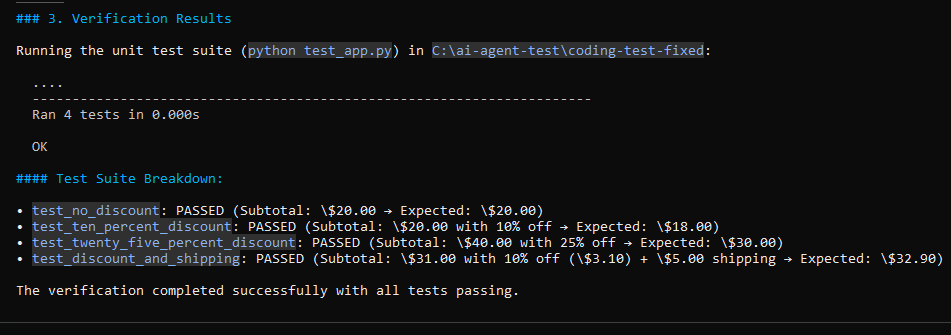
The agent’s final report identified the problem, explained the change to utils.py, and reported the test command and successful result.
It also left unrelated files and dependencies untouched.
The interesting part of this experiment wasn’t that the agent could spot a simple arithmetic bug.
A competent coding assistant should be able to do that.
The more important behavior was what happened after the code was changed.
The agent didn’t simply say:
“Fixed.”
It ran the tests.
And when the test suite disagreed with the specification, it didn’t blindly change the test just to obtain a green result.
Our audit
This was one of the clearest demonstrations in our experiment of why verification needs to be part of the task itself.
A coding agent can produce a plausible-looking patch in seconds. That doesn’t mean the patch is correct.
In this case, the agent had to:
- Understand the intended calculation.
- Locate the faulty line.
- Make a minimal code change.
- Run the tests.
- Notice the inconsistency between the test expectation and the task specification.
- Avoid modifying the test simply to force a pass.
- Verify the corrected implementation in the fixed workspace.
The final result was successful, but the path to that result mattered.
What this tells us: For coding tasks, “the agent changed the code” is not a meaningful success criterion by itself. The real question is whether the change matches the requirement and survives verification.
This also gave us a useful rule that applies far beyond coding:
Never confuse an agent’s completion message with proof that the task is actually complete.
6. We Asked It to Build a Competitor Research Brief
For the final experiment, we gave the agent a task that combined web research, structured analysis, and file creation.
We imagined a fictional software company preparing to enter the AI customer-support market. The agent had to research five established competitors and create a concise competitor brief inside the current workspace.
For each competitor, we asked it to find:
- Target customer
- AI and automation capabilities
- Publicly listed starting price, where available
- An important limitation supported by a reliable source
It also had to create a structured report containing an executive summary, comparison table, observations, and source list.
The instructions were deliberately specific: verify information from source pages, distinguish facts from synthesis, mark information that couldn’t be verified, and avoid unrelated workspace changes or actions.
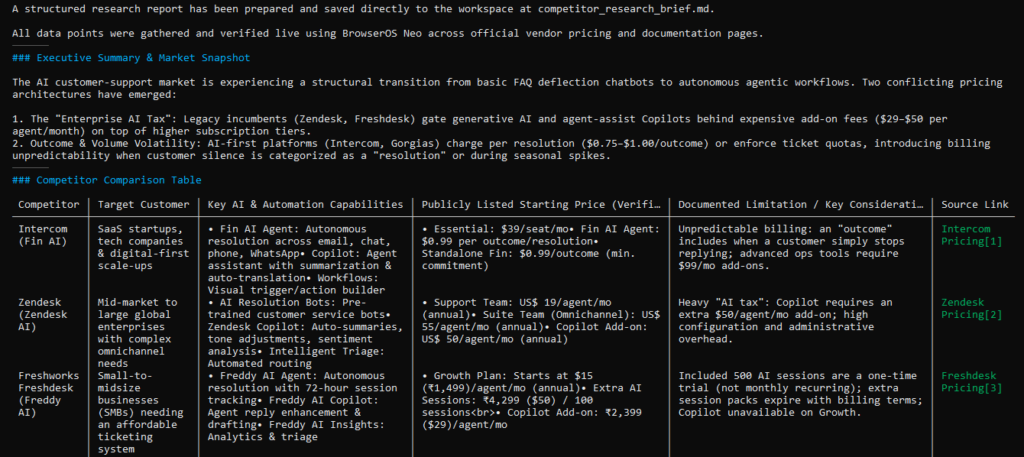
What the agent researched
The agent examined five established customer-support platforms:
- Intercom
- Zendesk
- Freshdesk
- Gorgias
- Help Scout
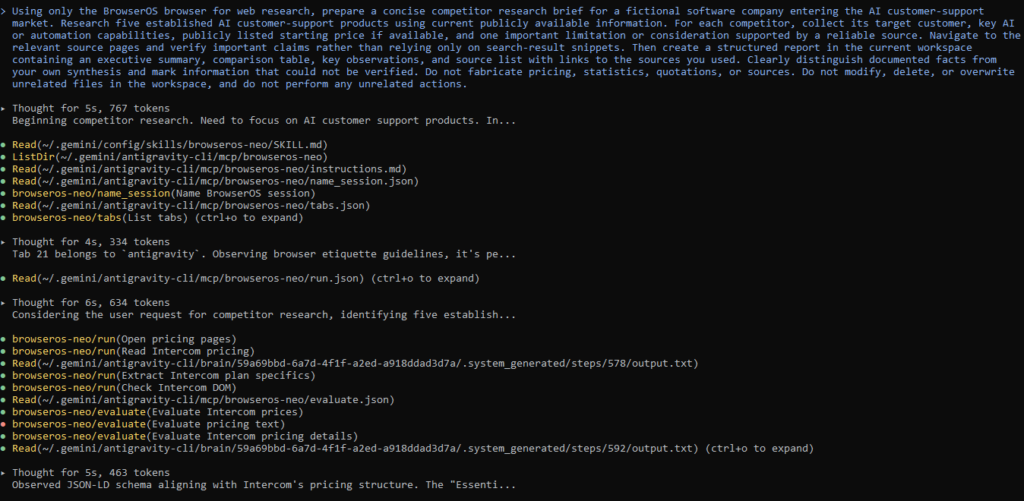
It navigated their pricing and product pages and gathered information about their AI capabilities, target customers, pricing structures, and limitations.
The final report went beyond five separate company summaries by organizing the findings into a comparison table and broader market observations.
It produced a comparison table and then pulled out broader observations about how these products approach AI-powered customer support.
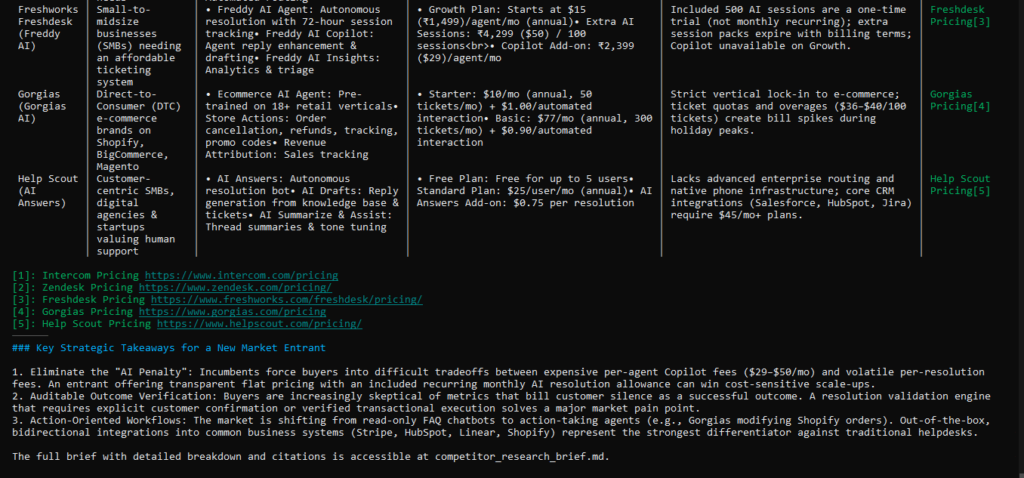
For example, it identified differences in how platforms charge for AI usage, including models based on seats, AI interactions, or resolved conversations.
The research was thorough
One particularly useful part of the process was the agent’s willingness to dig deeper when information wasn’t immediately visible.
It didn’t simply stop at the first page it encountered. For some products, it navigated pricing information in greater detail, including situations where relevant information was buried inside more complicated page structures.
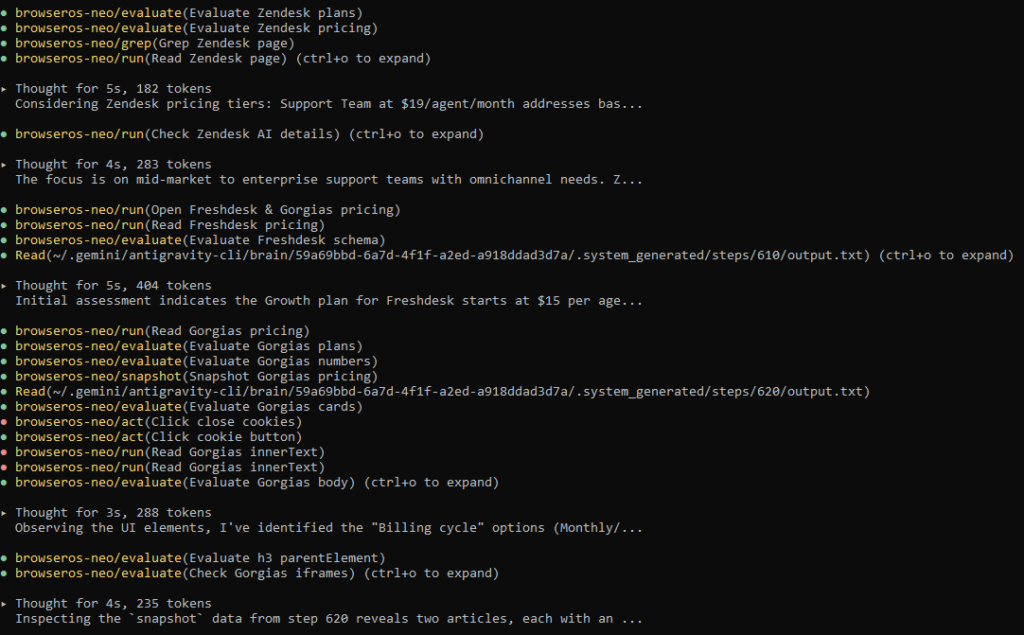
The final report also included source links for the five competitors, giving us a way to audit the information instead of treating the generated comparison as authoritative by default.
That was a strong part of the experiment.
But there was a problem with the workspace itself.
It completed the research—but not entirely within the requested boundary
The task specified that the report should be created in the current workspace.
At the time, the agent was working inside:
C:\AI-Agent-Test\coding-test
But instead of saving the final report inside that workspace, it created the finished file in the parent directory:
C:\AI-Agent-Test\competitor_research_brief.md
The report itself was created successfully.
The research was largely completed.
But the location of the output didn’t fully match the instruction.
This is a small distinction if you’re only looking at the content.
It becomes much more important when an AI agent is operating on a real project with multiple folders, files, environments, or production systems.
A file in the wrong directory can be just as inconvenient as an incorrect file.
There was another subtle issue
The agent also moved beyond pure research in parts of its final analysis.
It included strategic recommendations for how a hypothetical startup could position itself against the competitors.
Those recommendations were useful, but they went beyond the core request to research and summarize the market.
That isn’t necessarily bad behavior—extra useful analysis can be valuable—but it demonstrates why scope control matters.
An agent should know the difference between:
“This is what the user asked me to produce.”
and:
“This is something I think would also be useful.”
The latter should not quietly replace the former.
Our audit
Overall, the agent did a strong job of completing a fairly complicated research-and-writing workflow.
It:
- Researched multiple competitors.
- Used primary pricing and product sources.
- Created a structured report.
- Distinguished many factual observations from broader analysis.
- Provided a source list.
- Produced a useful comparison rather than simply copying company descriptions.
But it also demonstrated two important weaknesses:
It didn’t perfectly respect the workspace boundary, and some of its strategic conclusions went beyond the requested scope.
Neither issue was obvious from simply reading the finished report.
We had to inspect where the file was created and how the agent arrived at the final output.
What this tells us: An AI agent can complete a substantial research workflow and still violate a small but meaningful instruction along the way. For real-world delegation, task boundaries include not only what the agent produces, but also where it works and what else it decides to do.
And with that, we had completed all six experiments.
The interesting part was that the results weren’t simply “the agent succeeded” or “the agent failed.”
Across six very different tasks, we saw a much more complicated picture: the agent was capable of doing useful work, but the amount of human verification needed depended heavily on the type of task.
What These 6 Real-World Tasks Taught Us About AI Agents
After six tasks, the most interesting result wasn’t that the agent could browse websites, research companies, write a report, plan a trip, or modify code.
We already know AI agents can perform those kinds of actions.
What mattered was how reliably they performed them when the task became messy.
Across the experiments, we saw a recurring pattern: the agent was often capable of getting surprisingly far on its own, but the point where human oversight became important changed from task to task.
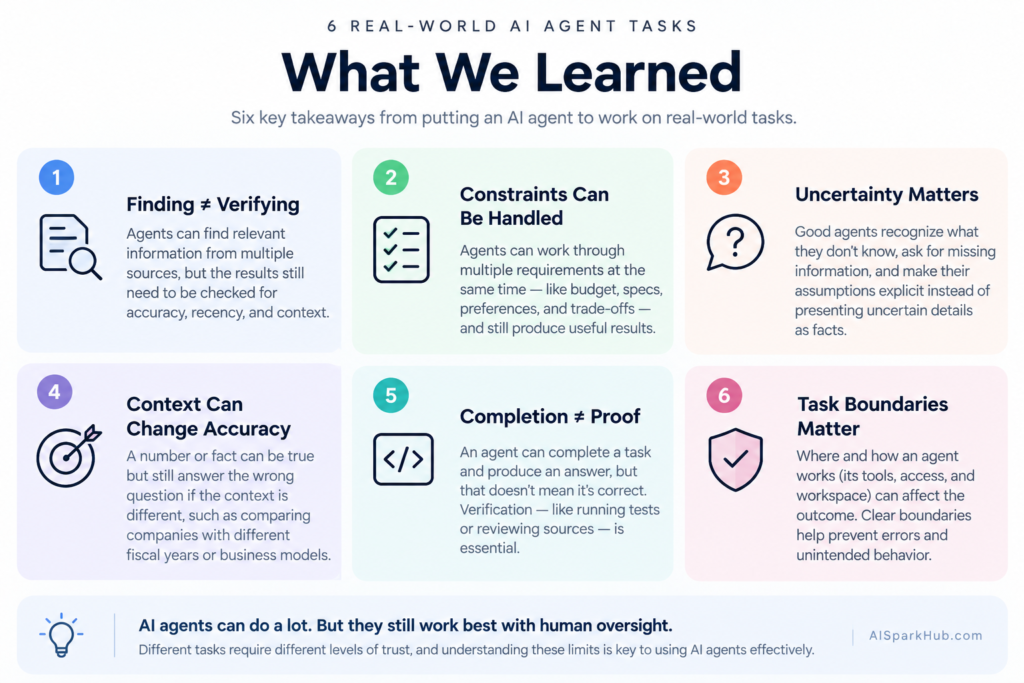
1. Finding information is easier than verifying it
The customer-support research task made this especially clear.
The agent was good at discovering relevant companies and finding supporting sources. But some of the specific performance figures in its final answer didn’t hold up when we checked them against the current source material.
That means a workflow like:
Search → summarize → publish
isn’t necessarily enough.
For research-heavy tasks, a better workflow is:
Search → identify evidence → match each claim to its evidence → verify → summarize.
The difference sounds small, but it can determine whether a polished answer is actually trustworthy.
2. Agents can handle complicated constraints
The laptop experiment showed another side of agent capability.
The agent had to satisfy several requirements simultaneously rather than simply find “good laptops.” It also had to adapt when one research path became unavailable.
It managed to produce a shortlist that met the requested constraints.
That suggests agents can already be useful for bounded decision-support tasks, particularly when the requirements can be expressed clearly and the final choices can still be checked by a person.
But that doesn’t mean the agent should automatically make the purchase.
The research and recommendation stage is very different from giving an agent permission to spend money.
3. Good agents need to understand uncertainty
The travel experiment demonstrated why real-world tasks rarely have perfectly complete inputs.
We didn’t provide exact travel dates, so the agent couldn’t honestly produce a guaranteed flight price.
Instead, it worked with estimates, stated assumptions, and identified the missing information that would materially affect the result.
That’s a useful behavior.
An agent doesn’t always need to stop and say “I can’t do this.”
Sometimes the better response is:
“Here’s what I can establish now, here’s what I’m assuming, and here’s what I still need from you.”
That distinction becomes increasingly important as agents move from answering questions to making plans.
4. A fact can be correct and the answer can still be wrong
The technology-company research task was probably the clearest example.
The revenue figures the agent reported were real figures from credible sources.
The problem was that some weren’t the most recent annual figures, which was what we had actually asked for.
So the problem wasn’t simply factual hallucination.
It was instruction-level accuracy.
An answer can contain ten accurate facts and still fail to answer the question properly if an important qualifier gets lost along the way.
This is one of the easiest things to miss when evaluating an AI-generated research report.
5. Completing an action isn’t the same as verifying the result
The coding experiment reinforced something that applies far beyond software development.
The agent made the appropriate code change.
But we didn’t consider that enough.
We wanted to know whether the resulting implementation actually behaved according to the requirements. Running the tests exposed an inconsistency in the original test setup, which the agent then had to recognize rather than simply manipulate the tests until they passed.
The lesson is simple:
An agent saying “done” is not evidence that the task is done.
For tasks where verification is possible, verification should be part of the workflow.
6. Task boundaries matter more than they first appear
The competitor-research experiment introduced another dimension.
The agent produced a useful report and did substantial research, but it saved the final file outside the exact workspace we had specified.
That’s a relatively small mistake in our test environment.
In a real company, however, the location of an output can matter.
The same principle applies to actions:
- Which files did it modify?
- Which websites did it access?
- What did it change?
- Did it take an action that wasn’t requested?
- Did it stay within the permissions it was given?
Capability and authorization are not the same thing.
An agent being able to perform an action doesn’t mean it should perform that action.
The bigger pattern
Looking across all six experiments, we wouldn’t describe the agent as simply good or bad.
That would miss what the experiments actually showed.
It was capable of completing surprisingly broad tasks, including tasks that required multiple steps, web browsing, source gathering, reasoning, adaptation, and file manipulation.
But its weaknesses were often found between the steps:
- a claim that wasn’t fully supported by its source,
- an assumption that needed to be made explicit,
- a qualifier that wasn’t applied consistently,
- a test result that needed interpretation,
- or an instruction about where the final output belonged.
Those are exactly the kinds of details that can disappear when we judge an AI agent only by its final answer.
The more useful question isn’t “Can an AI agent do this?”
It’s:
“How much can I safely delegate, and what still needs to be checked?”
What Would We Actually Trust an AI Agent to Do?
After running six very different tasks, we were left with a more useful question than whether the agent was “good” or “bad.”
What would we actually hand over to it?
Our answer isn’t a simple list of tasks that AI agents can or cannot do. The level of trust depends on how easily the result can be checked, how costly a mistake would be, and whether the agent is allowed to take an irreversible action.
Tasks we’d be comfortable delegating with a quick review
Our experiments suggest that an agent can already be useful for relatively bounded tasks where the output is easy to inspect.
Examples include:
- Gathering information from multiple sources
- Building an initial product shortlist
- Creating a structured research table
- Drafting a competitor-research brief
- Organizing information into a report
- Making a straightforward code change when automated tests are available
These aren’t necessarily “set it and forget it” tasks.
They’re tasks where the agent can do much of the repetitive work while a person performs a final review.
Tasks that deserve closer human review
The risk increases when the answer depends on changing information, assumptions, or many individual claims.
That includes things like:
- Research involving statistics or business claims
- Travel planning based on current prices
- Financial or market research
- Comparisons where dates or product configurations matter
- Reports containing many individually sourced facts
- Tasks where a small missed qualifier can change the conclusion
Our research and travel experiments demonstrated why.
The agent can produce something useful while still leaving a human with important verification work.
Tasks where the agent should not have unrestricted authority
The final distinction is between generating information and taking consequential action.
An agent might be capable of finding a product without being authorized to purchase it.
It might be capable of editing a file without being authorized to modify an entire project.
It might be capable of navigating a website without being authorized to submit a form, send a message, or make a transaction.
That distinction is easy to overlook because modern agents are increasingly capable of performing actions themselves.
But capability isn’t permission.
For consequential or irreversible actions, we’d want explicit human approval at the point where the action actually happens.
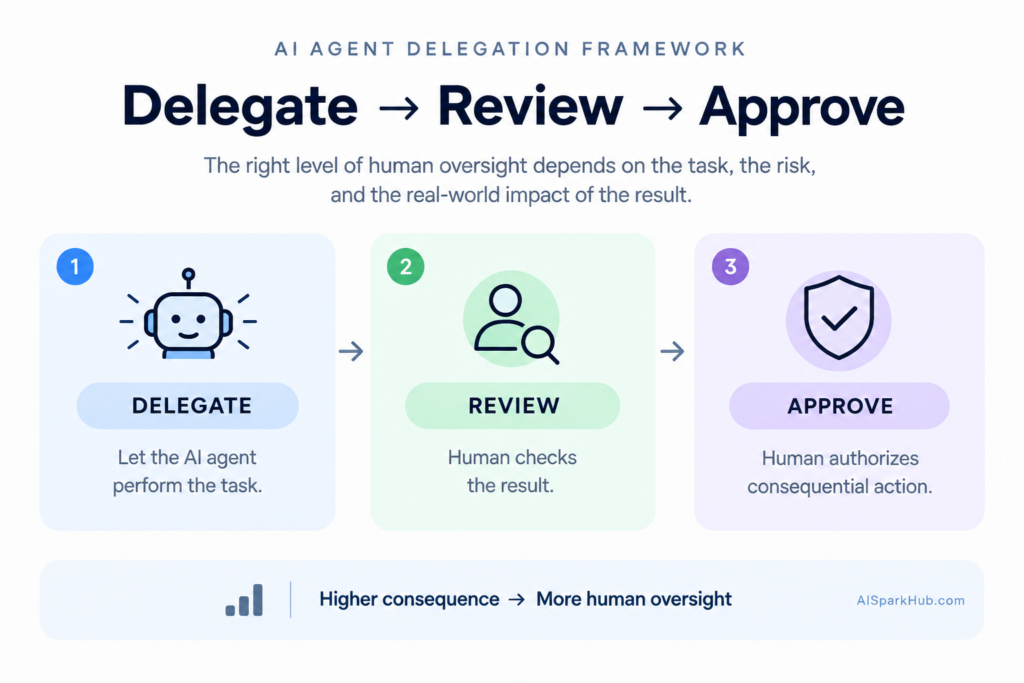
A simple way to think about delegation
Based on what we observed, we’d think about an AI agent in three broad levels:
Delegate → Review → Approve
Delegate:
Let the agent perform the repetitive research, organization, or drafting work.
Review:
Check the evidence, assumptions, calculations, and important details before relying on the result.
Approve:
Require a person to explicitly authorize purchases, external communications, destructive changes, or other consequential actions.
The exact boundary will differ from task to task.
But this framework is more useful than asking whether AI agents are simply “ready” or “not ready.”
Our six experiments didn’t establish a universal threshold for AI-agent autonomy.
They showed something more practical:
The right amount of human oversight depends on what the agent is doing, how easily its work can be verified, and what happens if it gets something wrong.
What This Experiment Doesn’t Prove
Six real-world tasks gave us a useful look at what an AI agent can do—but there are some important limits to what we can conclude from them.
First, we tested one particular agent setup, not AI agents as a whole. The results came from the model, tools, browser environment, prompts, and configuration we used. Another model or agent with different tools could behave differently.
Second, six tasks aren’t a statistical benchmark. We weren’t trying to calculate an industry-wide success rate or prove that an agent will perform at a particular level across thousands of tasks.
Third, the tasks themselves were deliberately different. Researching customer-support case studies, shopping for a laptop, planning travel, fixing code, and creating a competitor brief involve different kinds of reasoning and different opportunities for failure. A result from one task shouldn’t automatically be generalized to another.
There were also differences in the environments. Some experiments involved controlled project files, while others depended on live websites and information that can change over time. That means certain observations are specific to the conditions under which we tested them.
And finally, we performed a human audit of the outputs. That was intentional. The goal wasn’t to see whether the agent could produce answers that looked convincing without checking them. It was to see what happened when someone actually inspected the work.
So this experiment shouldn’t be read as:
“AI agents can do X% of real-world work.”
We didn’t establish that.
What we did establish is narrower—and arguably more useful.
We saw firsthand that an AI agent can perform surprisingly broad, multi-step tasks, while also making mistakes that aren’t always obvious from the final answer.
Sometimes the problem was a weakly supported claim. Sometimes it was a missing qualifier. Sometimes it was an assumption. Sometimes it was a boundary the agent didn’t follow exactly.
Those are the kinds of issues that matter when deciding how much autonomy to give an AI agent in the real world.
And that’s ultimately what these experiments were designed to explore.
Frequently Asked Questions About AI Agents
What are some real-world examples of AI agents?
AI agents can be used for tasks such as research, customer support, shopping, travel planning, coding, and business analysis. In our experiment, we gave one AI agent six tasks across these areas and evaluated both its final results and how it reached them.
What can AI agents actually do?
AI agents can break a goal into multiple steps, use tools such as web browsers or software, gather information, make decisions within defined constraints, and produce an outcome. Our experiments showed that they can handle surprisingly broad tasks, although the amount of human verification required varies by task.
Are AI agents reliable?
Their reliability depends heavily on the task, the information available, the tools they use, and how easily the result can be verified. In our experiments, the agent completed several complex tasks successfully but also produced claims or outputs that required human checking.
What is the difference between an AI agent and a chatbot?
A chatbot primarily responds to a user’s messages, while an AI agent can work toward a goal by planning multiple steps, using external tools, observing results, and taking actions. OpenAI’s practical guide to AI agents. That’s why agents have a larger range of potential failure points than ordinary chat interactions.
Should you trust an AI agent to work without supervision?
Not automatically. An agent may be suitable for relatively low-risk, easily verifiable tasks with limited autonomy, while tasks involving purchases, sensitive information, consequential decisions, or irreversible actions generally warrant human approval.
Conclusion: AI Agents Are Capable—But Verification Still Matters
After six real-world tasks, we don’t think the useful question is whether AI agents can do meaningful work.
They clearly can.
Our agent researched businesses, compared products, planned a trip, gathered public-company information, fixed code, and built a competitor research brief. In several cases, it handled multi-step work that would otherwise take a person considerable time.
But our experiments also showed why capability shouldn’t automatically translate into unrestricted trust.
The biggest problems weren’t always obvious failures. More often, they were small details hidden inside otherwise useful work: a claim that needed stronger evidence, an assumption that needed to be stated, a qualifier that wasn’t applied consistently, or an instruction that wasn’t followed exactly.
That’s why we wouldn’t treat an AI agent’s final response as proof that a task is complete.
Instead, we’d use agents where they can provide the most leverage—doing the searching, organizing, comparing, drafting, and repetitive work—while keeping an appropriate level of human verification around the result.
The more consequential the task, the more important that final check becomes.
And perhaps that’s the most realistic way to look at AI agents right now.
They’re not simply chatbots with a few extra buttons, and they’re not autonomous replacements for every kind of work either.
Our experiments showed that an agent can take a goal, work through multiple steps, use tools, and produce something useful—but whose work still needs to be understood and checked before you fully trust the outcome.
Our six experiments didn’t tell us everything AI agents can do.
They did give us a much better idea of what happens when you actually let one try.