
By Muthamizh Chelvan · Updated September 2026
━━━━━━━━━━━━━━━━━━━━━━━━━━━━━━
🎬 Tools Tested: 8
🎥 Videos Generated: 37
⏱️ Testing Time: ~9 Hours
✅ 100% Tested on Free Plans
━━━━━━━━━━━━━━━━━━━━━━━━━━━━━━
Finding a good free AI video generator is surprisingly difficult.
Some tools only let you create one video before asking you to upgrade. Others advertise a free plan but hide important limitations like watermarks, low resolutions, or extremely limited credits. After trying a few myself, I realized that most comparison articles weren’t answering the one question people actually care about:
Which free AI video generator is actually worth using?
So I decided to test them myself.
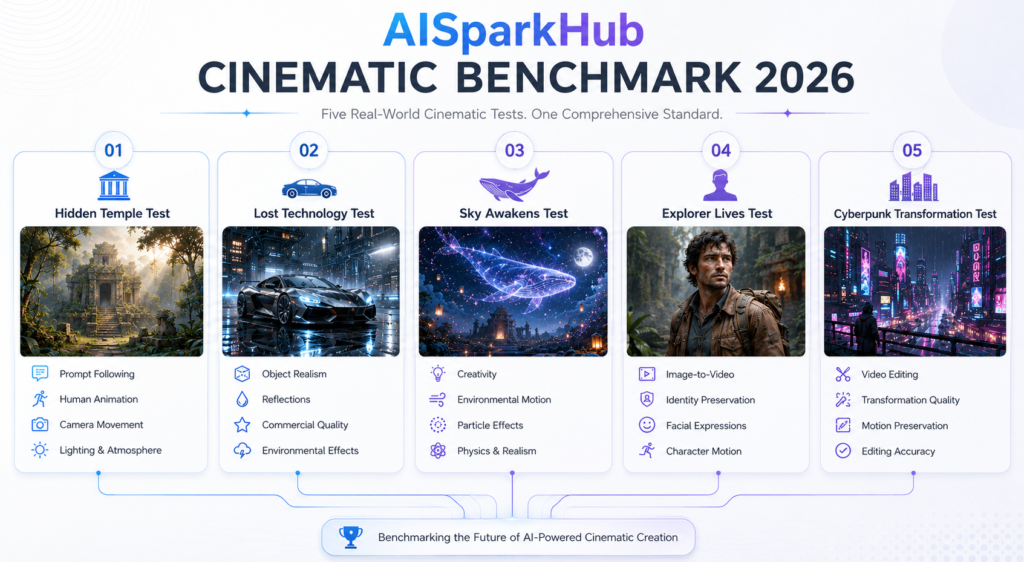
Over the past few days, I generated dozens of videos using the exact same five benchmark prompts across eight popular AI video generators. Every tool was tested on its free plan and evaluated based on prompt accuracy, visual quality, motion, editing capabilities, generation speed, and overall user experience.
Some tools genuinely impressed me.
Others didn’t live up to their reputation.
One of the biggest surprises was Google Flow, a tool I hadn’t even considered before starting this benchmark. By the end of my testing, it had become my overall favorite. On the other hand, a few well-known names struggled to justify their popularity when restricted to the free version.
If you’re looking for the best free AI video generator for YouTube, social media, presentations, or creative projects, this guide will help you choose the right one without wasting your time or credits.
👇Jump to Reviews
👇Jump to Comparison Table
🏆 Quick Rankings
| Rank | AI Video Generator | Best For |
|---|---|---|
| 🥇 | Google Flow (Omni) | Best Overall |
| 🥈 | Google Vids (Veo) | Best Prompt Following |
| 🥉 | Kling AI | Best Cinematic Storytelling |
| 4 | PixVerse AI | Best Camera Movement |
| 5 | Bing Video Creator | Best Completely Free Option |
| 6 | Hailuo AI | Best Hidden Gem |
| 7 | Pika | Best Creative Animations |
| 8 | Runway | Limited Free Experience |
How I Tested These AI Video Generators
Unlike most comparison articles, I didn’t rank these tools based on online reviews or marketing claims. Every AI video generator on this page was tested by me using the same five benchmark prompts and only the free version of each platform.
The benchmark was designed to simulate real-world use cases instead of simple one-line prompts. Each tool had to generate cinematic scenes, animate images, and perform video editing under identical conditions.
During testing, I evaluated every tool based on:
- Prompt accuracy – Did it understand the instructions correctly?
- Visual quality – Were the videos realistic and detailed?
- Motion quality – Did the movements look natural?
- Camera movement – Were the shots cinematic or static?
- Editing capabilities – Could it transform an existing video smoothly?
- Generation speed – How long did it take to produce a result?
- Free-tier experience – Were the credits generous enough for regular use?
This hands-on approach made it much easier to identify which tools genuinely perform well and which ones only look good on paper.
💡 My Tip: During testing, I found that detailed prompts consistently produced better videos. Describing camera movement, lighting, actions, and the environment often made a much bigger difference than simply describing the subject.
If you’d like to improve your prompting skills, check out my guide on How to Write AI Image Prompts. Most of the same principles also work for AI video generation.
📦 Want to Try the Same Benchmark?
I tested every AI video generator using the same five benchmark prompts to keep the comparison as fair as possible.
If you’d like to recreate these tests yourself—or compare future AI models using the exact same methodology—you can download my complete AI Video Generator Benchmark Pack below.
✅ All 5 benchmark prompts
✅ Prompt descriptions
✅ Testing methodology
✅ Scoring criteria
File Size: ~128 MB (ZIP)
⬇️ Download the Free Benchmark Pack (Google Drive)
What Can You Actually Create With a Free AI Video Generator?
One thing I noticed while testing these tools is that they’re no longer just for creating random AI clips. Many of them are now good enough to create YouTube intros, product advertisements, presentations, and even short cinematic films. Whether you’re a content creator, student, marketer, or simply experimenting with AI, there’s now a free video generator that can handle most everyday projects.
Here are some of the most common ways people use them:
🎥 YouTube & Short-Form Content
Need a quick intro, cinematic B-roll, or an eye-catching YouTube Short? AI video generators can turn simple ideas into engaging clips within minutes.
📱 Social Media Content
Whether you’re creating Instagram Reels, TikTok videos, or Facebook posts, AI-generated videos can help you grab attention without spending hours editing.
🛍️ Product & Brand Promotions
Several of the tools generated realistic camera movements, lighting, and object animations, making them suitable for promotional videos, product showcases, and brand content.
🎓 Education & Presentations
Instead of creating static slides, you can use AI-generated videos to explain concepts visually or make presentations more engaging. Even short 5–8 second clips can make a project stand out.
🎬 Storytelling & Creative Projects
This was my favorite use case during testing. Whether you’re visualizing a fantasy world, creating short films, or experimenting with cinematic scenes, modern AI video generators can produce results that were almost impossible to create for free just a couple of years ago.
Hands-on Reviews
The rankings gave you the quick answer. Now let’s take a closer look at each AI video generator to understand where it excels, where it falls short, and who it’s actually best suited for.
I’ll start with my overall favorite.
Google Flow
⭐⭐⭐⭐⭐ 9.8/10
If I had to recommend just one free AI video generator after completing this benchmark, it would be Google Flow.
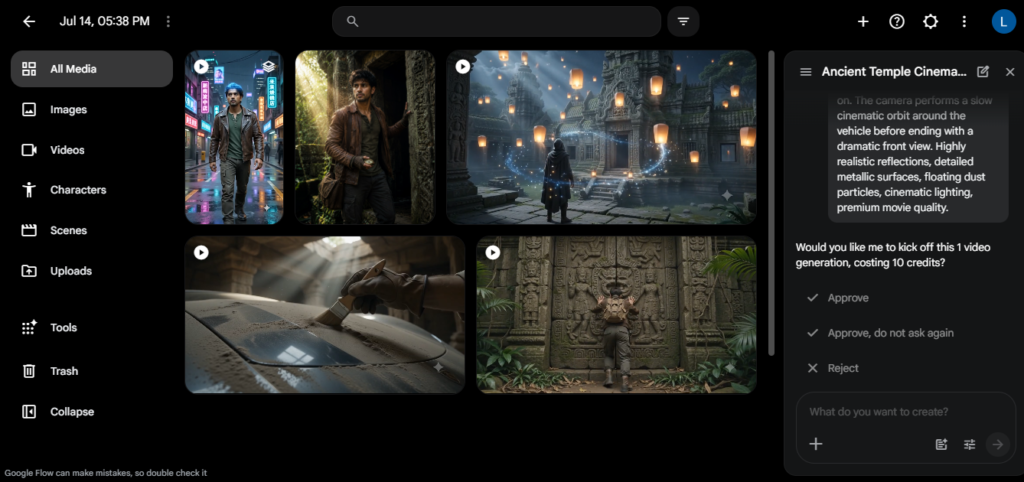
I honestly didn’t expect that going into this test. Before researching for this article, I wasn’t even aware that Google had a dedicated AI filmmaking tool inside Google Labs. But after running it through all five benchmark tests, it consistently produced some of the most cinematic, realistic, and well-directed videos I generated. What impressed me most was how consistently it understood small details in my prompts. During multiple benchmark tests, it wasn’t always the flashiest tool, but it almost always produced a result that felt complete and believable.
Whether you’re creating YouTube content, short films, social media videos, or simply experimenting with AI, Google Flow is easily one of the strongest free options available today.
✅ Pros
- Google Flow delivered the most consistent performance across the entire benchmark. It rarely misunderstood my prompts and handled complex scenes with impressive accuracy. Even when other tools struggled with camera movement or scene composition, Flow stayed remarkably reliable.
- Its video editing feature was the highlight of my testing. During the Cyberpunk Transformation benchmark, most tools either switched scenes instantly or relied on blur effects. Google Flow actually showed the transformation happening step by step, making the edit feel much more natural and cinematic.
- The cinematic camera work consistently impressed me. Camera movements felt smooth and intentional rather than random, giving many of the generated clips a professional look without requiring any manual adjustments.
- The daily credit system felt practical. Receiving fresh credits every day meant I could keep experimenting instead of worrying about exhausting a small one-time allowance. That made the overall experience much more enjoyable than some of the other tools I tested.
❌ Cons
- Finding Google Flow for the first time wasn’t very straightforward. Since it’s currently available through Google Labs instead of having its own dedicated website, new users may spend a few minutes figuring out where to access it.
- The daily credit limit can still become restrictive during larger projects. While I found the free plan generous for normal use, I eventually hit the daily limit while completing my benchmark tests and had to wait until the next day to finish the final editing scenario.
💰 Free Plan
| Feature | Details |
|---|---|
| Model | Omni Flash |
| Free Credits | 50 credits per day |
| Generation Cost | 10 credits |
| Editing Cost | 20 credits |
| Video Duration | 10 seconds |
| Resolution | 720p |
| Text to Video | ✅ Yes |
| Image to Video | ✅ Yes |
| Video Editing | ✅ Yes |
| Watermark | Yes (Minimal Gemini watermark) |
| Average Generation Time | 57 seconds |
💭 My Honest Thoughts
Google Flow ended up being the biggest surprise of this entire benchmark. I started testing it simply because I wanted another competitor for Kling AI, but by the end of the process, it became my personal favorite.
What I appreciated most wasn’t just the quality—it was the consistency. Every tool had moments where it completely exceeded my expectations and moments where it failed. Google Flow had the fewest of those failures. Even when it didn’t rank first in a benchmark, it was always close to the top.
If you’re someone who enjoys creating cinematic videos or wants an AI that understands detailed prompts without requiring constant retries, this is the tool I’d recommend first.
✅ Choose Google Flow if…
- You want the best overall free AI video generator based on real-world testing.
- You create cinematic content for YouTube, Instagram, or TikTok.
- You need reliable video editing alongside text-to-video and image-to-video generation.
- You prefer a tool that consistently follows detailed prompts.
❌ Skip Google Flow if…
- you’re planning to generate dozens of videos every day or need complete manual control over your edits. In those cases, a paid platform will probably suit you better.
- You need complete manual control over every aspect of the generated video.
- You specifically want a platform with longer free video durations.
Google Vids
⭐⭐⭐⭐⭐ 9.7/10
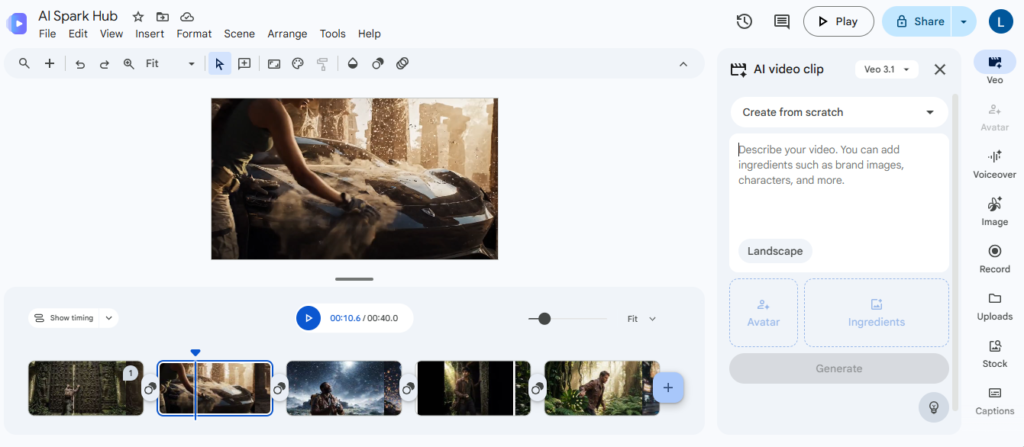
When I first came across Google Vids, I honestly assumed it was just another AI presentation tool. It wasn’t until I started testing it that I realized it uses Google’s Veo 3.1 model to generate AI videos.
After running it through all five benchmark tests, Google Vids quickly became one of the biggest surprises of this comparison. It consistently understood my prompts, preserved small details that other tools ignored, and generated realistic videos with very little effort. It wasn’t always the most cinematic generator, but when it came to following instructions accurately, nothing else performed as consistently.
If your priority is creating videos that closely match your prompts instead of relying on creative interpretation, Google Vids is easily one of the best free AI video generators available today.
✅ Pros
- Google Vids consistently understood my prompts better than almost every other tool I tested. During several benchmarks, it picked up on details that many competitors either ignored or interpreted differently. That made the outputs feel much closer to what I had originally imagined.
- Image-to-video generation was one of its biggest strengths. It preserved the character’s appearance well and even included small details like dust particles during the Explorer benchmark—something only a few tools managed to do successfully.
- The generated videos felt polished straight out of the box. I rarely found myself thinking, “I wish it had done this differently.” Most outputs required very little prompting beyond my original instructions.
- It also includes text-to-video, image-to-video, and video editing in the free experience, making it one of the most complete AI video generators I tested.
❌ Cons
- Google Vids occasionally interpreted prompts a little too literally. During one benchmark, it transformed the entire sky into a glowing whale instead of simply showing a whale in the sky. While the result still looked impressive, it wasn’t exactly how I had visualized the scene.
- Finding the AI video generation feature wasn’t immediately obvious. Like Google Flow, you’ll need a few minutes to explore the interface before everything starts making sense.
💰 Free Plan
| Feature | Details |
|---|---|
| Model | Veo 3.1 |
| Free Plan | Usage limits vary depending on your Google account |
| Video Duration | 8 seconds |
| Resolution | 720p |
| Text to Video | ✅ Yes |
| Image to Video | ✅ Yes |
| Video Editing | ✅ Yes |
| Watermark | Yes |
| Average Generation Time | 48 seconds |
💭 Final Thoughts
Google Vids completely changed my expectations during this benchmark.
Before testing, I thought Google Flow would easily outperform every other Google product. Instead, Google Vids became its biggest competitor by doing one thing exceptionally well—it understood exactly what I was asking for.
There were multiple moments where it picked up on tiny prompt details that other AI generators overlooked. That consistency made it one of the easiest tools to trust during testing. If I needed an AI video generator for projects where prompt accuracy mattered more than creative interpretation, Google Vids would probably be my first choice.
✅ Choose Google Vids if…
- You want an AI that closely follows detailed prompts.
- You frequently create videos from reference images.
- You value consistency over creative improvisation.
- You want access to text-to-video, image-to-video, and editing in one platform.
❌ Skip Google Vids if…
- You prefer AI that takes creative liberties instead of following prompts literally.
- You want a tool that’s immediately easy to discover without navigating Google’s ecosystem.
- You need clearly displayed credit information while generating videos.
Kling AI
⭐⭐⭐⭐☆ 9.4/10
If this review were based purely on video quality, Kling AI would easily be one of the best AI video generators I tested. In fact, some of its cinematic scenes genuinely looked like they belonged in a short film rather than something generated from a text prompt.
Unfortunately, this review isn’t just about quality—it’s about the entire free-tier experience.
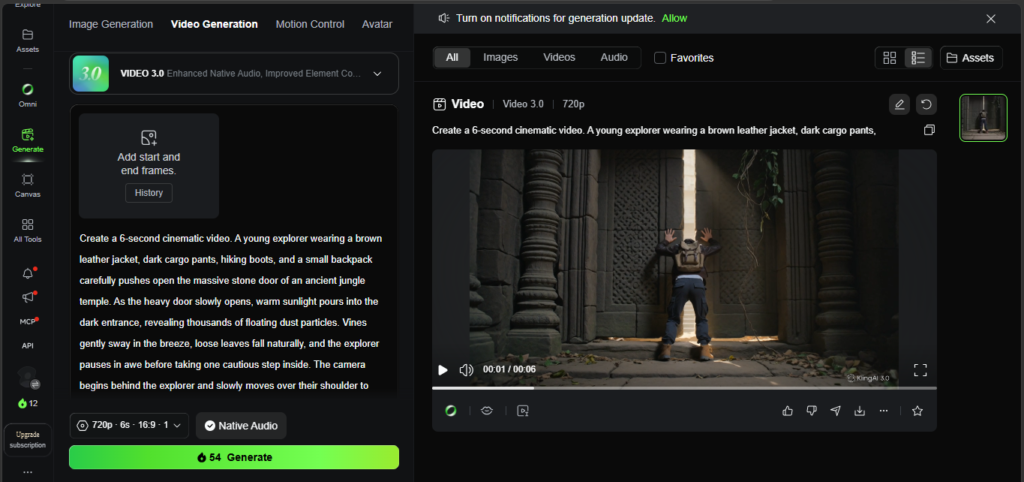
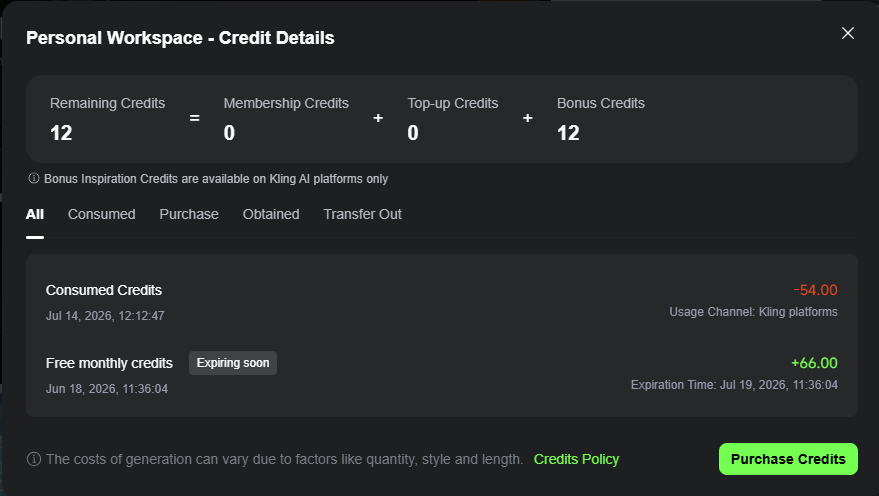
While Kling consistently produced beautiful videos with smooth animations and impressive storytelling, its restrictive free plan made it difficult to recommend as my top choice. After just one generation, I had already used most of my monthly credits, making it almost impossible to properly experiment without creating additional accounts.
Despite that limitation, Kling remains one of the most capable AI video generators available today.
✅ Pros
- Kling AI consistently produced some of the most cinematic videos in my benchmark. Camera movements felt natural, scenes flowed smoothly, and the overall presentation often looked like a professionally directed short film rather than a simple AI-generated clip.
- It understood complex scenes without making them feel artificial. During several benchmark tests, Kling handled lighting, character movement, and environmental details exceptionally well, making the final videos feel immersive from start to finish.
- One thing I particularly liked was how it occasionally added subtle storytelling on its own. During the Image-to-Video benchmark, instead of simply completing the requested action, the explorer naturally continued walking into the cave afterward. It wasn’t part of my prompt, but it made the scene feel more complete instead of abruptly ending.
❌ Cons
- The free plan became frustrating almost immediately. One generation consumed most of my available monthly credits, which meant I had to create additional accounts just to complete my benchmark tests. That completely interrupted the testing experience.
- Because of the limited credits, I couldn’t properly test its video editing features. The quality may be excellent, but the free plan simply doesn’t leave enough room to explore everything the platform offers.
💰 Free Plan
| Feature | Details |
|---|---|
| Model | Kling 3.0 |
| Free Credits | 66 monthly credits |
| Generation Cost | 54 credits per video |
| Video Duration | 6 seconds |
| Resolution | 720p |
| Text to Video | ✅ Yes |
| Image to Video | ✅ Yes |
| Video Editing | Available, but difficult to test on the free plan |
| Watermark | Yes |
| Average Generation Time | 1 minute 27 seconds |
💭 Final Thoughts
Kling AI left me with mixed feelings.
On one hand, I completely understand why it’s considered one of the best AI video generators available today. The visual quality is outstanding, and several of its videos genuinely impressed me throughout this benchmark.
On the other hand, I kept running into the same problem—I couldn’t actually use it enough.
As someone reviewing the free version, I don’t just care about how good a single video looks. I also care about whether I can keep experimenting, improve my prompts, and generate multiple versions without immediately running out of credits. That’s where Kling lost valuable points compared to Google Flow and Google Vids.
If Kling ever becomes more generous with its free tier, I honestly think it could challenge for the top spot.
✅ Choose Kling AI if…
- You care more about cinematic quality than the number of free generations.
- You enjoy storytelling and movie-like camera movements.
- You’re happy to use the free version as a way to experience the platform before considering a paid plan.
❌ Skip Kling AI if…
- You’re planning to generate multiple videos every day on the free plan.
- You want enough free credits to experiment with different prompts and edits.
- You’re looking for the best long-term free AI video generator.
PixVerse AI
⭐⭐⭐⭐☆ 9.0/10
Before starting this benchmark, I didn’t expect PixVerse AI to rank this high. It wasn’t one of the tools I was most excited to test, but after generating videos across all five benchmark scenarios, it consistently proved that it deserved a place among the best free AI video generators.
What impressed me most wasn’t just the visual quality—it was how naturally the videos moved. Camera movements felt smooth, scenes flowed well, and several outputs looked surprisingly cinematic. While it didn’t always produce the most accurate interpretation of my prompts, it rarely generated anything that felt disappointing.
If you’re looking for a free AI video generator with great motion quality and a practical daily credit system, PixVerse is definitely worth trying.
✅ Pros
- PixVerse consistently produced some of the smoothest camera movements I saw during this benchmark. Whether it was a slow cinematic reveal or a moving character, the videos felt fluid and natural instead of stiff or robotic.
- The daily credit system makes the platform easy to come back to. Unlike tools that lock most of their features behind a one-time free allowance, PixVerse gives you fresh credits every day, making it a practical option if you generate videos regularly.
- It handled creative scenes surprisingly well. During the Sky Awakens benchmark, the whale’s movement looked realistic, and it even generated matching ambient whale sounds without being asked. Small touches like that made the final videos feel much more immersive.
- Despite being a free tool, PixVerse gives you access to all the major AI video generation modes without making the experience feel overly restricted.
❌ Cons
- PixVerse occasionally focused more on creating a visually appealing scene than following the prompt exactly. During the Cyberpunk Transformation benchmark, it skipped the actual transformation and simply showed the final cyberpunk version instead. The end result looked good, but it missed the journey that the prompt asked for.
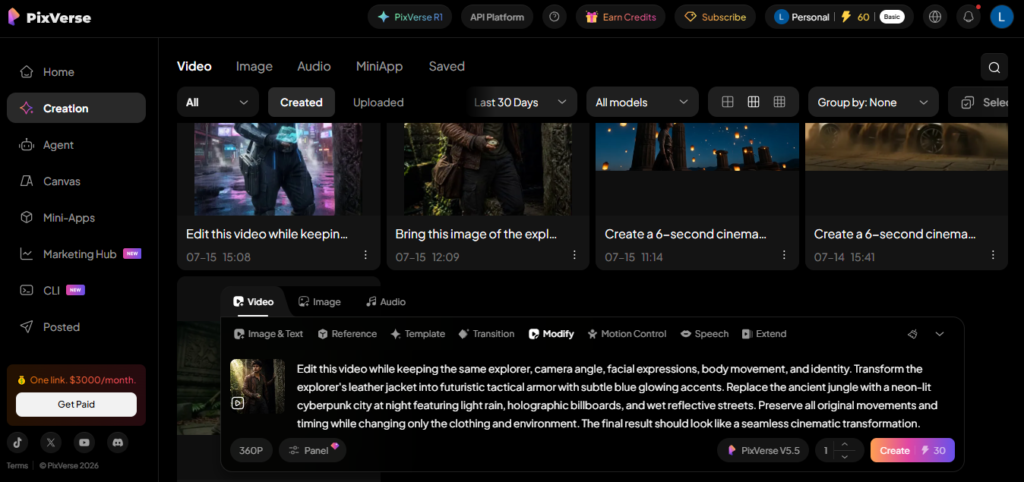
- The free credits are generous enough for casual use, but you’ll usually only manage one or two meaningful generations each day. If you’re experimenting with several ideas, you’ll probably end up waiting for the next credit refresh.
💰 Free Plan
| Feature | Details |
|---|---|
| Model | PixVerse V5.5 |
| Free Credits | 90 bonus credits + 30 credits every day |
| Generation Cost | 30 credits per video |
| Video Duration | 6 seconds |
| Resolution | 360p (Free Plan) |
| Text to Video | ✅ Yes |
| Image to Video | ✅ Yes |
| Video Editing | ✅ Yes |
| Watermark | Yes |
| Average Generation Time | 2 minutes 15 seconds |
💭 Final Thoughts
PixVerse ended up being one of the biggest surprises of this benchmark.
I initially thought it would sit somewhere in the middle of the rankings, but it consistently produced videos that were enjoyable to watch. More importantly, I found myself appreciating the small details—smooth camera work, natural movement, and even ambient sounds that made some scenes feel more alive.
The only reason it didn’t rank higher was prompt accuracy. While the videos often looked great, there were a few occasions where PixVerse preferred its own creative interpretation over my exact instructions.
Even so, it’s a tool I’ll definitely continue using, especially on days when I want a quick cinematic clip without worrying too much about complicated prompts.
✅ Choose PixVerse AI if…
- You enjoy cinematic camera movements and smooth animations.
- You want a free tool that refreshes credits every day.
- You like AI that occasionally adds its own creative touch to a scene.
- You want access to text-to-video, image-to-video, and editing in one platform.
❌ Skip PixVerse AI if…
- You expect every prompt to be followed exactly as written.
- You frequently generate multiple videos in a single day.
- You need higher free resolutions than the current 360p output.
Bing Video Creator
⭐⭐⭐⭐☆ 8.9/10
Before starting this benchmark, Bing Video Creator wasn’t a tool I expected to recommend. Since it’s powered by OpenAI’s Sora model and completely free to use, I assumed there would be significant compromises in quality or usability.
Instead, it ended up becoming one of the biggest surprises of the entire comparison.
Although Bing doesn’t offer features like video editing, it consistently generated enjoyable videos with realistic motion, convincing sound effects, and even occasional dialogue that wasn’t part of my prompt. It wasn’t the most accurate AI I tested, but it often added its own creative touches that made the videos feel surprisingly natural.
If you’re looking for a free AI video generator that’s simple to use and genuinely fun to experiment with, Bing Video Creator is an excellent place to start.
✅ Pros
- The generated videos felt much more alive than I expected. During one of my benchmark tests, Bing made the explorer say, “Looks like we’re on the right path.” That dialogue was never mentioned in my prompt, yet it fit the scene perfectly and actually improved the final result.
- Sound effects were another pleasant surprise. Several videos included natural environmental audio that made the scenes feel more immersive without me having to ask for it. Small details like these gave the outputs much more personality.
- Getting started couldn’t have been easier. Unlike some AI video generators that immediately make you think about credits or complicated settings, Bing let me jump straight into generating videos, making it a great option for beginners.
❌ Cons
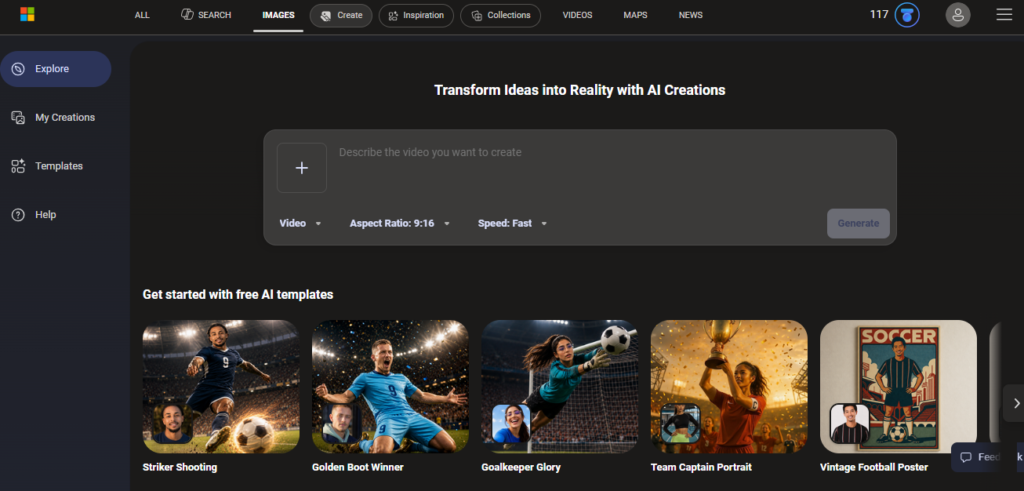
- The 480-character prompt limit became frustrating during testing. My original benchmark prompts were much longer, so I had to rewrite and simplify almost every one before Bing would accept them. It didn’t ruin the experience, but it definitely interrupted my workflow.
- After the 10 fast generations were used, patience became part of the experience. Bing switches to standard generation, where videos can take hours to be created. The videos are still generated, but if you’re planning to experiment with lots of prompts in a single day, the waiting time quickly becomes noticeable.
💰 Free Plan
| Feature | Details |
|---|---|
| Model | Sora 2 |
| Fast Generations | 10 |
| Standard Generations | ✅ Available (Longer waiting time) |
| Video Duration | 8 seconds |
| Text to Video | ✅ Yes |
| Image to Video | ✅ Yes |
| Video Editing | ❌ No |
| Watermark | Yes |
| Average Fast Generation Time | 1 minute 57 seconds |
September 2026 Availability Note: Following backend infrastructure updates, Bing Video Creator’s Sora 2 integration may experience intermittent queue throttling or regional waitlists. Availability may vary by region and account.
💭 Final Thoughts
Bing Video Creator completely changed my opinion during this benchmark.
I expected it to be a basic AI video generator with lots of compromises, but it consistently delivered videos that were enjoyable to watch. The occasional dialogue, realistic sound effects, and surprisingly good visual quality made it feel far more capable than I had anticipated.
Its biggest drawbacks were the prompt limit and the long wait once the fast generations ran out. Even so, I kept coming back to Bing because it was simply enjoyable to use. If you’re patient enough to wait for standard generations, it’s easily one of the best completely free AI video generators available today.
✅ Choose Bing Video Creator if…
- You want one of the easiest AI video generators to get started with.
- You enjoy videos that include natural sound effects and occasional dialogue.
- You’re looking for a genuinely useful free tool without paying for a subscription.
- You don’t mind waiting for standard generations after using your fast quota.
❌ Skip Bing Video Creator if…
- You regularly write long, detailed prompts.
- You need built-in video editing tools.
- You prefer complete control over how the AI interprets your instructions.
- You need lots of videos quickly and can’t wait for standard generation times.
Hailuo AI
⭐⭐⭐⭐☆ 8.7/10
Before starting this benchmark, I had heard good things about Hailuo AI, but I wasn’t sure how well it would perform against more established AI video generators like Google Flow, Google Vids, or Kling AI.
After testing it across all five benchmarks, my opinion was mixed—but mostly positive.
Hailuo AI consistently produced good-looking videos and offered one of the more complete free experiences, including text-to-video, image-to-video, and video editing. It even performed surprisingly well in a few of my benchmark tests. However, it also struggled with realism in certain scenes, which prevented it from competing with the very best tools in this comparison.
If you’re looking for another capable free AI video generator beyond the popular names, Hailuo AI is definitely worth exploring.
✅ Pros
- Hailuo AI handled creative prompts better than I expected. During the Sky Awakens benchmark, it generated one of the more convincing interpretations of the floating whale scene, following my instructions more closely than several higher-ranked competitors.
- The inclusion of video editing makes the free plan much more useful. Unlike some platforms where editing is locked behind paid plans or impossible to test, I was able to try Hailuo’s editing feature and found it reliable for experimenting with transformations.
- The outputs generally felt consistent. While they didn’t always reach the cinematic quality of the top-ranked tools, I rarely received results that felt completely broken or unusable.
❌ Cons
- Realism was inconsistent in more complex scenes. During the Lost Technology benchmark, Hailuo generated a sports car that looked unusually small compared to the surrounding environment, making the final scene feel unrealistic despite following the prompt.
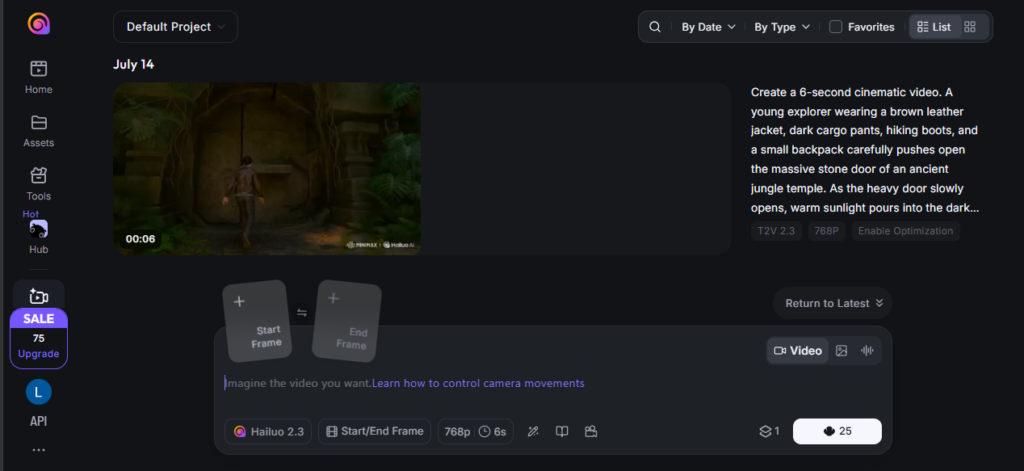
- The free credits disappear faster than you’d expect. With 100 one-time credits and each generation costing 25 credits, I found myself thinking more about saving credits than experimenting with different prompt variations.
💰 Free Plan
| Feature | Details |
|---|---|
| Model | Hailuo 2.3 |
| Free Credits | 100 one-time credits |
| Generation Cost | 25 credits per video |
| Video Duration | 6 seconds |
| Resolution | 768p |
| Text to Video | ✅ Yes |
| Image to Video | ✅ Yes |
| Video Editing | ✅ Yes |
| Watermark | Yes |
| Average Generation Time | 2 minutes 37 seconds |
💭 Final Thoughts
Hailuo AI ended up sitting in an interesting position.
It wasn’t the tool that impressed me the most, but it also never became frustrating to use. Throughout the benchmark, it delivered reliable results, handled creative prompts reasonably well, and gave me enough flexibility to explore different generation modes.
The biggest thing holding it back was consistency. Every now and then, I’d get an output where the proportions or realism felt slightly off, and those small issues were enough to separate it from the top performers.
Even so, I genuinely think Hailuo AI deserves more attention than it currently gets. If you’re someone who enjoys trying different AI tools, this is one I’d happily recommend adding to your shortlist.
✅ Choose Hailuo AI if…
- You want another strong alternative beyond the most popular AI video generators.
- You enjoy experimenting with text-to-video, image-to-video, and video editing.
- You don’t mind occasionally refining your prompts to get the best results.
- You value consistent performance over flashy gimmicks.
❌ Skip Hailuo AI if…
- You expect perfect realism in every generation.
- You frequently generate dozens of videos while experimenting.
- You want the strongest cinematic quality available on a free plan.
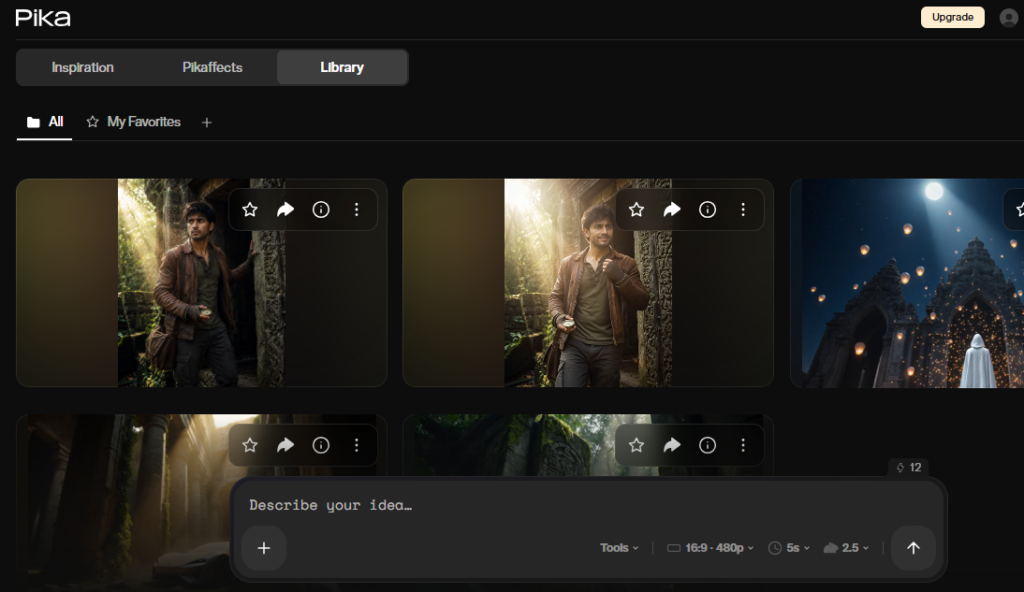
Pika
⭐⭐⭐⭐☆ 8.5/10
When I started testing Pika, I expected it to be one of the strongest contenders in this benchmark. It’s one of the more recognizable names in AI video generation, and I’d seen plenty of impressive examples online.
After putting it through the same five benchmark tests as every other tool, I came away with mixed feelings.
Pika consistently generated visually appealing videos and offered a generous enough free plan to experiment without feeling overly restricted. However, while the outputs often looked good at first glance, I noticed that some actions were simplified or replaced with shortcuts instead of being animated naturally. Those small details prevented it from competing with the top performers.
Even so, Pika remains a solid option if you’re looking for a creative AI video generator that’s easy to experiment with.
✅ Pros
- One of Pika’s strengths was how naturally it animated characters. During the Image-to-Video benchmark, the explorer moved realistically throughout the scene, and the overall animation felt smooth instead of robotic. While it missed a few finer details from my prompt, the character’s motion itself was convincing enough to keep the video engaging.
- The monthly credit system strikes a good balance between generosity and usability. With 80 credits refreshed every month and relatively low generation costs, I never felt pressured to save every single generation.
- The interface was one of the easiest to understand. I could move between text-to-video, image-to-video, and editing without spending time searching through menus, making the overall experience beginner-friendly.
❌ Cons
- Pika occasionally took shortcuts instead of animating the actions I asked for. During the Lost Technology benchmark, the explorer never actually brushed the dust off the car. Instead, the brush simply moved while the car became clean on its own. Small moments like that made the animation feel less believable.
- The Cyberpunk Transformation benchmark exposed another weakness. Rather than showing the transformation happen naturally, Pika mainly relied on blur effects before revealing the final cyberpunk scene. The end result looked good, but the transition itself lacked the realism I was hoping for.
💰 Free Plan
| Feature | Details |
|---|---|
| Model | Pika 2.5 |
| Free Credits | 80 credits per month |
| Generation Cost | 12 credits (480p) / 20 credits (720p) |
| Video Duration | 5 seconds |
| Resolution | 480p (tested) / 720p available |
| Text to Video | ✅ Yes |
| Image to Video | ✅ Yes |
| Video Editing | ✅ Yes |
| Watermark | Yes |
| Average Generation Time | 1 minute 25 seconds |
💭 Final Thoughts
Pika left me with the impression that it’s a tool capable of producing attractive videos, but it sometimes prioritizes speed over realism.
Throughout the benchmark, I enjoyed using it because the interface was simple and the free plan gave me enough opportunities to experiment. However, once I started paying attention to the finer details—like object interactions and transformations—I noticed that it occasionally relied on visual shortcuts instead of fully animating the scene.
Would I use it again?
Absolutely. But mainly for quick creative ideas rather than projects where I need every action to happen exactly as described.
✅ Choose Pika if…
- You want an AI video generator that’s simple to learn.
- You enjoy experimenting with creative concepts and fantasy scenes.
- You want a reasonable number of free generations every month.
- You value smooth animations more than perfect prompt accuracy.
❌ Skip Pika if…
- You expect every action in your prompt to be animated realistically.
- You need highly detailed scene transformations.
- You want the strongest prompt-following AI in this comparison.
Runway
⭐⭐⭐☆☆ 7.8/10
When I started this benchmark, Runway was actually one of the tools I was most excited to test. Its reputation in the AI community is excellent, and many creators consider it one of the leading platforms for AI video generation.
Unfortunately, my experience with the free version didn’t match those expectations.
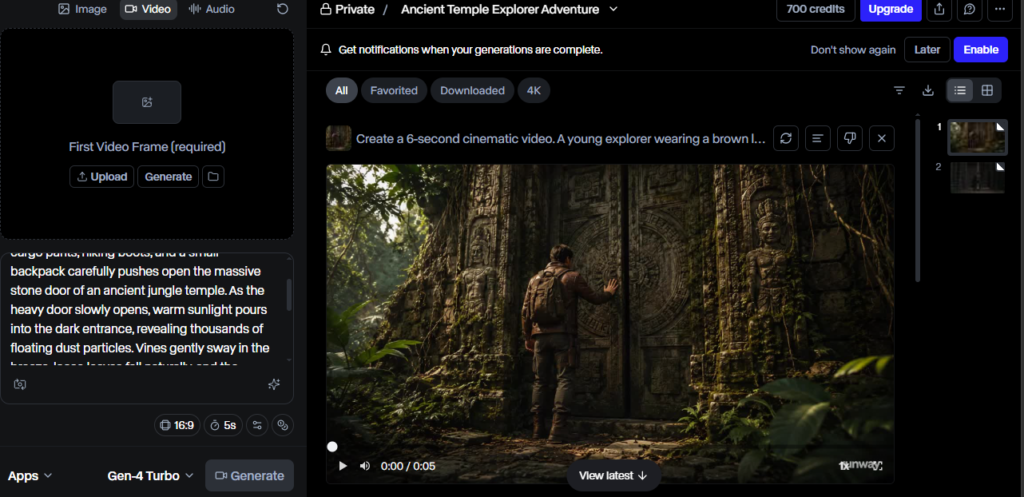
Although Runway offers access to its Gen-4 Turbo model, the free plan felt heavily restricted compared to the other AI video generators I tested. More importantly, the actual outputs rarely lived up to what I was asking for. Across multiple benchmark tests, it struggled to follow my prompts accurately, making it difficult to recommend as a free AI video generator despite its impressive reputation.
If you’re planning to use the paid version, your experience may be completely different. But based solely on the free plan, Runway finished last in my benchmark.
✅ Pros
- Runway gives new users a generous one-time allowance of 750 credits. Unlike some platforms that only let you generate one or two videos before asking you to upgrade, I had enough credits to properly experiment during my benchmark.
- The interface feels polished and professional. Everything is well organized, making it easy to understand where different tools and settings are located.
- Even though the free plan is limited, it still provides access to Gen-4 Turbo. That gives new users an opportunity to experience one of Runway’s latest models before deciding whether the platform is worth paying for.
❌ Cons
- The biggest disappointment was prompt accuracy. During multiple benchmark tests, Runway often ignored important parts of my instructions or introduced completely unrelated actions. One example that stood out was the Hidden Temple benchmark, where an unexpected character appeared inside the scene even though my prompt never mentioned anyone else.
- Image-to-video performance was surprisingly weak. This became even more frustrating because the free plan only supports image-to-video generation. After carefully creating a reference image specifically for Runway, the final output barely animated the scene. In one test, the character simply smiled instead of performing the actions described in my prompt.
- The free version doesn’t include text-to-video or video editing. Compared to almost every other tool in this benchmark, the free experience felt noticeably more restricted.
💰 Free Plan
| Feature | Details |
|---|---|
| Model | Gen-4 Turbo |
| Free Credits | 750 one-time credits |
| Generation Cost | 25 credits |
| Video Duration | 5 seconds |
| Text to Video | ❌ No |
| Image to Video | ✅ Yes |
| Video Editing | ❌ No |
| Watermark | Yes |
| Average Generation Time | 28 seconds |
💭 Final Thoughts
Runway was easily the biggest disappointment of this benchmark—not because it’s a bad platform, but because I expected so much more from it.
The generous credit allowance initially gave me confidence that I would be able to explore everything the platform had to offer. Instead, I found myself repeatedly frustrated by outputs that either misunderstood my prompts or barely animated the reference image at all.
I genuinely believe Runway has incredible technology behind its paid plans, and I understand why so many professional creators use it. However, if you’re specifically searching for the best free AI video generator, I simply can’t recommend it over the other tools in this comparison.
For free users, Google Flow, Google Vids, Bing Video Creator, PixVerse, and even Hailuo provided a much more satisfying overall experience.
✅ Choose Runway if…
- You want to explore the platform before considering a paid subscription.
- You’re mainly interested in experimenting with Gen-4 Turbo.
- You prefer a polished interface and don’t mind working within the free plan’s limitations.
❌ Skip Runway if…
- You’re looking for the best free AI video generator.
- You expect the AI to closely follow detailed prompts.
- You want access to text-to-video and video editing without upgrading.
- You’re comparing free tools based on overall value rather than brand reputation.
Which AI Video Generator Should You Choose?
After spending several days testing these AI video generators using the same benchmark prompts, I realized there isn’t a single tool that’s best for everyone. Some excel at following prompts, others create more cinematic videos, while a few simply offer the best free experience.
If you’re still unsure which one to use, here’s my recommendation based on different needs.
🏆 Best Overall: Google Flow
If I could recommend only one AI video generator to most people, it would be Google Flow. It delivered the best balance of prompt accuracy, editing quality, realistic motion, and a generous free plan. Throughout my benchmark, it consistently produced excellent results without any major weaknesses.
🎯 Best Prompt Accuracy: Google Vids
Google Vids was the closest competitor to Google Flow. It repeatedly followed my prompts with impressive precision, preserving small details that several other tools ignored. If you care more about getting exactly what you describe, Google Vids is the better choice.
🎬 Best Cinematic Videos: Kling AI
Kling AI produced some of the most visually stunning videos in this benchmark. Camera movement, lighting, and scene composition often looked like scenes from a short film. Its only major drawback is the restrictive free plan, which makes experimentation difficult.
💰 Best Completely Free Option: Bing Video Creator
If you don’t want to think about subscriptions or monthly credits, Bing Video Creator is one of the easiest places to start. The prompt limit can be frustrating, and standard generations require patience after your fast quota runs out, but the overall quality is surprisingly good for a completely free tool.
🎥 Best for Image-to-Video
Winner: Google Vids
Google Vids preserved character details and subtle movements better than any other tool I tested. It consistently transformed reference images into natural-looking videos while following my prompts closely.
Runner-up: Google Flow
✨ Best Video Editing
Winner: Google Flow
The Cyberpunk Transformation benchmark made this decision easy. Google Flow created the smoothest and most believable transformation sequence, making it my top recommendation for AI-powered video editing.
Runner-up: Hailuo AI
🎞️ Best Camera Movement
Winner: PixVerse AI
PixVerse consistently produced smooth camera movements and visually engaging scenes. Even when it wasn’t the most accurate tool, the overall presentation often felt cinematic and enjoyable to watch.
🚀 My Top Picks (If I Had to Choose Again)
If I were starting from scratch today, this is the order I’d use them:
🥇 Google Flow – My first choice for almost every project.
🥈 Google Vids – When prompt accuracy matters most.
🥉 Bing Video Creator – For quick, free experiments without overthinking the setup.
📊 Final Comparison Table
| Tool | Overall Score | Best For | Free Plan | My Verdict |
|---|---|---|---|---|
| 🥇 Google Flow | ⭐ 9.8 | Overall Winner | 50 credits/day | Best free AI video generator overall |
| 🥈 Google Vids | ⭐ 9.7 | Prompt Accuracy | Varies | Excellent if you want precise results |
| 🥉 Kling AI | ⭐ 9.4 | Cinematic Videos | 66 credits/month | Amazing quality, limited by its free plan |
| PixVerse | ⭐ 9.0 | Camera Movement | Daily credits | Great for cinematic motion |
| Bing Video Creator | ⭐ 8.9 | Completely Free | 10 fast + standard | Surprisingly capable and beginner-friendly |
| Hailuo AI | ⭐ 8.7 | Balanced Experience | 100 one-time credits | A solid all-rounder that deserves more attention |
| Pika | ⭐ 8.5 | Quick Creative Videos | 80 credits/month | Fun to use, but not always consistent |
| Runway | ⭐ 7.8 | Paid Users | 750 one-time credits | Excellent platform, disappointing free tier |
Frequently Asked Questions (FAQ)
What is the best free AI video generator in 2026?
After testing eight AI video generators using identical benchmark prompts, Google Flow delivered the best overall experience. It offered the strongest balance of prompt accuracy, video quality, editing features, and a generous free plan. If you’re looking for one tool to start with, Google Flow is my top recommendation.
Which AI video generator follows prompts most accurately?
In my benchmark, Google Vids consistently followed prompts more accurately than any other tool. It preserved small details that several competitors overlooked, making it the best choice for users who want videos to closely match their instructions.
Which AI video generator is completely free?
Bing Video Creator is one of the most generous free options available. It provides 10 fast generations and continues to offer standard generations afterward, although you’ll need to wait longer for the videos to be created.
Which AI video generator is best for image-to-video?
Based on my testing, Google Vids produced the best image-to-video results. It preserved character appearance, followed prompts closely, and generated natural-looking motion throughout the benchmark.
Which AI video generator has the best video editing?
Yes—but with limitations.
Every tool I tested offered a free plan, but most included restrictions such as watermarks, limited credits, shorter video durations, or feature limitations. The quality of the free experience varied significantly from one platform to another.
Do free AI video generators add watermarks?
Yes. Every AI video generator I tested added a watermark to videos created on the free plan. However, some watermarks were much less noticeable than others. For example, Google Flow uses a subtle Gemini watermark that blends into the video better than most competitors.
Can ChatGPT generate AI videos?
Not directly.
ChatGPT can help you write detailed video prompts, create storyboards, or generate images that can later be animated using AI video generators like Google Flow, Google Vids, Kling AI, or PixVerse.
Which AI video generator would I personally use?
After completing this benchmark, I’d continue using Google Flow for most projects because of its overall quality and free plan. I’d also keep Google Vids for prompt-heavy projects and Bing Video Creator whenever I wanted a quick, free way to generate videos.
Conclusion
After spending several days testing eight AI video generators with the same benchmark prompts, one thing became clear: free AI video generation has improved far more than I expected.
Each tool had its own strengths. Google Flow impressed me with its overall balance, Google Vids stood out for prompt accuracy, Kling AI delivered stunning cinematic visuals, and Bing Video Creator proved that a completely free tool can still produce surprisingly enjoyable results.
At the same time, this benchmark also showed that no single AI video generator is perfect. Some tools prioritize creativity over accuracy, while others offer incredible quality but restrict the free experience through limited credits or missing features.
If you’re just getting started, I recommend trying Google Flow first. From there, you can explore the other tools depending on what matters most to you—whether that’s cinematic visuals, image-to-video generation, editing, or simply getting the best value from a free plan.
I hope this hands-on benchmark saves you time, helps you choose the right tool faster, and gives you a clearer idea of what today’s AI video generators are actually capable of.
Happy creating! 🎬✨