
By Muthamizh Chelvan · Updated September 2026
━━━━━━━━━━━━━━━━━━━━━━━━━━━━━━
🧪 Tools Tested: 8
🖼️ Images Generated: 56
⏱️ Testing Time: 7+ Hours
✅ 100% Tested on Free Plans
━━━━━━━━━━━━━━━━━━━━━━━━━━━━━━
Finding a good free AI image generator isn’t difficult anymore—finding one that actually fits your needs is.
To make this guide, I personally tested 8 popular AI image generators using the same real-world prompts, including portraits, product advertisements, blog featured images, YouTube thumbnails, text-heavy posters, creative artwork, and image editing. I also compared image quality, prompt accuracy, generation speed, editing capabilities, and free-tier limits to see which tools are genuinely worth using.
A few results were exactly what I expected. Others completely changed my opinion. Along the way, I discovered some underrated AI image generators that I now use regularly alongside ChatGPT and Gemini.
Whether you’re a student, blogger, designer, or content creator, this guide will help you choose the right free AI image generator without wasting time testing every tool yourself.
📌 Every recommendation on this page is based on my personal hands-on testing using the free versions of each tool.
👇 Skip to Comparison Table
👇 Skip to Reviews
What Are AI Image Generators
AI image generators are tools that can create completely new images from a text prompt. Instead of searching through stock photo websites or spending hours designing graphics yourself, you simply describe what you want, and the AI generates it within seconds.
Over the past few years, these tools have improved dramatically. Today’s AI image generators can produce realistic portraits, professional product advertisements, blog graphics, social media posts, illustrations, concept art, and even edit existing images. Many of them also offer free plans, making them accessible to students, creators, and small businesses.
The best part is that you don’t need to be a designer or an artist. If you can clearly explain your idea, AI can often turn it into an image that’s ready to use or only needs a few small edits.
💡 New to AI image generation?
The quality of your prompt can completely change the final image. Before trying the tools below, check out my guide on How to Write Better AI Image Prompts, where I share the techniques and prompt structure I personally use during this benchmark.
How Can You Use Them?
During my testing, I realized that these tools are useful for much more than creating “cool AI art.” Here are some of the most practical ways I’ve personally used them:
- Blog Featured Images – Create eye-catching images for articles without relying on generic stock photos.
- Presentation Slides – Generate custom visuals that make university or office presentations more engaging.
- YouTube Thumbnails – Design attention-grabbing thumbnails that stand out in search results.
- Social Media Posts – Create graphics for Instagram, LinkedIn, Facebook, or X in just a few minutes.
- Product Advertisements – Generate promotional images for websites, online stores, or marketing campaigns.
- Posters & Flyers – Quickly create promotional designs for events, workshops, or college activities.
- Creative Projects – Bring stories, characters, and ideas to life for personal or professional work.
- Image Editing – Remove backgrounds, replace objects, change clothing, or modify existing images without learning complex editing software.
After comparing all eight tools, one thing became clear: no single AI image generator is the best at everything. Some excel at realistic images, others are better for text, while a few are surprisingly good at editing or marketing graphics. That’s exactly why I decided to compare them side by side.
💡 Quick Tip
Don’t choose an AI image generator just because it’s popular. Choose the one that fits what you actually create. A blogger, a student, a designer, and a marketer may all end up choosing different tools—and that’s completely okay.
Comparison Table
| Tool | Best For | Free Tier | Editing | Ease of Use | My Rating |
|---|---|---|---|---|---|
| ChatGPT | Overall Best, Bloggers, Students | ⭐⭐⭐⭐⭐ | ⭐⭐⭐⭐⭐ | ⭐⭐⭐⭐⭐ | 9.8/10 |
| Gemini | Students, Google Users | ⭐⭐⭐⭐⭐ | ⭐⭐⭐⭐☆ | ⭐⭐⭐⭐⭐ | 9.4/10 |
| Reve | Hidden Gem, High-Quality Images | ⭐⭐⭐⭐⭐ | ⭐⭐⭐⭐⭐ | ⭐⭐⭐⭐☆ | 9.3/10 |
| Leonardo AI | Creative Artwork & Designers | ⭐⭐⭐⭐☆ | ⭐⭐⭐⭐⭐ | ⭐⭐⭐⭐☆ | 9.2/10 |
| Recraft | Marketing Graphics & Branding | ⭐⭐⭐⭐☆ | ⭐⭐⭐⭐⭐ | ⭐⭐⭐⭐☆ | 8.8/10 |
| Meta AI | Casual Image Generation | ⭐⭐⭐⭐⭐ | ⭐⭐⭐⭐☆ | ⭐⭐⭐⭐⭐ | 8.2/10 |
| Ideogram | Text & Posters | ⭐⭐☆☆☆ | ⭐⭐⭐⭐☆ | ⭐⭐⭐⭐☆ | 7.8/10 |
| Microsoft Designer | Beginners | ⭐☆☆☆☆ | ⭐⭐☆☆☆ | ⭐⭐⭐⭐⭐ | 7.5/10 |
🏆 Quick Recommendations
Sometimes, the “best” AI image generator depends on what you’re trying to create. After testing all eight tools, these are the ones I’d personally recommend for different use cases.
🥇 Best Overall: ChatGPT
🎨 Best for Creative Artwork: Leonardo AI
💎 Best Hidden Gem: Reve
📝 Best for Posters & Text: Ideogram
📢 Best for Marketing Graphics: Recraft
🎓 Best for Students: Gemini
🚀 Fastest Image Generation: Recraft
🌟 Best Beginner Experience: Microsoft Designer
💡 Before You Decide…
Every tool on this list has its own strengths. ChatGPT impressed me with its consistency, Leonardo AI surprised me with its creative flexibility, Reve completely exceeded my expectations, and Recraft felt more like a professional design workspace than a traditional image generator.
Instead of choosing the most popular option, I recommend scrolling through the individual reviews and benchmark results to see which tool matches the type of images you actually want to create.
How I Tested These AI Image Generators
Rather than relying on feature lists or marketing claims, I personally tested every AI image generator using the same set of real-world prompts on their free plans.
The testing included:
- 📸 Photorealistic Portrait
- 🛍️ Product Advertisement
- 📝 Blog Featured Image
- ✍️ Text Rendering
- 🎬 YouTube Thumbnail
- 🎨 Creative Scene
- 🖼️ Image Editing
While reviewing the results, I compared image quality, prompt accuracy, editing capabilities, generation speed, ease of use, and free-tier limitations to understand how each tool performs in everyday use.
You’ll find the complete benchmark results, performance tables, and the original generated images in the AISparkHub Benchmark Results section below.
Individual Reviews
After spending several hours testing these AI image generators side by side, one thing became clear: no single tool is perfect for everyone.
Some AI tools produced incredibly realistic images, while others impressed me with their editing capabilities, text rendering, or overall workflow. A few even changed my opinion completely—I started this comparison expecting ChatGPT and Gemini to dominate every category, but by the end of my testing, I had discovered some surprisingly capable alternatives that I now use alongside them.
Below, you’ll find my honest experience with each tool, including what impressed me, where it struggled, who I think should use it, and the small workflow details that you won’t usually find in feature comparison tables.
ChatGPT
Quick Overview
If I had to recommend just one free AI image generator to most people, ChatGPT would probably be my first choice. It consistently produced some of the best images during my testing, followed prompts accurately, and felt like the most reliable tool overall. While it wasn’t the fastest image generator I tested, the final results usually made the extra wait worthwhile.
Best For: Bloggers, Students, Content Creators, Beginners
My Experience
I’ve been using ChatGPT for several months, so going into this comparison I was already familiar with how it understands my prompts. During testing, it continued to impress me by generating realistic portraits, polished product advertisements, and blog graphics that I would genuinely use on AISparkHub.
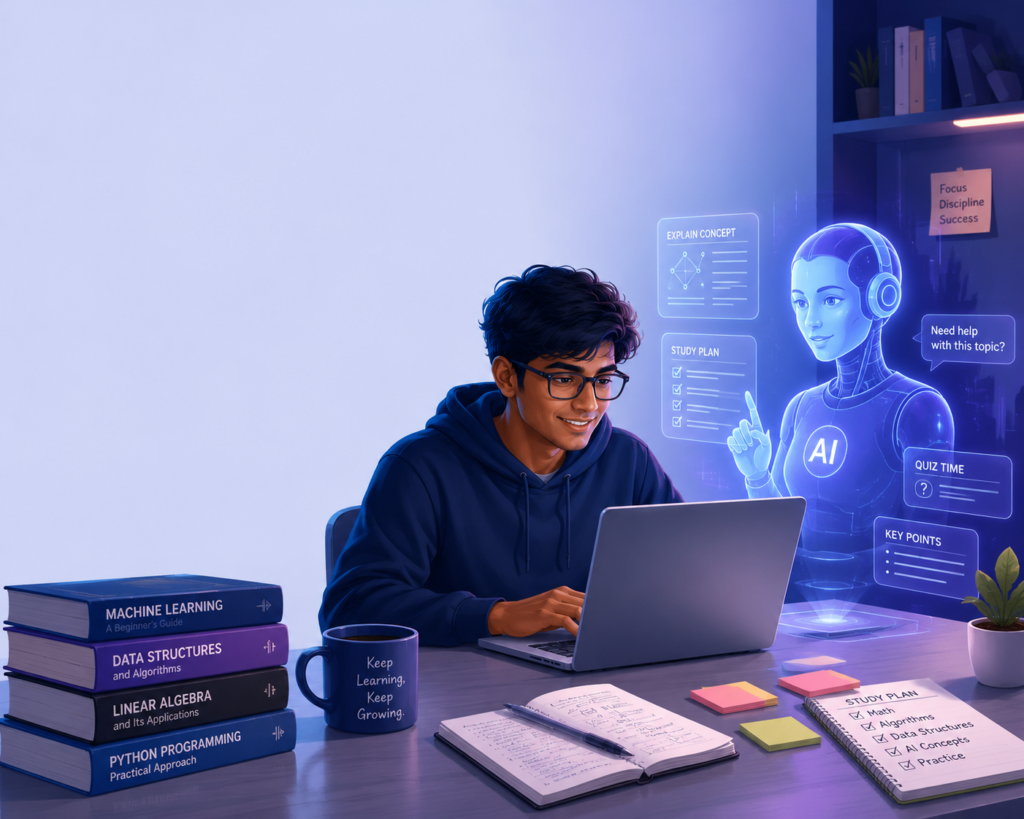
For my website, I regularly use ChatGPT to create featured images, promotional graphics, and visuals for blog posts. I also use it for university presentations whenever I need custom illustrations instead of generic stock images. One thing I appreciate is that it usually understands exactly what I’m trying to create without forcing me to rewrite my prompts multiple times.
What Impressed Me
The biggest strength I noticed wasn’t just the image quality—it was how consistently ChatGPT followed my prompts. Across almost every test, it included the details I requested without making unexpected changes.
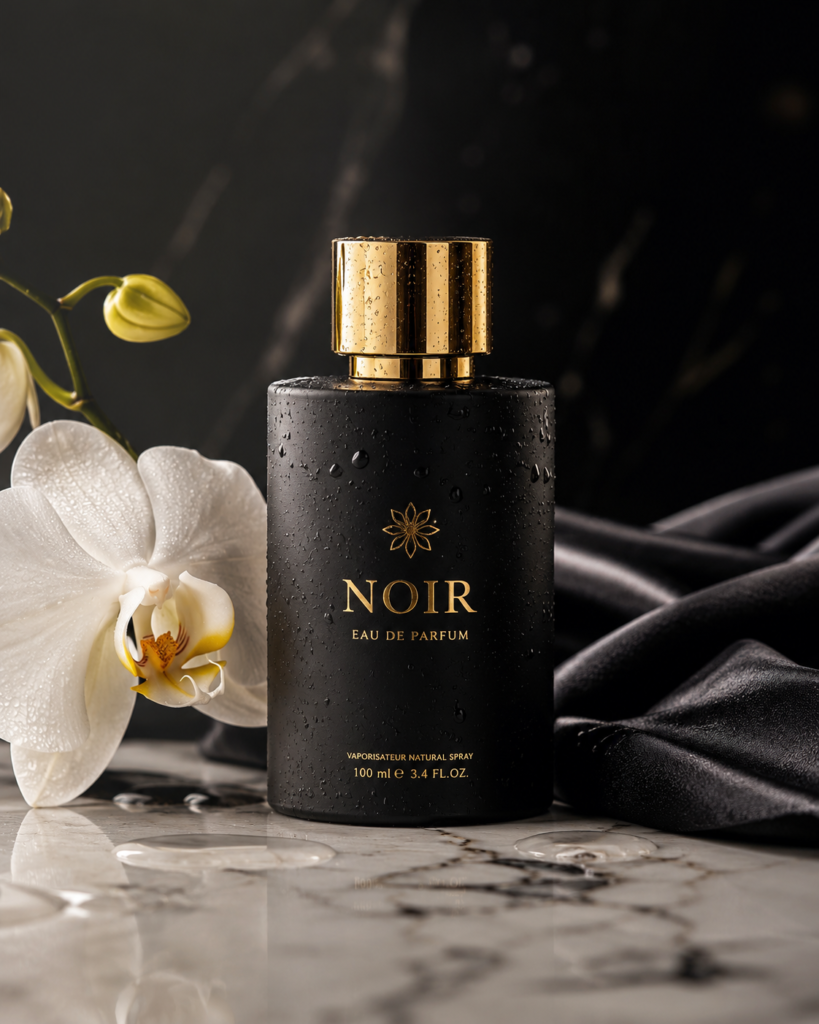
One example was the product advertisement test. Instead of generating a plain perfume bottle, ChatGPT even added a realistic-looking sample brand name and packaging text that actually suited a luxury perfume advertisement. It wasn’t something I asked for, but it made the final image feel much more professional.
Another area where ChatGPT stood out was blog featured images. The compositions looked clean, balanced, and gave enough space for adding titles later, making them practical for real websites rather than just visually attractive images.
What Could Be Better
If there’s one thing I’d improve, it’s the generation speed. Compared to tools like Gemini and Recraft, ChatGPT usually took much longer to produce an image. On a few occasions, once the generation crossed the one-minute mark, I had to refresh the page or switch to another chat before the image finally appeared.
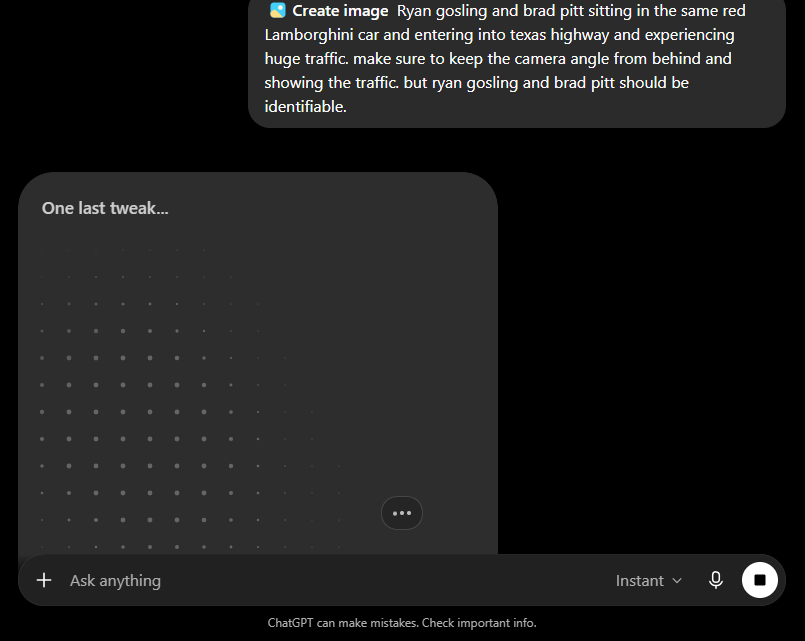
Like every AI image generator I tested, it also isn’t perfect. Occasionally it missed small prompt details or interpreted something differently than I intended. While this didn’t happen often during my testing, it’s still worth checking the final image before using it.
💡 Tiny Moments
One thing I’ve realised after using ChatGPT for so long is that it has gradually learned how I write prompts. I rarely spend time figuring out how to phrase my ideas anymore—I simply describe what I want naturally, and most of the time it understands me surprisingly well.
That familiarity is difficult to measure in a benchmark, but it’s one of the biggest reasons I keep coming back to ChatGPT.
Pricing
- Free Plan: ChatGPT offers a free plan with image generation built in, making it one of the easiest AI image generators to try. During my testing, I never hit the image generation limit, although OpenAI applies dynamic usage limits that can change depending on demand. If you reach the limit, you’ll simply need to wait for it to reset.
- ChatGPT Go: $8 per month (in selected regions)
- ChatGPT Plus: $20 per month (standard global plan with higher limits and priority access)
For most casual users, the free plan is more than enough to explore AI image generation before deciding whether a paid plan is worth it.
Final Verdict
After testing eight different AI image generators side by side, ChatGPT is still the one I’d recommend to most people. It isn’t the fastest, and it isn’t perfect, but it consistently produced high-quality images across almost every category I tested.
If you’re a student, blogger, content creator, or someone who’s just getting started with AI image generation, ChatGPT is one of the easiest tools to recommend because it balances image quality, usability, and reliability extremely well.
My Rating: 9.8/10 ⭐
Gemini
Quick Overview
If you already use Google Search, Gmail, Google Drive, Android, or other Google services, Gemini feels less like a separate AI tool and more like a natural extension of the Google ecosystem. During my testing, it consistently generated high-quality images, responded quickly, and offered one of the smoothest experiences among all the free AI image generators I tried.
Best For: Students • Android Users • Google Workspace Users • Everyday AI Tasks
My Experience
Unlike ChatGPT, Gemini isn’t the AI image generator I use every day, but whenever I need recent information or quick image generation, it’s usually one of my first choices. During this comparison, it impressed me with its speed and overall consistency. Most images were generated in just a few seconds, making it easy to experiment without constantly waiting.
For my website, I occasionally use Gemini to create featured images and promotional graphics, especially when I want another creative perspective before making a final decision. For university work, it’s useful for creating presentation visuals and explaining topics with custom illustrations instead of searching through dozens of images online.
One thing I also appreciate is how naturally Gemini fits into my daily workflow. Whether I’m using Android, Chrome, or other Google services, it’s always just a click away.
What Impressed Me
The first thing that stood out during testing was speed. Gemini was one of the fastest tools I tested, generating most images in around 18 seconds on average.
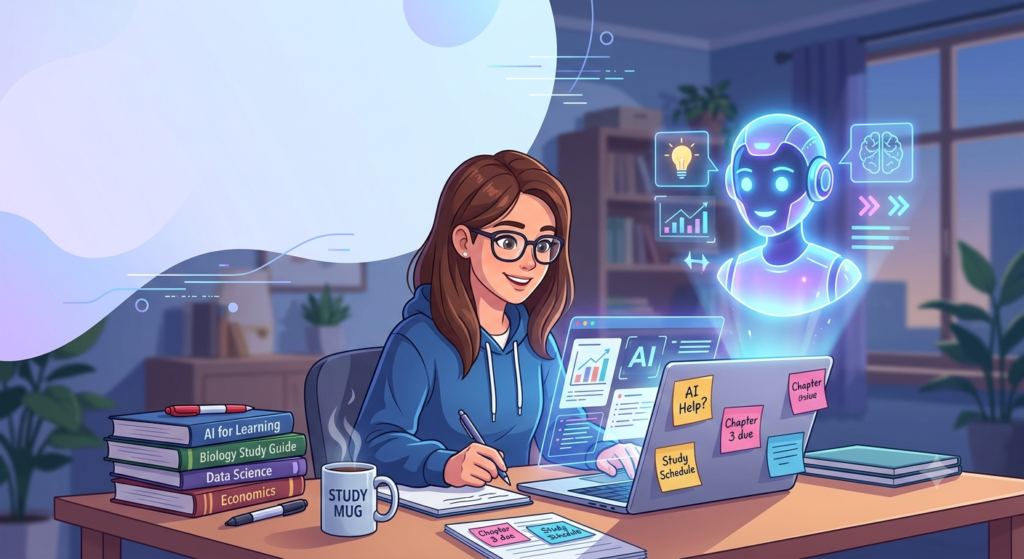
I also liked how well it handled the product advertisement prompt. The final image looked premium, followed almost all of the instructions, and maintained a clean composition. During the blog featured image test, Gemini even created a speech-bubble style empty space for the title. It wasn’t part of my prompt, but it ended up looking like a thoughtful design choice that bloggers could actually use.
Another advantage is how well Gemini integrates with Google’s ecosystem. Features like Circle to Search and the built-in assistant on Android make it much easier to move between searching, learning, and creating images without switching between multiple apps.
What Could Be Better
While the overall image quality was excellent, Gemini wasn’t perfect.
During the portrait test, it interpreted the prompt differently and generated the image in landscape orientation instead of producing a portrait-style composition. Small prompt interpretation issues like this didn’t happen often, but they were noticeable when comparing the results side by side.

The editing workflow also felt slightly less convenient than some other tools. If I wanted to continue editing an image, I often had to upload it again or branch it into a new conversation before making additional changes. It’s not a deal-breaker, but it adds an extra step that slows down the workflow.
I also noticed that the generated images contained a visible watermark during my testing, something I didn’t encounter with most of the other tools.
💡 Tiny Moments
One small detail I genuinely liked was something I never expected.
For the blog featured image test, Gemini automatically left the title area inside a rounded speech-bubble style shape instead of just leaving empty space. It made the layout feel more polished without me specifically asking for it.
Another thing I appreciated was how quickly I could move from asking a question to generating an image. That smooth workflow made Gemini feel less like an image generator and more like an AI assistant that’s always ready to help.
Pricing
- Free Plan: Gemini includes free AI image generation without a separate credit system. Throughout my testing, I didn’t encounter any image generation limits, making it one of the most comfortable tools to experiment with for longer sessions.
- Google AI Plus: $4.99 per month
For most students and casual users, I think the free plan is generous enough to explore image generation without feeling heavily restricted.
Final Verdict
Gemini may not have replaced ChatGPT as my primary AI tool, but after this comparison, it definitely earned a permanent place in my workflow. Its combination of speed, ease of use, and deep integration with Google’s ecosystem makes it one of the easiest AI image generators to recommend.
If you already use Android or Google’s productivity tools every day, Gemini feels like a very natural choice. And if you’re a student who values quick results without a complicated interface, it’s easily one of the strongest free options available today.
My Rating: 9.4/10 ⭐
Reve
Quick Overview
Before starting this comparison, Reve wasn’t even on my shortlist of AI image generators. I signed up simply because I wanted to give every popular free tool a fair chance. By the end of my testing, though, Reve had completely changed my opinion. It consistently produced high-quality images, surprised me with its editing workflow, and became one of the few tools I’ll continue using alongside ChatGPT and Gemini.
Best For: Bloggers • Content Creators • Students • Anyone looking for a powerful free alternative
My Experience
Before testing Reve, I honestly didn’t know what to expect. Since it isn’t discussed as often as ChatGPT or Gemini, I assumed it would perform somewhere in the middle of the pack. Instead, it became one of the biggest surprises of this entire comparison.
For AISparkHub, I can easily see myself using Reve to create featured images, promotional graphics, and product-style visuals. The image quality felt consistently strong across different prompts, and it rarely made me feel like I had to regenerate the same image over and over again. It has already earned a place in my workflow whenever I want another creative opinion alongside ChatGPT and Gemini.
What Impressed Me
The first thing that caught my attention wasn’t even the image quality—it was the way Reve generates images. Instead of suddenly displaying the finished result, it gradually builds the image in front of you. It’s a small detail, but it made the whole experience feel much more interactive and enjoyable than simply waiting for a loading spinner.
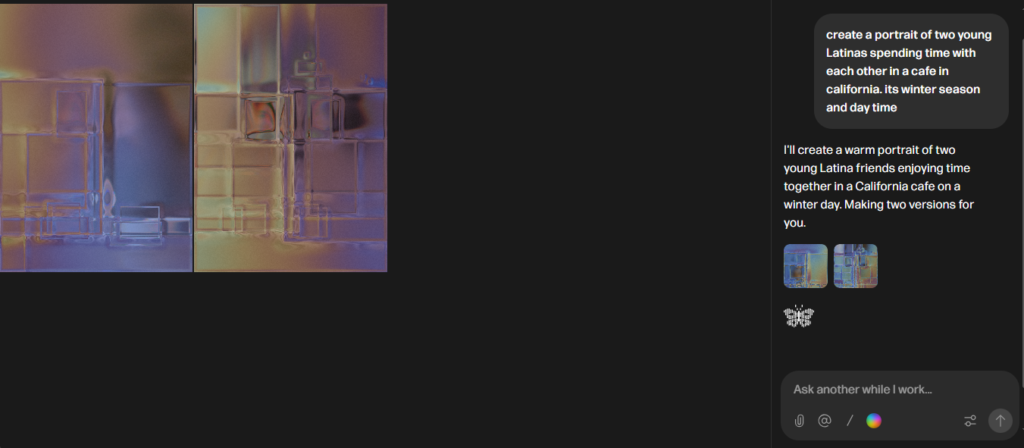
Another feature I genuinely loved was its layer-aware editing. After generating an image, Reve automatically recognised different elements such as text, hair, accessories, and other objects. Instead of manually masking parts of the image, I could simply click on the specific element I wanted to change and edit only that section. It made editing feel surprisingly natural.
What impressed me even more was that these workflow improvements were backed by consistently strong image quality. During my testing, Reve produced one of my favourite product advertisements and handled text rendering exceptionally well. It wasn’t just different—it was genuinely competitive with some of the biggest names on this list.
What Could Be Better
Honestly, I didn’t run into many major issues while testing Reve. The biggest challenge is simply that not many people know about it yet, which means there are fewer tutorials, community discussions, and prompt guides compared to more established tools.
Generation speed was also a little slower than Gemini or Recraft in my testing, averaging around one minute, but the final quality usually made the extra wait worthwhile.
💡 Tiny Moments
One of my favourite moments happened completely by accident.
After generating an image, I moved my cursor across different parts of it and noticed that Reve was automatically highlighting individual objects like text, hair, and accessories. At first, I thought it was just a hover effect. Then I realised I could actually click those elements and edit them individually.
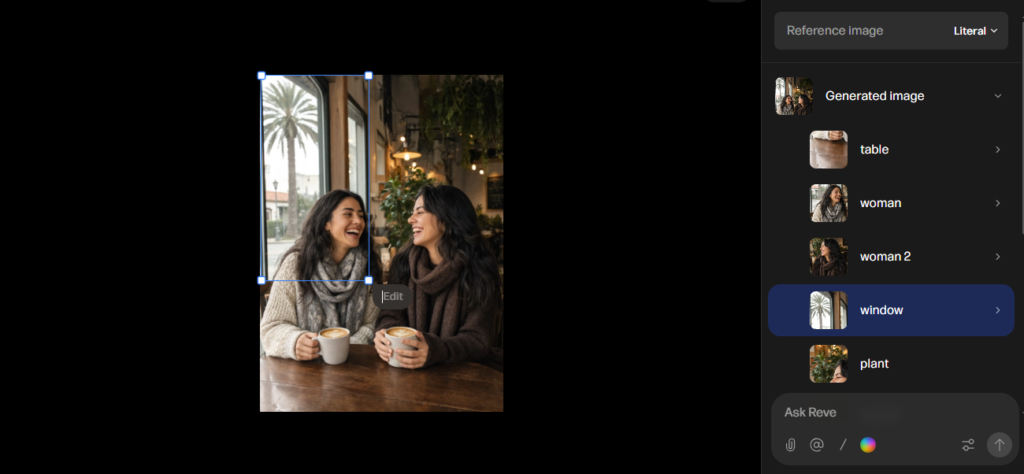
That was the moment I stopped thinking of Reve as “another AI image generator” and started thinking of it as a tool I’d genuinely continue using.
Pricing
- Free Plan: Reve offers a generous free plan that was more than enough for my testing. I never ran into generation limits while comparing the tools, so I was able to experiment freely without constantly worrying about saving credits.
- Lite: $7.99 per month
For most students, bloggers, and casual creators, I think the free plan offers more than enough room to experiment before even considering an upgrade.
Final Verdict
Reve was easily the biggest surprise of my entire testing process.
I expected it to be another average AI image generator, but instead it consistently produced impressive images while introducing one of the most enjoyable editing workflows I experienced. It’s now one of the tools I’ll continue using whenever I need a second opinion or a fresh creative perspective.
If you’ve never tried Reve before, I’d genuinely recommend giving it a chance. It may not be as well-known as ChatGPT or Gemini, but after spending hours comparing them side by side, I think it has absolutely earned a place among the best free AI image generators available today.
My Rating: 9.3/10 ⭐
Leonardo AI
Quick Overview
Out of all the AI image generators I tested, Leonardo AI felt like it was built for people who love experimenting. While many tools focus on giving you a quick result, Leonardo gives you more creative control without making the experience feel complicated. Whether you’re creating realistic images, fantasy artwork, or marketing visuals, it strikes a great balance between quality and flexibility.
Best For: Designers • Digital Artists • Content Creators • Anyone who enjoys experimenting with AI images
My Experience
Before this comparison, I had heard a lot about Leonardo AI, but I had never spent enough time exploring it. After using it across all seven tests, I completely understood why it’s recommended by so many creators.
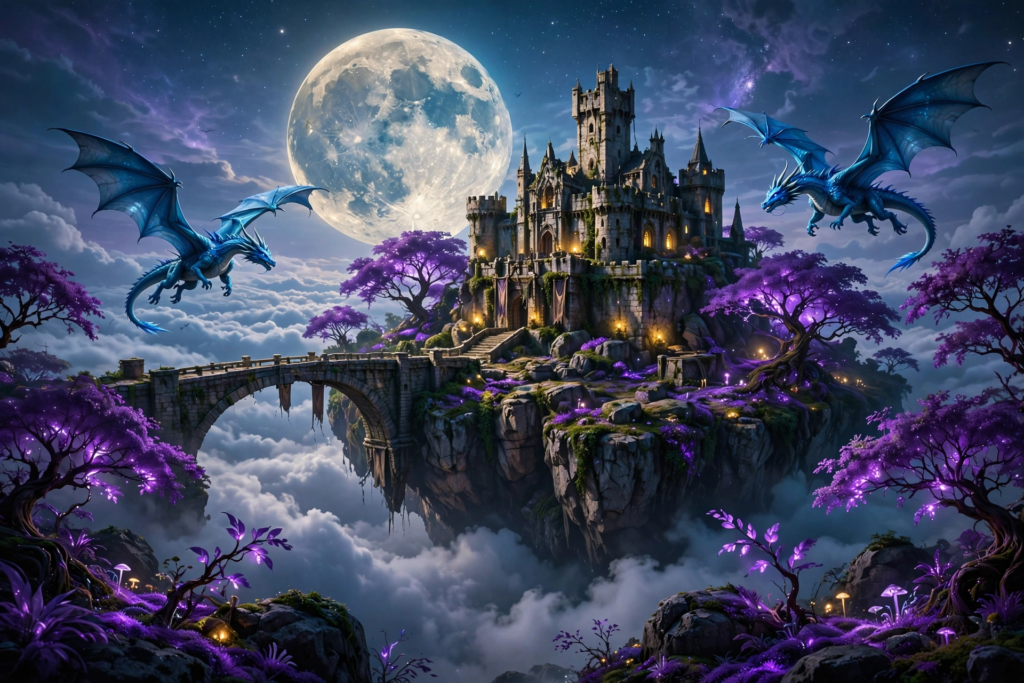
For AISparkHub, Leonardo is definitely one of the tools I’ll continue using whenever I want something a little more creative than my usual workflow. It handled almost every prompt well, from realistic portraits to product advertisements and fantasy scenes. The outputs felt polished, and I rarely felt disappointed with the first generation.
I also found myself experimenting more than I expected. Instead of generating one image and moving on, Leonardo made me curious to try different styles and prompts just to see how the results changed.
What Impressed Me
The feature that impressed me the most was Auto Model Selection.
Instead of expecting me to know which AI model works best for a particular prompt, Leonardo automatically selected what it thought was the right one. It sounds like a small feature, but it made the entire experience much simpler. I could focus on describing the image I wanted instead of worrying about technical settings or wasting credits on the wrong model.
Another thing I appreciated was its Canva integration. Knowing that I could continue editing my generated images inside Canva made Leonardo feel like a practical tool for creators rather than just another AI image generator.
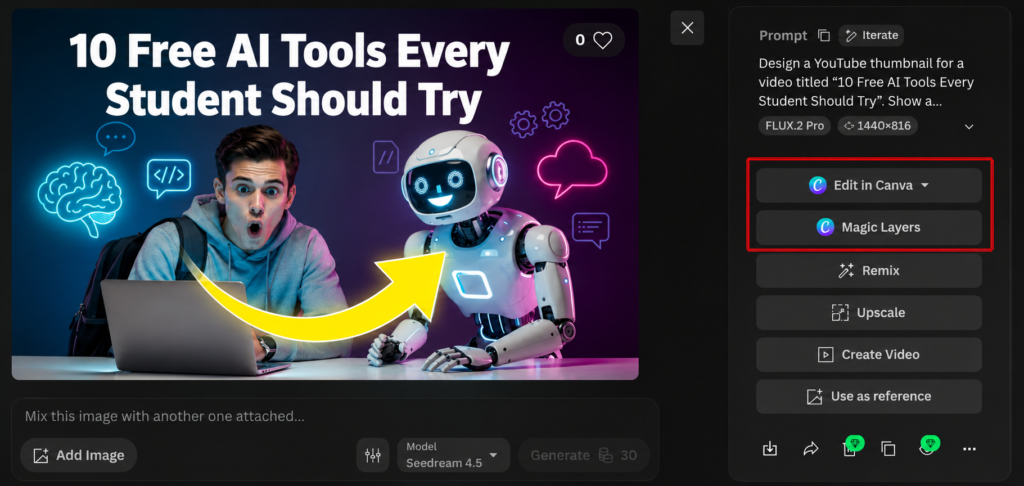
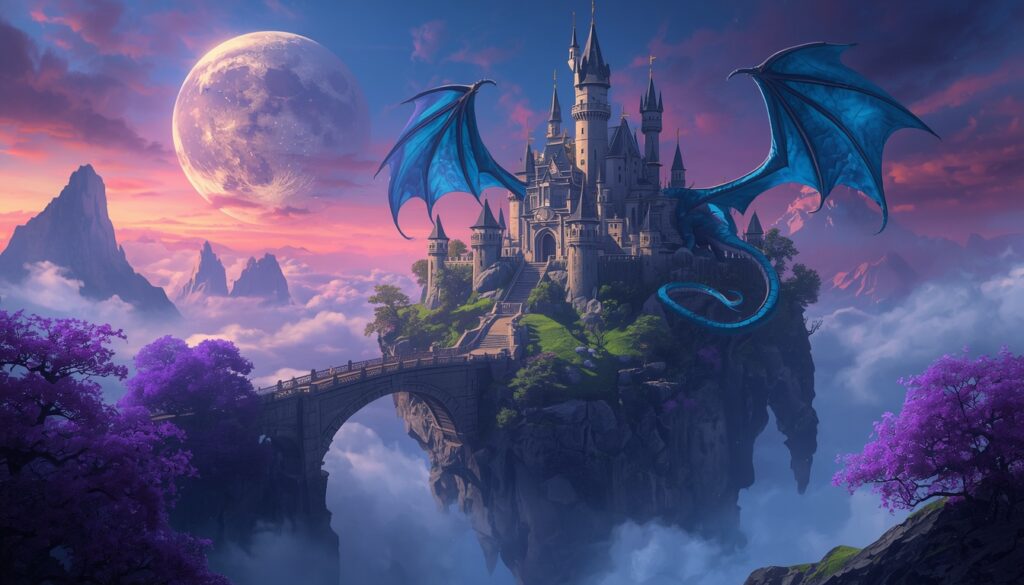
During my testing, it also performed consistently well across different categories. The portrait looked realistic, the product advertisement felt premium, and the creative scene was one of my favourite outputs from the entire comparison.
What Could Be Better
If I had one complaint, it would be the credit system.
Leonardo gives a generous number of free credits every day, but the number of credits used per generation depends on the model you choose. While Auto Mode usually consumed around 8–15 credits during my testing, manually selecting certain models could increase the cost significantly.
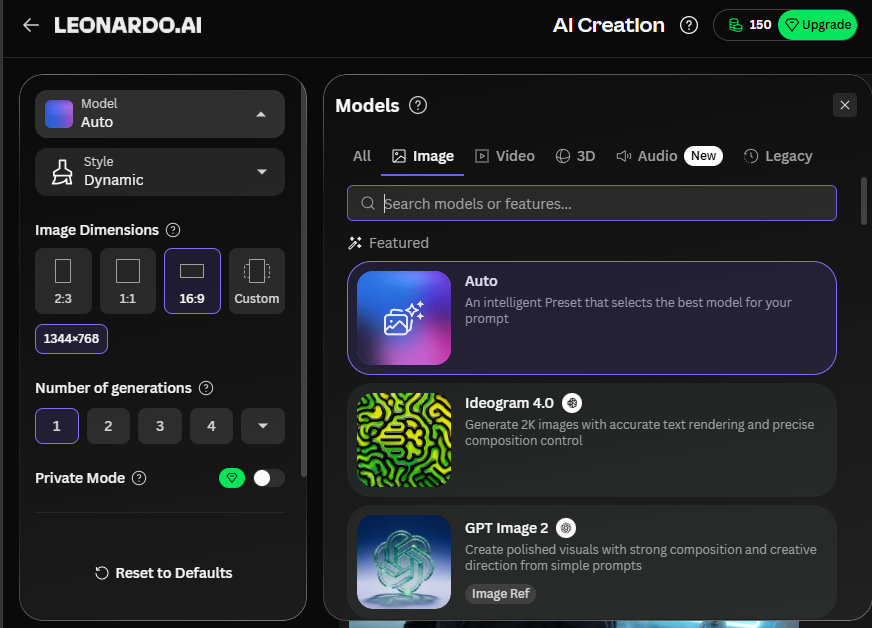
This isn’t a major issue once you understand how the system works, but beginners might feel slightly confused at first when they see different credit costs for different models.
💡 Tiny Moments
One small moment that stayed with me happened halfway through my testing.
I kept wondering why Auto Mode was consistently giving me good results, so I started switching between different models just to compare them. Surprisingly, I found myself returning to Auto Mode most of the time because it had already chosen a model that suited my prompt really well.
Sometimes, the smartest feature isn’t the one that gives you more controls—it’s the one that quietly makes good decisions for you.
Pricing
- Free Plan: Leonardo AI provides 150 free credits every day, making it one of the most generous free plans I tested. In Auto Mode, most of my generations used around 8–15 credits, although choosing specific models can increase the cost depending on which one you use.
- Essential: $10 per month
For a free plan, I found Leonardo to be one of the most generous options for people who enjoy experimenting with different ideas.
Final Verdict
Leonardo AI ended up becoming one of the biggest additions to my personal toolkit after this comparison.
It combines excellent image quality, creative flexibility, generous daily credits, and useful workflow features without feeling overly technical. Whether you’re creating blog graphics, fantasy artwork, concept designs, or presentation visuals, Leonardo gives you enough freedom to explore while still being approachable for beginners.
I’ll definitely continue using it alongside ChatGPT and Reve whenever I want a more creative perspective or simply want to experiment with different artistic styles.
My Rating: 9.2/10 ⭐
Recraft
Quick Overview
If ChatGPT feels like an AI assistant and Leonardo feels like a creative studio, Recraft feels like a design workspace. Throughout my testing, I noticed that it approaches image generation a little differently. Instead of focusing purely on creating beautiful images, it seems to think more like a designer, making it particularly useful for branding, marketing graphics, and promotional content.
Best For: Designers • Marketers • Small Businesses • Social Media Creators
My Experience
Before this comparison, I honestly didn’t know much about Recraft. I had seen people recommend it occasionally, but I never had a reason to try it myself. After spending a few hours with it, I finally understood why designers like it.
For AISparkHub, I probably wouldn’t use Recraft for every featured image, but I’d definitely open it whenever I need promotional banners, advertisements, or branded graphics. During testing, it consistently produced clean-looking images, and I found myself appreciating its overall workflow more than I expected.
Unlike most AI image generators where every image disappears into different chats, Recraft kept all of my generations organised in one dedicated workspace. It sounds simple, but when you’re generating dozens of images, that organisation makes a surprisingly big difference.

What Impressed Me
The biggest surprise wasn’t actually the image quality—it was the overall experience of using the platform.
Recraft organises every generation inside a dedicated workspace, making it incredibly easy to compare different versions without jumping between conversations. After testing several AI tools one after another, I realised how much I appreciated having everything neatly organised in one place.
I also liked how it interpreted the product advertisement prompt. While several tools generated a luxury perfume bottle, Recraft took a different approach by creating something that looked closer to a magazine advertisement. It even added magazine-style headlines around the product, something I never asked for but genuinely liked. It felt creative rather than incorrect.
Another thing worth mentioning is its daily credit system. Receiving fresh credits every day encouraged me to experiment without constantly worrying about wasting generations.
What Could Be Better
Although Recraft performed well overall, I noticed that it sometimes leaned more towards illustration and graphic design than pure realism.
During the portrait test, I spotted a slight facial misalignment that made the image feel less natural compared to some of the strongest performers. I also felt that its blog featured image wasn’t quite as publish-ready as some of the other tools I tested. The design looked attractive, but it didn’t immediately communicate the topic as clearly.
If your main goal is creating highly realistic portraits, there are better options available. But if you’re designing promotional graphics or marketing material, those differences become much less important.
💡 Tiny Moments
One thing I didn’t expect was how quickly I adapted to Recraft’s workspace.
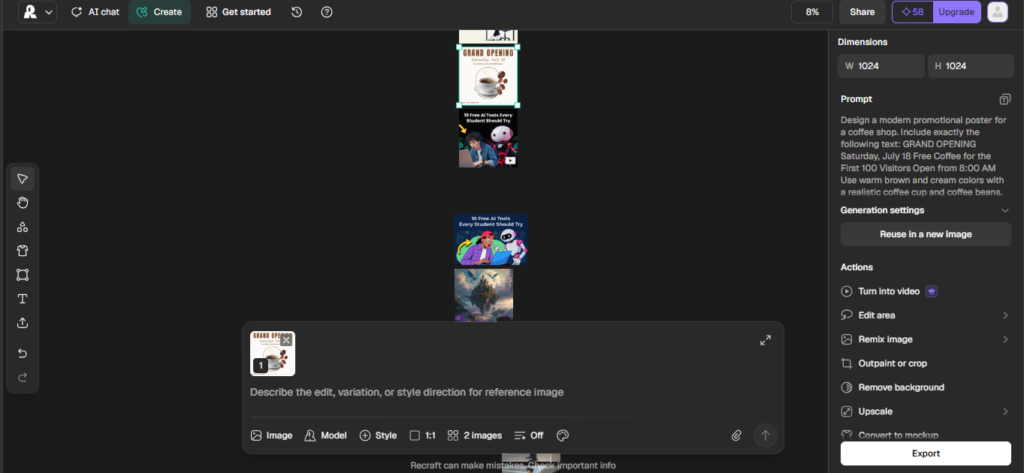
After generating several images, I realised I wasn’t wasting time searching through previous conversations or scrolling endlessly to find older outputs. Everything stayed organised in one place, and that small workflow improvement made the platform feel much more professional than I expected.
It’s one of those features you don’t think about until you use it.
Pricing
- Free Plan: Recraft gives you 30 credits every day, and in my testing, a standard image generation typically used 2 credits. That made it easy to experiment with different prompts without feeling restricted. One thing worth noting is that credits reset every 24 hours, so you don’t need to wait until the next month to continue creating.
- Basic: $12 per month
Considering how little each generation costs, I found Recraft’s free plan to be one of the easiest to experiment with.
Final Verdict
Recraft wasn’t the most realistic AI image generator I tested, and I don’t think that’s what it’s trying to be.
Instead, it feels like a tool built for people who create marketing graphics, promotional designs, branding assets, and social media content. The organised workspace, affordable daily credits, and polished design style make it a tool I’ll continue using whenever I want something that feels professionally designed rather than purely AI-generated.
It’s a different kind of AI image generator—and after using it, I think that’s exactly what makes it worth trying.
My Rating: 8.8/10 ⭐
Meta AI
Quick Overview
Unlike most AI image generators on this list, Meta AI doesn’t ask you to visit a separate website or learn a new interface. It’s already built into apps like WhatsApp, Instagram, Messenger, and Facebook, making it one of the easiest AI tools to access. While it isn’t the most advanced image generator I tested, its convenience makes it a surprisingly useful option for everyday image creation.
Best For: Casual Users • Social Media Users • Beginners • Quick Image Generation
My Experience
I don’t use Meta AI for AISparkHub or any professional work, but I do use it quite often in my personal life. Since it’s integrated into apps I already open every day, it’s usually the quickest way for me to generate a fun image or understand something I come across while scrolling through social media.
During this comparison, Meta AI performed better than I expected in several tests. It handled portraits and product advertisements reasonably well, and the overall generation speed was one of the fastest I experienced. That said, I still found myself choosing other tools whenever I needed images for my website or university presentations.

What Impressed Me
The biggest advantage of Meta AI is how accessible it feels.
Instead of opening another browser tab or signing in to a different platform, I can generate an image from the same app where I’m already chatting with friends or browsing social media. That convenience makes it incredibly easy to use, especially when I just need a quick visual.
I also liked how fast it generated images. During my testing, it consistently produced results in around 23 seconds, making it one of the quicker tools in this comparison.
Another pleasant surprise was its lighting. In the portrait test, Meta AI added cinematic lighting that made the final image look more dramatic than I expected. Even though it wasn’t always the most accurate, the images often looked visually appealing at first glance.
What Could Be Better
While Meta AI produced some attractive images, I noticed that it sometimes focused more on making the image look dramatic than on following the prompt precisely. Also, Meta AI leaves watermark.
The best example came during the creative scene test, where it exaggerated the lighting and atmosphere much more than I had intended. It looked impressive, but it also moved away from what I had actually described.
I also experienced this during image editing. In one of my editing prompts, Meta AI unexpectedly changed the subject’s pose instead of only applying the requested modification. It wasn’t a major issue, but it showed that the editing process isn’t always as predictable as some of the other tools I tested.
Because of that, I personally wouldn’t rely on Meta AI for blog graphics, client work, or anything that requires precise prompt control.
💡 Tiny Moments
One thing I genuinely appreciate is that Meta AI never feels like “another tool” I have to remember to open.
If I’m chatting on WhatsApp or scrolling through Instagram and suddenly need an image, it’s already there. That small convenience is something I didn’t fully appreciate until I started testing several different AI platforms side by side.
Sometimes, the easiest tool to access is the one you end up using the most.
Pricing
- Free Plan: Meta AI offers free image generation without making me think about credits during my testing. I never encountered any noticeable limits, making it a convenient option for casual image creation and experimentation.
For everyday image generation, I never felt limited by the free plan.
Final Verdict
Meta AI isn’t the tool I’d personally choose for professional projects, but I also don’t think that’s its goal.
Its biggest strength is convenience. If you already spend most of your time inside WhatsApp, Instagram, Messenger, or Facebook, being able to generate images without switching platforms is genuinely useful.
For blog graphics, presentations, or more demanding creative work, I’d still reach for ChatGPT, Leonardo AI, or Reve first. But for quick ideas, casual image generation, and social media use, Meta AI is a solid free option that’s much better than I initially expected.
My Rating: 8.2/10 ⭐
Ideogram
Quick Overview
Not every AI image generator tries to do everything, and Ideogram is a perfect example of that. While many tools focus on realism or creative artwork, Ideogram stands out for something much more specific—generating images with accurate, readable text. If your work involves posters, banners, advertisements, or social media graphics, it’s one of the few free AI tools that consistently gets typography right.
Best For: Posters • Marketing Graphics • Social Media Creators • Anyone who needs accurate text inside images
My Experience
Before testing Ideogram, I had already heard that it was one of the best AI tools for text generation, so I was curious to see if it actually lived up to that reputation.
For AISparkHub, I don’t see myself using Ideogram as my primary image generator. Most of my work involves blog featured images and realistic illustrations, where other tools suited my workflow better. However, if I ever need a poster, event banner, announcement, or promotional graphic with readable text, Ideogram would probably be one of my first choices.
Throughout my testing, the image quality remained consistently good, but I always felt like the platform was encouraging me to create graphics rather than traditional AI artwork.
What Impressed Me
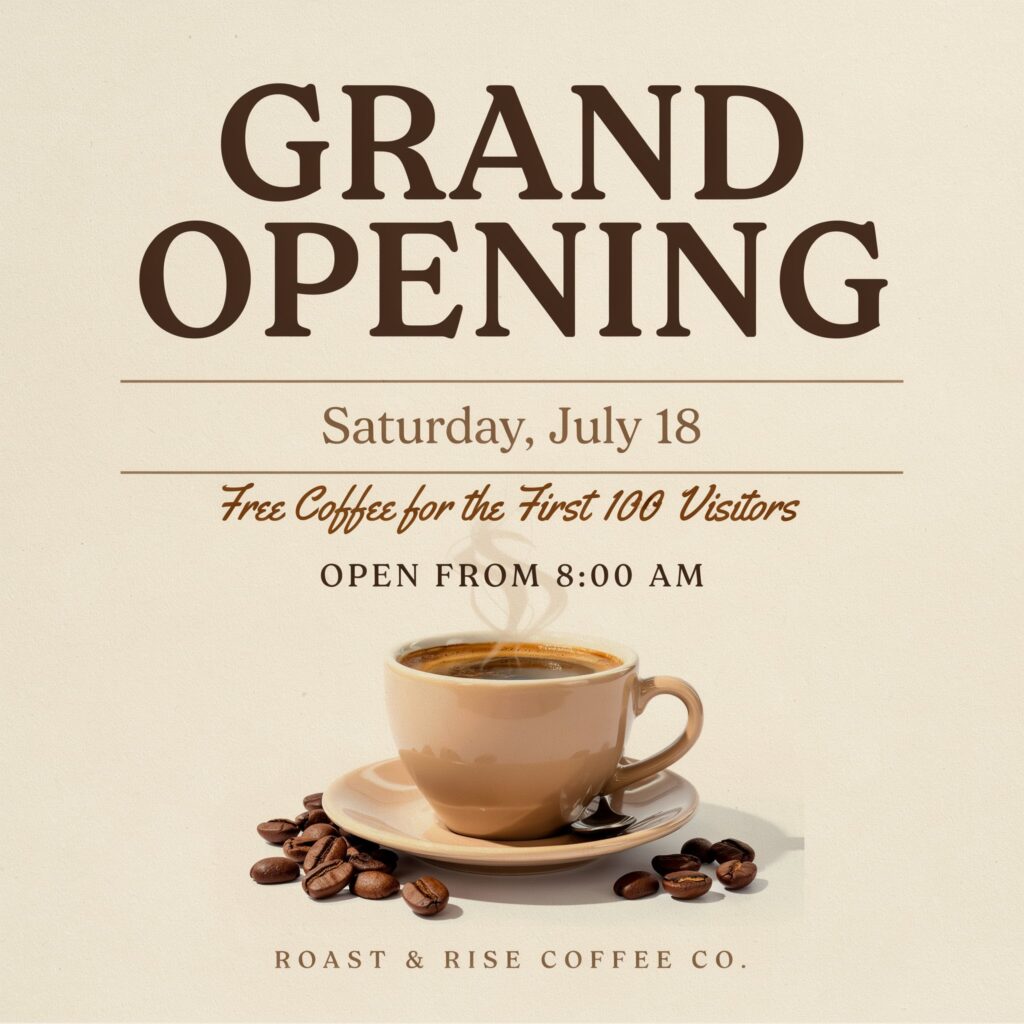
As expected, text rendering was Ideogram’s biggest strength.
During my benchmark, it handled the poster prompt extremely well, producing clean typography while also adding small details like a sample company name and supporting text that made the design feel complete instead of empty. That’s something many AI image generators still struggle with.
I also liked that every generation produced multiple image variations at once. Instead of deciding whether an image was good or bad immediately, I could compare different layouts and choose the one that worked best.
Another thing I appreciated was that even though Ideogram specialises in text, it still produced surprisingly good portraits and product advertisements during my testing. It may not have been the strongest overall tool, but it definitely performed better than I expected outside its main speciality.
What Could Be Better
The biggest downside wasn’t the image quality—it was the free plan.
Out of every tool I tested, Ideogram made me think the most before clicking the Generate button. The weekly credit limit is already quite restrictive, and image editing also consumes credits, making experimentation feel expensive compared to the other free tools.
The inability to change how many image variations are produced also felt limiting. Sometimes I only needed one image, but Ideogram still generated multiple versions while using the available credits.
💡 Tiny Moments
The funniest moment during my testing wasn’t caused by the AI—it was caused by me.
I also made a mistake during my very first generation.
I selected Quality Mode because I assumed a slower generation would use fewer credits. Instead, it consumed 8 credits in a single generation, leaving me with much fewer generations than I expected. That experience taught me to double-check the rendering settings before generating anything.
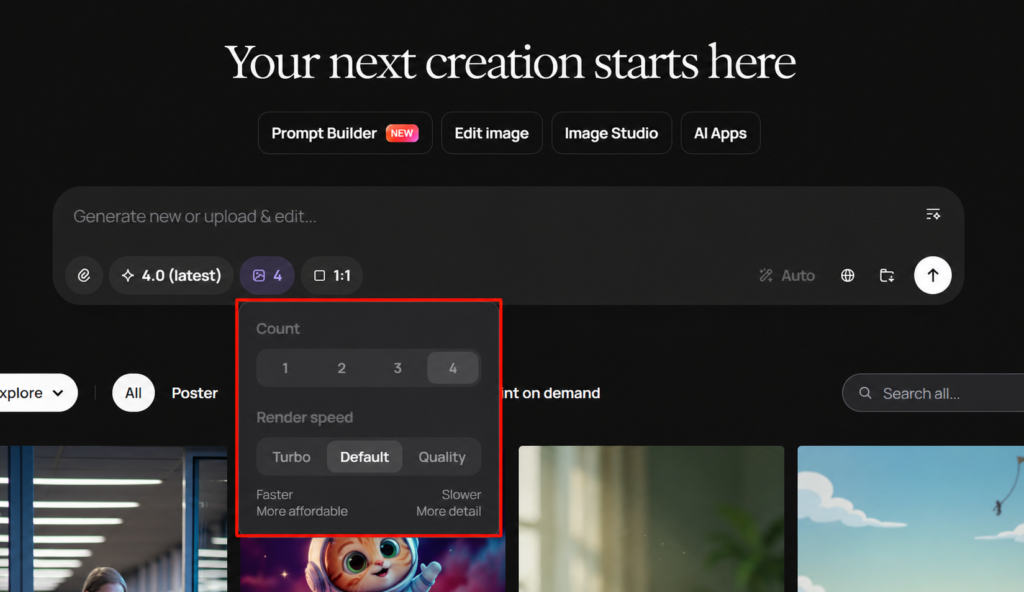
It was a painful lesson… but probably one that will save someone else from making the same mistake after reading this review.
Pricing
- Free Plan: Ideogram’s free plan was the most restrictive experience during my testing. I received 12 free credits per week, and generating images in different rendering modes consumed those credits quite quickly. Since image editing also uses credits, I found myself planning each generation much more carefully than on the other platforms.
- Plus: $20 per month
While the quality is genuinely impressive, I found the free tier to be one of the most restrictive among all the tools I tested.
Final Verdict
Ideogram knows exactly what it’s trying to be—and I respect that.
If your work revolves around posters, event banners, advertisements, or graphics that require clean, readable text, it’s easily one of the strongest free AI image generators available today.
For my own workflow, though, I probably won’t use it as often. The limited weekly credits made experimentation difficult, and since I mostly create blog graphics and realistic images, other tools fit my needs better.
That said, if text inside images is your priority, Ideogram is absolutely worth trying.
My Rating: 7.8/10 ⭐
Microsoft Designer
Quick Overview
Microsoft Designer is probably the easiest AI image generator to get started with, especially if you’re already using Windows or Microsoft 365. The interface is clean, simple, and doesn’t overwhelm beginners with too many settings. While it didn’t outperform the other AI image generators in my testing, I can still see why someone new to AI would enjoy using it.
Best For: Beginners • Microsoft Users • Quick Social Graphics
My Experience
Before this comparison, I had only used Microsoft Designer occasionally and never really explored it in depth. After putting it through the same seven tests as the other tools, my opinion became pretty clear.
The platform is incredibly easy to use. Everything feels organised, and generating an image only takes a few clicks. If someone has never used an AI image generator before, I think Microsoft Designer is one of the easiest places to start.
That said, once I started comparing the outputs side by side with tools like ChatGPT, Gemini, Leonardo AI, and Reve, I noticed that the difference in image quality became much more obvious. For simple graphics it worked well, but I rarely found myself choosing its images over the others.
What Impressed Me
The biggest strength of Microsoft Designer isn’t necessarily the images—it’s how approachable the platform feels.
I never had to spend time figuring out where anything was. The interface is clean, the workflow is straightforward, and it feels like Microsoft designed it for everyday users rather than experienced designers.
Generation speed was also respectable, and for simple requests it produced results quickly enough that I never felt like I was waiting around.
Although its images weren’t my favourites overall, I still think it does a good job for quick social media graphics, basic presentations, and simple promotional visuals.
What Could Be Better
The biggest limitation I experienced was the free plan.
With only 15 credits per month, I found myself thinking twice before generating anything. Compared to tools like Recraft, Leonardo AI, or ChatGPT, it simply didn’t encourage experimentation.
The image quality was another area where it struggled during my testing.
In the portrait benchmark, the face looked more AI-generated than natural, and some details—like the hair from my prompt—were missing entirely. During the blog featured image test, it also ignored my instruction to leave space for a title.
The text rendering benchmark highlighted another issue. The word “Grand” in the heading was partially cropped, making the design look unfinished.
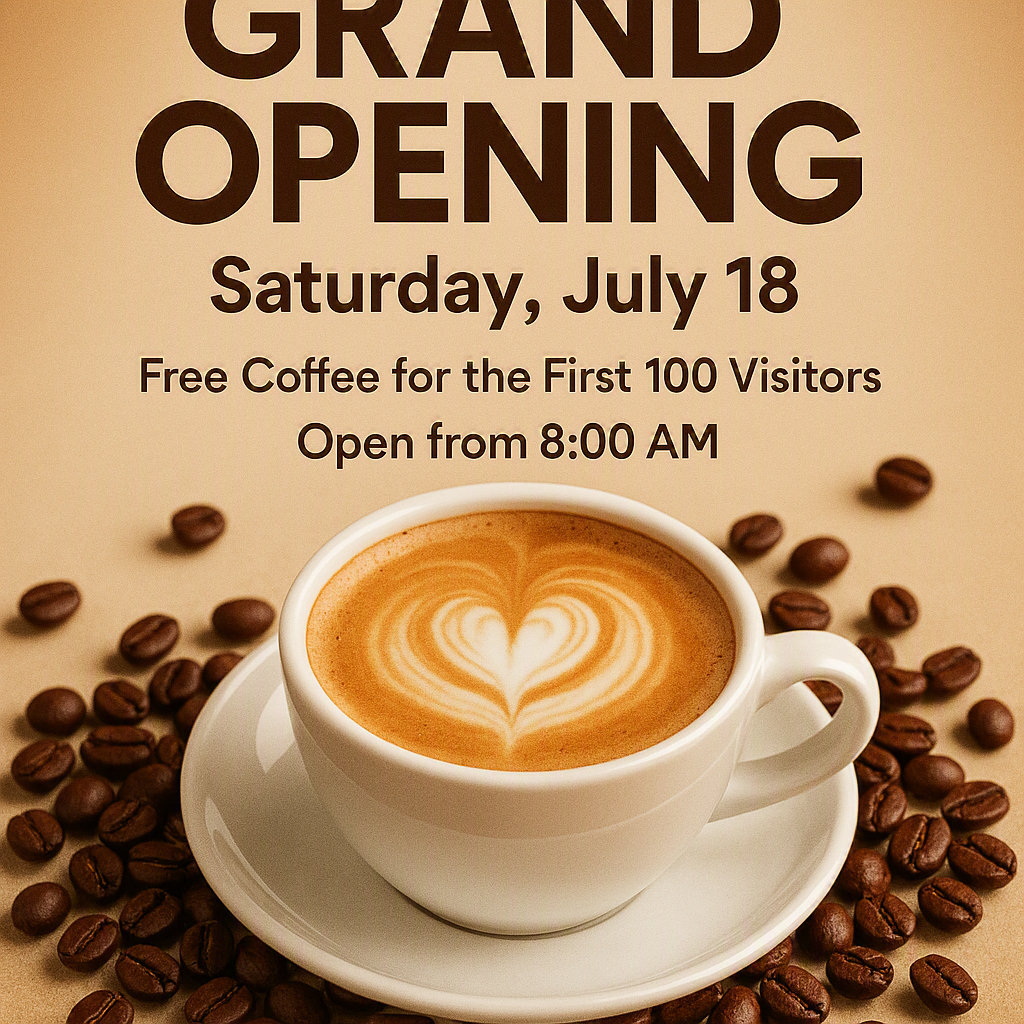
Image editing also felt quite limited. Instead of offering conversational editing like several other tools, most of the available options focused on basic adjustments such as removing backgrounds or changing colours.
💡 Tiny Moments
One thing I realised while testing Microsoft Designer is that it never frustrated me—it simply never surprised me either.
Everything worked exactly as I expected. The interface was smooth, the image generation process was simple, and nothing felt confusing.
But after spending time with tools like Reve and Leonardo AI, I found myself wishing Designer would take a few more creative risks instead of always playing it safe.
Pricing
- Free Plan: Microsoft Designer provides 15 free credits per month, which was the lowest allowance among all the tools I tested. While it’s enough to explore the platform, I found it far too restrictive for anyone who plans to generate images regularly.
- Paid plans and additional AI credits are available through Microsoft 365 subscriptions.
For casual users, the free plan is enough to explore the platform. However, if you’re planning to generate images regularly, you’ll probably reach the monthly limit much sooner than expected.
Final Verdict
Microsoft Designer is a tool I would happily recommend to someone who’s completely new to AI image generation. It’s easy to understand, quick to learn, and integrates nicely into Microsoft’s ecosystem.
However, after comparing it directly with seven other AI image generators, I don’t think it’s the strongest choice for creators who regularly need blog graphics, realistic portraits, or advanced image editing.
If you’re just getting started, it’s a comfortable place to begin. But if you plan to use AI image generation frequently, I think you’ll eventually find yourself looking for a more capable tool.
My Rating: 7.5/10 ⭐
🏆 AISparkHub Benchmark Results
The Results: Which AI Image Generator Performed the Best?
After generating 50+ images across 8 different AI image generators, it was finally time to compare the results side by side. Every tool was tested using the same prompts, allowing me to evaluate their strengths and weaknesses as fairly as possible.
Rather than choosing a winner based on a single image, I looked at prompt accuracy, image quality, editing capabilities, generation speed, free-tier experience, and overall usability. The results below reflect my personal testing experience and are intended to help you choose the right tool based on what you actually need.
🏆 Winners by Test
| Test | 🥇 Winner | 🥈 Runner-up | Why It Won |
|---|---|---|---|
| Photorealistic Portrait | ChatGPT | Leonardo AI | Produced the most natural-looking portrait with excellent prompt accuracy and realistic facial details. |
| Product Advertisement | Reve | ChatGPT | Created a premium-looking advertisement with strong composition and impressive overall quality. |
| Blog Featured Image | ChatGPT | Gemini | Delivered the cleanest layout while leaving practical space for adding blog titles. |
| Text Rendering | Ideogram | Reve | Generated the most accurate and visually appealing typography with minimal errors. |
| YouTube Thumbnail | ChatGPT | Leonardo AI | Created the most eye-catching thumbnail with strong composition and readable text placement. |
| Creative Scene | Leonardo AI | ChatGPT | Produced the most imaginative and cinematic artwork while maintaining excellent detail. |
| Image Editing | ChatGPT | Reve | Edited images naturally while preserving the original subject and following editing instructions closely. |
⚡ Generation Speed
While image quality mattered the most, I also recorded how long each tool took to generate an image. If you regularly create graphics or need quick results, these differences are worth considering.
| Tool | Average Generation Time |
|---|---|
| 🥇 Recraft | 13 seconds |
| 🥈 Gemini | 18 seconds |
| 🥉 Meta AI | 23 seconds |
| Ideogram | 30 seconds |
| Leonardo AI | 42 seconds |
| Reve | 61 seconds |
| ChatGPT | 1 minute 40 seconds |
🎟️ Free Plan Experience
One thing I quickly realised during testing was that a good free plan can completely change the overall experience. Some tools encouraged experimentation, while others made me think twice before clicking the Generate button.
| Tool | Free Plan Experience | My Opinion |
|---|---|---|
| ChatGPT | ⭐⭐⭐⭐⭐ | Never felt restricted during my testing. |
| Gemini | ⭐⭐⭐⭐⭐ | Generous and comfortable for everyday use. |
| Reve | ⭐⭐⭐⭐⭐ | Plenty of room to experiment without worrying about limits. |
| Leonardo AI | ⭐⭐⭐⭐☆ | Daily credits are generous, but different models consume different amounts. |
| Recraft | ⭐⭐⭐⭐☆ | Daily credits refresh regularly and each generation is affordable. |
| Meta AI | ⭐⭐⭐⭐⭐ | No noticeable restrictions during my testing. |
| Ideogram | ⭐⭐☆☆☆ | Excellent quality, but the weekly credit limit felt restrictive. |
| Microsoft Designer | ⭐☆☆☆☆ | 15 monthly credits aren’t enough for regular use. |
⭐ What Surprised Me the Most
After spending several hours comparing these tools, these were the moments that genuinely changed my opinion:
- Reve completely exceeded my expectations. I signed up expecting an average AI image generator but ended up discovering one of my favourite tools from this entire comparison.
- Leonardo AI’s Auto Model Selection was smarter than I expected. It quietly chose suitable models for my prompts, saving both time and credits.
- Recraft felt more like a professional design workspace than a typical AI image generator. Having every generation organised in one place made the workflow much smoother.
- ChatGPT remained the most consistent performer. It wasn’t always the fastest, but it delivered high-quality results across almost every test.
- Ideogram still leads when text matters, but its limited free credits made me much more cautious while experimenting.
- Microsoft Designer is incredibly beginner-friendly, but its monthly credit limit makes it difficult to recommend for regular image generation.
📦 Download the AISparkHub AI Image Benchmark Pack
Want to compare the results yourself?
I’ve made the complete benchmark available so you can inspect every generated image instead of relying only on my opinions.
The benchmark pack includes:
- ✅ All prompts used during testing
- ✅ Original outputs from every AI image generator
- ✅ Image editing comparisons
- ✅ High-resolution benchmark images
- ✅ Organised folders for each test
📁 File Size: ~198 MB (ZIP)
⬇️ Download Benchmark Pack (Google Drive)
💡 Final Note
AI image generators are improving incredibly fast, and today’s rankings may change as these tools continue to evolve. I’ll keep updating this benchmark whenever major models or features are released, so this page remains a reliable resource for anyone looking for the best free AI image generator.
Frequently Asked Questions
Which is the best free AI image generator?
If I had to recommend just one, ChatGPT would be my overall pick because of its consistent image quality, strong prompt understanding, and reliable editing capabilities. That said, the “best” tool depends on your needs. For example, I’d choose Leonardo AI for creative artwork, Recraft for marketing graphics, and Ideogram when text accuracy is the priority.
Which AI image generator has the best free plan?
Based on my testing, ChatGPT, Gemini, Reve, Meta AI, and Recraft offered the most comfortable free-tier experience. I never felt overly restricted while experimenting with these tools. Microsoft Designer and Ideogram had the most limiting free plans during my testing.
Which AI image generator creates the most realistic images?
ChatGPT consistently produced the most realistic portraits and was my top performer for photorealistic image generation. Leonardo AI and Gemini were also impressive, especially when creating detailed portraits and cinematic scenes.
Which AI image generator is best for bloggers?
I’d recommend ChatGPT. It consistently created blog featured images with balanced compositions and enough space for titles, making the images practical for real websites instead of just looking attractive.
Which AI image generator is best for students?
For students, Gemini is an excellent option because it’s fast, beginner-friendly, and integrates naturally with Google’s ecosystem. If you already use Android, Gmail, or Google Drive, it fits seamlessly into your workflow.
Which AI image generator is best for text inside images?
Ideogram remains one of the strongest choices for posters, banners, and marketing graphics where text needs to look clean and readable. During my testing, it consistently produced better typography than the other tools.
Can I use these AI-generated images commercially?
It depends on the tool. Each AI image generator has its own licensing terms and commercial usage policy, so it’s always worth checking the official documentation before using generated images for business or client work.
Conclusion
Before starting this comparison, I genuinely thought ChatGPT and Gemini would dominate every category. While they were still among my favourites, this benchmark completely changed my opinion about some lesser-known tools.
The biggest surprise for me was Reve. I never expected it to compete so well, and it’s now a tool I’ll continue using alongside ChatGPT. Leonardo AI also impressed me with its creative workflow, while Recraft proved that good design is about more than just generating beautiful images.
If there’s one thing I learned from testing all these tools, it’s this: there isn’t one perfect AI image generator—only the one that fits your workflow. Hopefully, this guide saves you the time of testing every platform yourself and helps you find the right tool much faster.
If you found this comparison helpful, download the AISparkHub Benchmark Pack to explore all the original images and prompts I used. And if you think I missed a great free AI image generator, let me know in the comments—I’d love to include it in the next benchmark.