
Quick Answer: How to Run Bolt.diy with Ollama on Windows
To run Bolt.diy with Ollama locally on Windows:
- Install Git and Ollama via PowerShell:
winget install -e --id Git.Git; winget install -e --id Ollama.Ollama- Allow script execution:
Set-ExecutionPolicy RemoteSigned -Scope CurrentUser -Force- Pull a lightweight coding model:
ollama pull qwen2.5-coder:1.5b- Clone Bolt.diy and add
OLLAMA_API_BASE_URL=http://127.0.0.1:11434to a new.env.localfile.- Run
pnpm installandpnpm run dev, then select Ollama in the web interface.
If you are trying to escape daily credit caps on the cloud version, check out our guide on how to bypass Bolt.new token limits
Performance & Hardware Compatibility Matrix
| Hardware Profile | Recommended Model | Generation Latency | RAM Consumption | Suitability |
|---|---|---|---|---|
| 8 GB RAM / Integrated GPU (Tested) | qwen2.5-coder:1.5b | 7m 42s (Full scaffold) | ~2.45 GB combined | Working (Local CPU) |
| 16 GB RAM / No GPU | qwen2.5-coder:7b | ~3–5 mins | ~5.8 GB combined | Moderate |
| 16 GB+ / NVIDIA GPU (8GB+ VRAM) | qwen2.5-coder:7b or deepseek-r1:8b | ~20–45 seconds | GPU offloaded | Optimal |
| Any PC / Low Spec ($0 Cloud Fallback) | Groq / Gemini 2.0 Flash API | 1–3 seconds | < 500 MB | Fastest / 100% Free |
Test Machine Specifications
To provide realistic benchmarks for developers without expensive hardware, this guide was tested on a standard budget-tier laptop:
- Operating System: Windows 10/11 Home (64-bit)
- Processor: Intel Core i5 (CPU inference only)
- Graphics: Intel(R) HD Graphics 620 (No dedicated NVIDIA VRAM)
- Memory: 8 GB DDR4 (1.5 GB available physical memory at start)
- Runtime Stack: Node.js v24.20, Ollama v0.40.12, pnpm v9.15.9, Bolt.diy v1.0.0
Step 1: Installing Git, Ollama, and PNPM
Open PowerShell and install Git and Ollama in a single step using the native Windows Package Manager:
winget install -e --id Git.Git;
winget install -e --id
Ollama.Ollama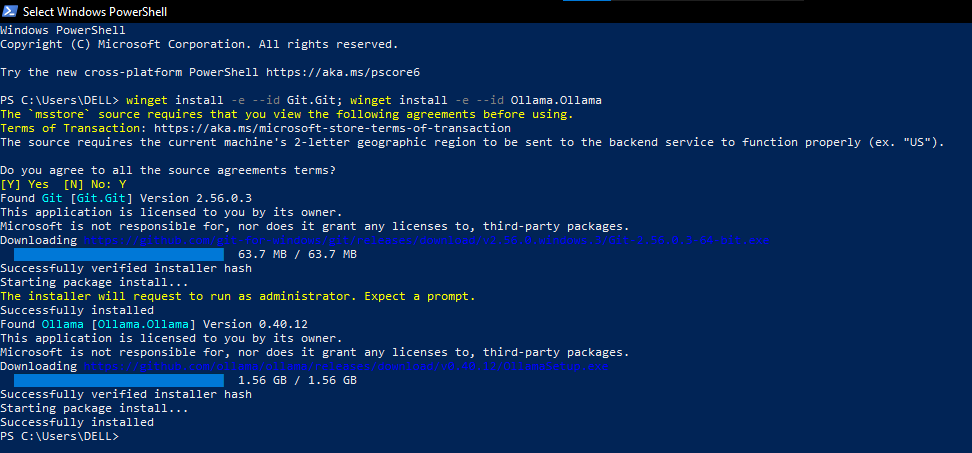
When the Ollama setup window appears, click “Continue”, then select “No thanks, I’ll use Ollama locally”. Ollama will minimize to your Windows system tray.
Next, install pnpm globally:
npm install -g pnpmStep 2: Resolving Common Windows Configuration Errors
Windows users routinely run into three specific environment errors that prevent Bolt.diy from running. Apply these three fixes before proceeding:
1. Fix the PowerShell Execution Policy Error
If running npm or pnpm produces this red error: File npm.ps1 cannot be loaded because running scripts is disabled on this system

Run this command in PowerShell to grant execution rights to your user account without requiring Administrator privileges:
Set-ExecutionPolicy RemoteSigned -
Scope CurrentUser -Force
2. Enable Ollama Cross-Origin Requests (CORS)
Because Bolt.diy runs in your browser via a local WebContainer, Windows security blocks requests to http://localhost:11434 unless CORS is explicitly permitted. Run:
[System.Environment]::SetEnvironmentVariable('OLLAMA_ORIGINS', '*', 'User')3. Resolving the PowerShell “QuickEdit” Console Freeze
WARNING
If you accidentally click your mouse inside the blue PowerShell console, Windows enters text-selection mode. The console title will change to Select Windows PowerShell, and Windows will completely freeze the Node.js server.
The Fix: Click inside the terminal and press the Esc key. The word Select will disappear, and the server will instantly resume.
Step 3: Downloading the 8GB-Friendly Model
Heavier models (such as 7B or 14B parameter models) consume 5GB–9GB of memory and will cause an 8GB Windows machine to freeze or crash.
For smooth local CPU execution, pull Alibaba’s specialized 1.5B coding model (~986 MB download):
ollama pull qwen2.5-coder:1.5bTo verify that Ollama is serving the model correctly, run:
curl
http://localhost:11434/api/tags
Step 4: Cloning Bolt.diy & Environment Setup
Clone the official repository:
git clone https://github.com/stackblitz-labs/bolt.diy.git
cd bolt.diy
Configuring the Required .env.local File
IMPORTANT
By default, Bolt.diy will hide Ollama from the model dropdown unless it detects a base URL configured in an environment file.
Create a file named .env.local in the root bolt.diy directory and add the following lines:
OLLAMA_API_BASE_URL=http://127.0.0.1:11434
DEFAULT_NUM_CTX=32768
Now install dependencies and start the development server:
pnpm install
pnpm run dev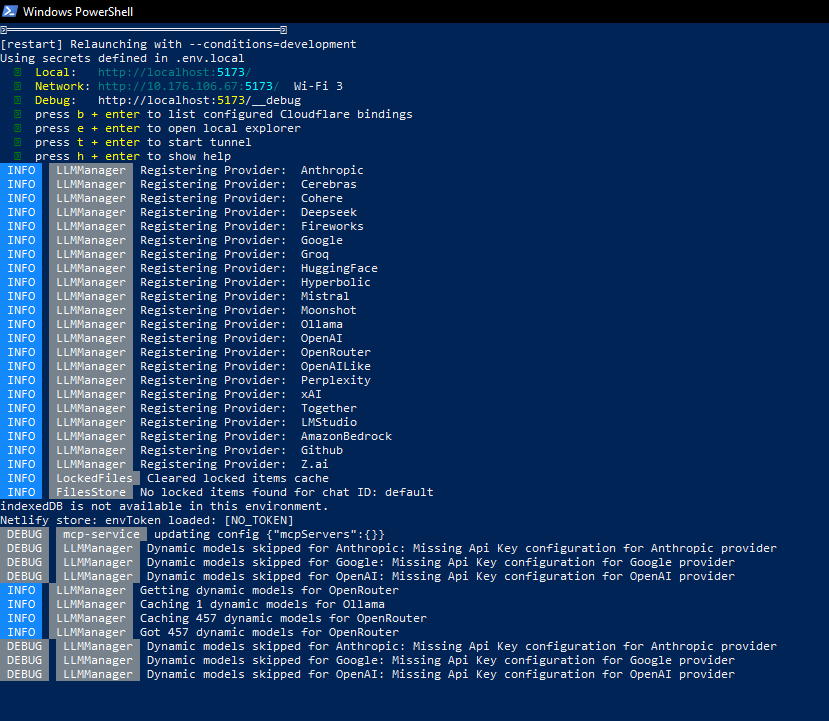
Step 5: Connecting the Engine & The 7m 42s Benchmark
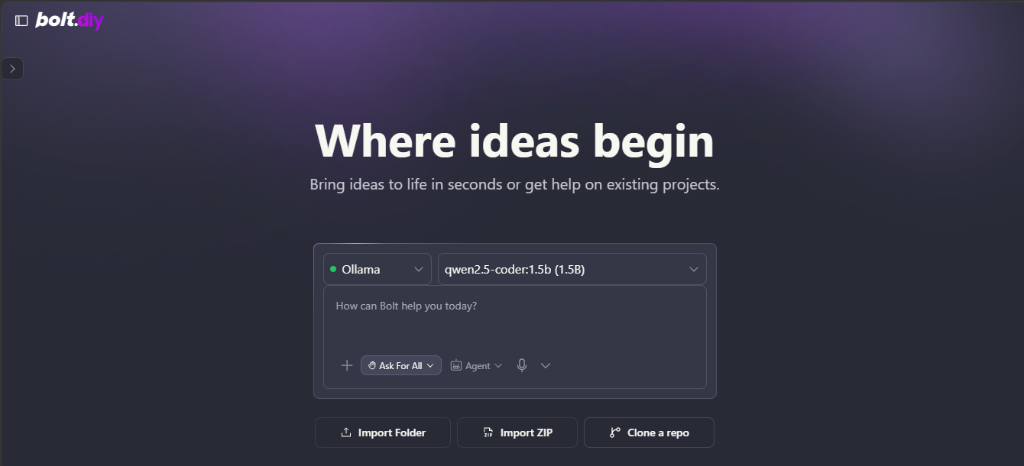
Open your browser and navigate to:
http://localhost:5173With .env.local loaded, click the provider dropdown. You will see a green status indicator: • Ollama, with qwen2.5-coder:1.5b (1.5B) selected as the default model:
The Benchmark Test
To benchmark real-world performance, we submitted a standard application prompt:
Create a clean and responsive Pomodoro Timer app with Start, Pause, and Reset buttons, a 25-minute countdown, and a simple task checklist using React and Tailwind CSS.The Workbench Scaffolding Phase
The local model immediately scaffolded the React template, configured package.json, and set up the directory tree:
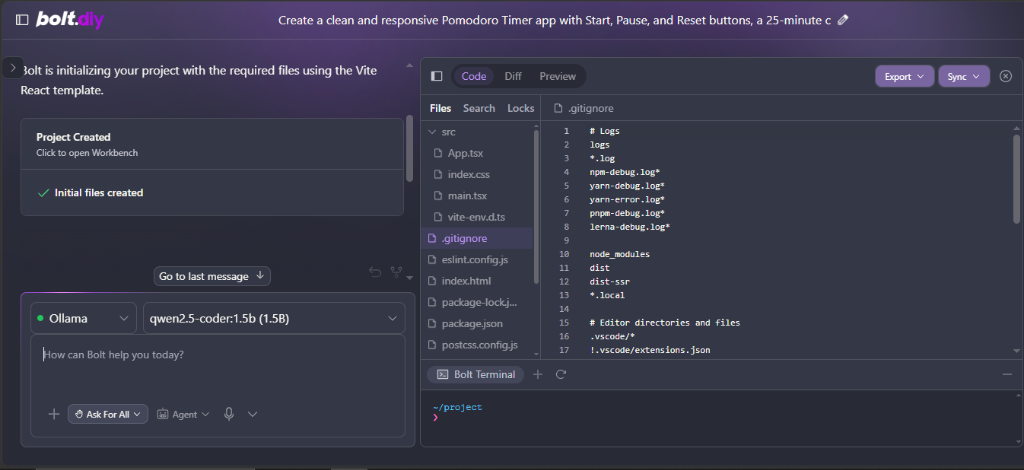
- Total Scaffolding Latency: 7 minutes 42 seconds (462s) on CPU.
- Context Consumption: 4,421 tokens processed (3,996 prompt tokens, 425 completion tokens).
- Financial Cost: $0.00 (Zero API fees; no subscription caps).
Step 6: Overcoming the 1.5B Model Limitation (“No Preview Available”)
When you switch to the Preview tab after the initial prompt, you may see a blank screen or the placeholder message: “Start prompting (or editing) to see magic happen”.
Why This Happens (Technical Explanation)
Sub-3B parameter models lack the instruction-following precision needed to parse Bolt’s custom XML action tags (<boltAction type="file">). Instead of injecting code into src/App.tsx, the 1.5B model emits raw JSON tool calls:
{"name":
"project_create_directory",
"arguments": {"path":
"./src/components"}}
The model creates the project structure, but leaves App.tsx with starter placeholder code.
The 10-Second Fix
- Click the
Codetab in Bolt.diy. - In the left file tree, click
src→App.tsx. - Replace the placeholder code with the complete React timer component:
import React, { useState, useEffect } from 'react';

export default function App() {
  const [seconds, setSeconds] = useState(1500);
  const [isActive, setIsActive] = useState(false);

  useEffect(() => {
    let interval: any = null;
    if (isActive && seconds > 0) {
      interval = setInterval(() => setSeconds((s) => s - 1), 1000);
    } else if (seconds === 0) {
      setIsActive(false);
      alert('Time is up!');
    }
    return () => clearInterval(interval);
  }, [isActive, seconds]);

  const formatTime = (sec: number) => {
    const mins = Math.floor(sec / 60);
    const remainingSecs = sec % 60;
    return `${mins.toString().padStart(2, '0')}:${remainingSecs.toString().padStart(2, '0')}`;
  };

  return (
    <div className="min-h-screen bg-slate-900 text-white flex flex-col items-center justify-center p-4">
      <div className="bg-slate-800 p-8 rounded-2xl shadow-xl text-center max-w-sm w-full border border-slate-700">
        <h1 className="text-2xl font-bold mb-4 text-purple-400">Pomodoro Timer</h1>
        <div className="text-6xl font-mono font-bold mb-8 tracking-wider">{formatTime(seconds)}</div>
        <div className="flex gap-4 justify-center">
          <button
            onClick={() => setIsActive(!isActive)}
            className={`px-6 py-2 rounded-lg font-semibold ${isActive ? 'bg-amber-500 hover:bg-amber-600' : 'bg-emerald-500 hover:bg-emerald-600'}`}
          >
            {isActive ? 'Pause' : 'Start'}
          </button>
          <button
            onClick={() => { setIsActive(false); setSeconds(1500); }}
            className="px-6 py-2 rounded-lg font-semibold bg-rose-500 hover:bg-rose-600"
          >
            Reset
          </button>
        </div>
      </div>
    </div>
  );
}- If the preview does not refresh automatically, click into the Bolt Terminal at the bottom and enter:
npm run dev- Click back to the
Previewtab. Hot Module Replacement (HMR) triggers immediately:
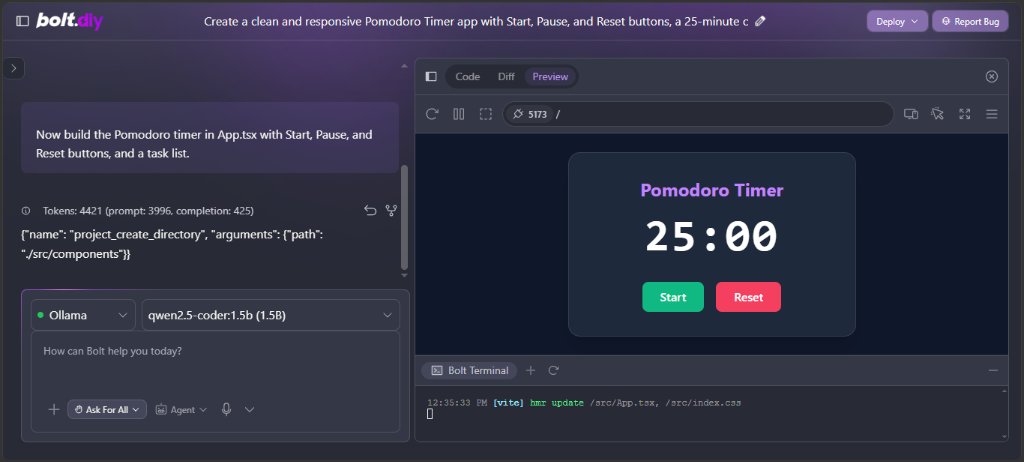
The application is fully interactive, running inside your browser’s local sandbox at zero cost.
For deeper browser terminal debugging, refer to our AI app builder debugging guide
Architectural Recommendation: The $0 Hybrid Setup
Running models locally via Ollama offers complete privacy and cost immunity. However, waiting 7+ minutes per generation on CPU hardware introduces friction during rapid prototyping.
The Recommended Workflow for Budget Hardware:
- Use Bolt.diy as Your Base: Keep
bolt.diyrunning locally to retain unrestricted code exports and bypass commercial token paywalls. - Plug in Free Cloud API Tiers: In Bolt.diy’s Settings, add a free API key from Google Gemini 2.0 Flash or Groq Cloud. Both providers offer generous free tiers that deliver sub-second generation speeds without straining your laptop CPU.
- Keep Ollama for Offline Development: Use your local
qwen2.5-coder:1.5bsetup whenever you are traveling or coding without internet access.
If you want to see how the official cloud platform performs against its main competitor, read our hands-on Lovable vs. Bolt.new benchmark
Frequently Asked Questions (FAQ)
Can I run Bolt.diy without a dedicated GPU on Windows?
Yes. You can run lightweight models like qwen2.5-coder:1.5b entirely on a CPU with 8GB of RAM. While project scaffolding takes around 7 minutes on entry-level hardware, it runs completely offline for $0. For instant generation without a GPU, you can also plug free cloud API keys (like Groq or Gemini Flash) directly into Bolt.diy.
Why doesn’t Ollama appear in the Bolt.diy provider dropdown?
Bolt.diy hides Ollama by default if it cannot detect an active endpoint URL. You must create a file named .env.local in your root bolt.diy directory containing OLLAMA_API_BASE_URL=http://127.0.0.1:11434, then restart your local server with pnpm run dev.
Is Bolt.diy completely free to use?
Yes. Bolt.diy is an open-source, self-hosted alternative to Bolt.new. When paired with local models via Ollama or free developer API keys, you pay $0 in subscription fees and have zero daily token limits.
Why does the preview window show “No preview available”?
Lightweight models (under 3B parameters) sometimes struggle to trigger Bolt’s automated XML code-injection tags. If the preview is blank, simply open the Code tab, paste your component logic into src/App.tsx, and run npm run dev inside the embedded Bolt Terminal.
What is the best Ollama model for Bolt.diy?
For 8GB RAM / No GPU: qwen2.5-coder:1.5b (safely runs on CPU without freezing Windows).
For 16GB RAM / Dedicated GPU: qwen2.5-coder:7b or deepseek-r1:8b (delivers full automated code injection and faster generation).