
Quick Verdict: Which One Should You Choose?
If you are deciding between Lovable and Bolt.new in 2026, here is the direct, unfiltered reality from our hands-on benchmark:
- Choose Bolt.new if you want speed, developer freedom, and a genuinely usable free tier. Bolt built our application in 8 minutes and 45 seconds, consumed 196,000 tokens (well inside its 300,000 daily free limit), and generated a featherlight, 4-dependency React/Vite single-page app that compiles to just 185 KB of JavaScript. It completed the entire build in a single day for $0.
- Choose Lovable if you want a premium, design-led UI out of the box and plan to pay for a subscription. Lovable produced a stunning, Linear-style dark theme with superior typography, character counters, and polished component styling. However, it was slower (12 minutes and 21 seconds), triggered an internal design-system retry, and burned 7.8 credits across two prompts. Because Lovable limits free users to 5 credits per day, our build hit a hard stop and required two separate days to complete without paying.
The Master Benchmark Tally
| Benchmark Metric | Lovable.dev | Bolt.new | Winner |
|---|---|---|---|
| Prompt 1 Scaffolding Time | 8 min 38 sec | 5 min 32 sec | 🟢 Bolt.new (-3m 06s) |
| Prompt 2 Full-Stack Time | 3 min 43 sec | 3 min 13 sec | 🟢 Bolt.new (-30s) |
| Total Build Time | 12 min 21 sec | 8 min 45 sec | 🟢 Bolt.new (30% faster) |
| Prompt 1 Resource Cost | 3.0 credits | 101,000 tokens | 🟢 Bolt.new (33% of daily cap) |
| Prompt 2 Resource Cost | 4.8 credits | 95,000 tokens | 🟢 Bolt.new (31% of daily cap) |
| Total Resource Burn | 7.8 credits | 196,000 tokens | 🏆 Bolt.new |
| Free-Tier 1-Day Completion | 🔴 FAILED (Required 2 days) | 🟢 PASSED (104k tokens left) | 🏆 Bolt.new |
| Visual Design & Polish | 9.8 / 10 (Linear dark-zinc) | 9.0 / 10 (Vibrant orange/amber) | 🏆 Lovable |
| Local Eject Compilation | 🟢 0 Errors (npm run build) | 🟢 0 Errors (npm run build) | 🤝 Tie (Both pass cleanly) |
| Exported Architecture | TanStack Start + Nitro SSR | Pure Vite + React SPA | Depends on use case |
| Total Dependencies | 🔴 52 packages (419 installed) | 🟢 4 packages (288 installed) | 🟢 Bolt.new (13x leaner) |
| Production Client Bundle | 🔴 565 KB JS (179 KB gzip) | 🟢 185 KB JS (57 KB gzip) | 🟢 Bolt.new (3x lighter) |
Why We Ran This Benchmark
“Vibe coding”—describing software in plain English and letting an AI agent generate, wire, and deploy a full-stack application—has become the dominant workflow trend of 2026. At the center of this movement are two breakout platforms: Lovable.dev and StackBlitz’s Bolt.new.
If you search Google or YouTube for comparisons between the two, you will find dozens of agency landing pages and superficial listicles repeating the same marketing talking points:
- “Lovable is for non-technical designers.”
- “Bolt.new is for hardcore developers.”
- “Both start at around $25/month.”
None of those reviews answer the questions that real founders, creators, and engineers are agonizing over on developer forums:
- Can you actually build a working full-stack app on the free plan, or will you hit a paywall at prompt #2?
- What is the real token and credit cost to build an MVP?
- What happens when the code breaks? Does the AI enter an infinite error loop that burns your monthly allowance?
- If you export the code to GitHub and run
npm run buildon your own laptop, does it actually compile—or is it tangled, unmaintainable spaghetti?
Following our empirical benchmarks on testing AI agents on 6 real-world tasks and our AI PDF to Excel accuracy test, we applied our systematic testing framework (detailed in our guide on how to test AI agents) to autonomous web app builders. We didn’t build a generic landing page. We used both platforms’ free tiers to build the exact same full-stack SaaS micro-application from the exact same starting prompts, measured every second and token, and pulled the code down to our terminal to inspect the raw architecture.
The Free-Tier Reality Check: Can You Build an App for $0?
Before looking at the user interfaces, you need to understand the economics of how both platforms charge for AI compute. This is where marketing claims crash into reality.
The Lovable Credit Trap: Why 5 Credits/Day Isn’t 5 Prompts
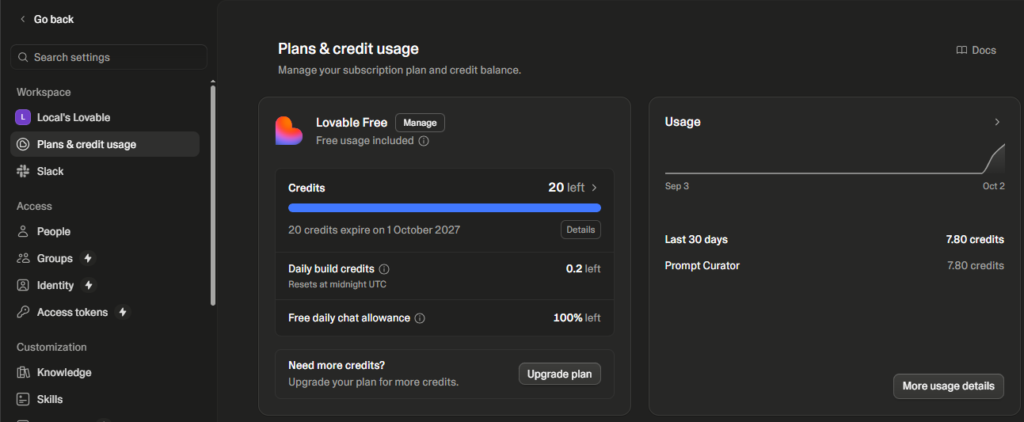
Lovable advertises 5 free build credits per day. A beginner naturally assumes this means they can send five prompts per day.
Our test revealed that is fundamentally untrue:
- When you submit a complex prompt involving multiple components, routes, or design systems, Lovable’s pricing engine dynamically calculates compute weight.
- On Prompt 1 (scaffolding our app), Lovable deducted 3.0 credits.
- On Prompt 2 (adding authentication, persistence, and modals), Lovable deducted 4.8 credits.
Total cost: 7.8 credits.
Because Lovable caps free users at 5 credits in a 24-hour rolling window, our build was stopped dead after Prompt 1. We had to wait until our daily credits reset the following day to submit Prompt 2.
The Lesson: On Lovable’s free tier, a real full-stack prompt consumes between 3 and 5 credits. In practice, Lovable’s free plan is a “one-major-prompt-per-day” plan. If you want to iterate quickly in a single afternoon, you are forced to upgrade to the $25/month Pro plan.
Bolt.new’s Token Model: The “Context-Sync Tax”
Bolt.new uses a raw token consumption model. Free users receive 300,000 tokens per day (capped at 1 million tokens per month).
- On Prompt 1, Bolt consumed 101,000 tokens (~33.6% of our daily allowance).
- On Prompt 2, Bolt consumed 95,000 tokens (~31.6% of our daily allowance).
Total cost: 196,000 tokens.
Bolt completed our entire application in a single sitting with 104,000 tokens to spare.
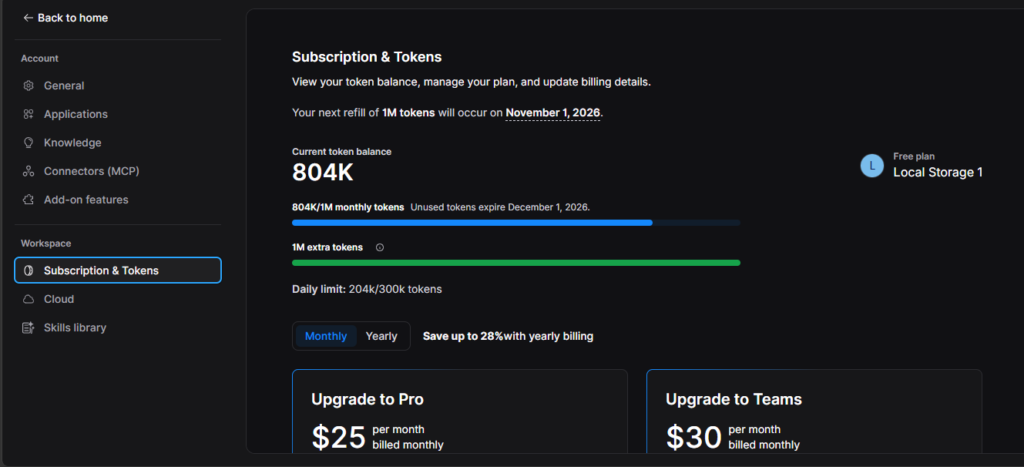
However, Bolt’s model has its own hidden catch: the Context-Sync Tax. Because Bolt runs a full WebContainer in your browser, every subsequent prompt sends your project’s growing file tree back into the LLM context. While Prompt 2 was small, it still burned 95K tokens. As your project scales to 30+ files, even a one-line button color change can consume 150K+ tokens per message.
The Experiment: What We Built
To make the benchmark fair and rigorous, we designed a micro-SaaS called PromptVault—a curated management dashboard for organizing, filtering, and copying high-performing AI prompts.
The PromptVault Feature Specification
To test real-world full-stack capabilities, the application was required to implement four distinct architectural zones:
- Header Controls: Application branding, real-time search bar with keyboard shortcut badge (
⌘K), “+ Add Prompt” modal trigger, and dynamic user authentication status. - Navigation Sidebar: Category filtering tabs (All Prompts, Marketing & Copy, Coding & Dev, Data & Research, Productivity), plus a dedicated Favorites pinned filter.
- Responsive Card Grid: 3-column desktop / 1-column mobile layout populated with 6 production-grade sample prompts with model badges (DeepSeek-R1, Claude 3.5 Sonnet, GPT-4o, Gemini 2.0 Flash), character counters, and copy buttons.
- Full-Stack State Layer: Form modal validation, real-time search filtering, empty-state recovery, and persistent browser storage.
Round 1: Scaffolding & Initial UI (Prompt 1)
We submitted the exact same prompt to both platforms. To ensure the generated library felt realistic and production-grade, we required the sample cards to feature the frontier models analyzed in our best AI assistants 2026 guide (including Claude 3.5 Sonnet, GPT-4o, Gemini 2.0 Flash, and DeepSeek-R1) rather than generic “Lorem ipsum” filler:
Build a modern, sleek web application called PromptVault — a curated library for managing, organizing, and copying high-performing AI prompts.
Key Requirements:
- Layout & Theme: Premium dark-themed dashboard using Tailwind CSS and Lucide icons (similar to Linear or Raycast). Dark charcoal/zinc background (#09090b or #18181b), subtle borders (#27272a), high-contrast typography, and smooth transitions. Fully responsive (desktop sidebar + mobile collapsible hamburger menu).
- Navigation Sidebar:
- App logo (“PromptVault”) with an AI spark/flame icon.
- Category filter list with icons: “All Prompts”, “Marketing & Copy”, “Coding & Dev”, “Data & Research”, and “Productivity”.
- A pinned “Favorites” tab with a star/heart icon.
- Top Header:
- Prominent search input bar with search icon and keyboard shortcut badge (⌘K / Ctrl+K).
- A primary “+ Add Prompt” button with a plus icon.
- A “Sign In” button in the top right.
- Main Grid:
- A responsive grid of prompt cards (3 columns on desktop, 1 on mobile).
- Pre-populate with 6 realistic, production-grade sample prompts across categories (e.g. DeepSeek-R1, Claude 3.5 Sonnet, GPT-4o, Gemini 2.0 Flash).
- Each card must display: Title, Category pill, Target Model badge, an expandable excerpt of prompt text, favorite heart icon, and “Copy Prompt” button with clipboard icon.
Bolt.new’s Execution: Fast, Functional, but Text Bugged
Bolt.new took 5 minutes and 32 seconds and burned 101,000 tokens.
It spun up a WebContainer, installed Vite, React, and Tailwind, and rendered a live preview with a striking dark-orange/amber theme.
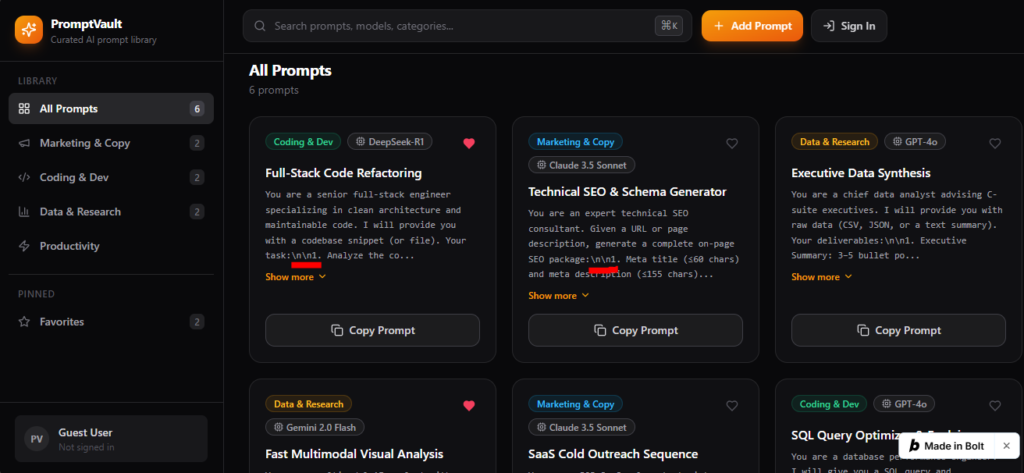
What Bolt Did Well:
- Anticipated State: To our surprise, Bolt didn’t just build a static mockup. The search bar, category filtering, “Show more” accordion, and favorite heart counters were already functional in the preview.
- Proactive Auth Thinking: In the bottom-left sidebar, Bolt automatically added a
"Guest User - Not signed in"avatar box, setting up the user session interface early. - Instant Persistence: Bolt automatically wired
localStorageinto its prompt array. Newly added cards stayed in memory even if we refreshed the browser!
The Flaw: The \n\n Escape Bug
Looking closely at Card 1 and Card 2, Bolt failed to parse multiline string escape characters in its sample prompts:
with a codebase snippet (or file). Your task:\n\n1. Analyze the co...
SEO package:\n\n1. Meta title (≤60 chars) and meta description (≤155 chars)...
Instead of rendering clean line breaks, it printed raw \n\n1. directly onto the card UI.
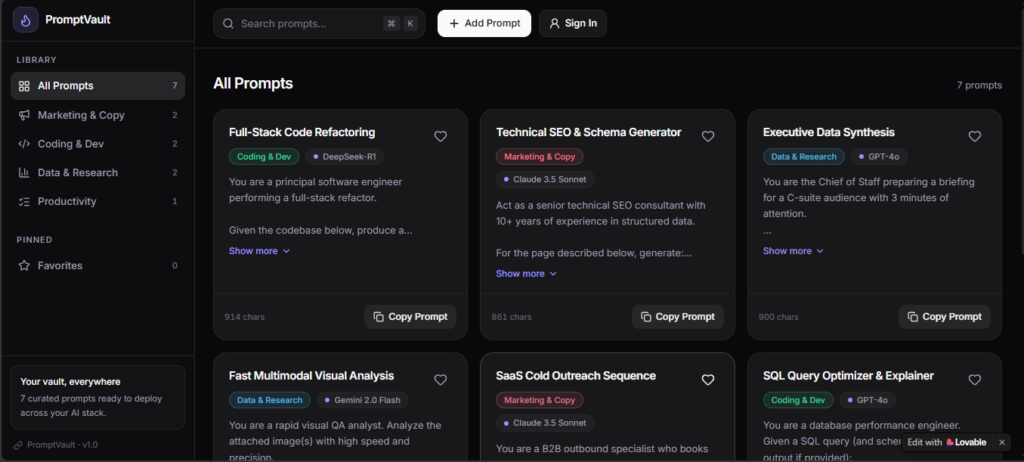
Lovable’s Execution: Slower, Self-Healing, and Visually Superior
Lovable took 8 minutes and 38 seconds and burned 3.0 credits.
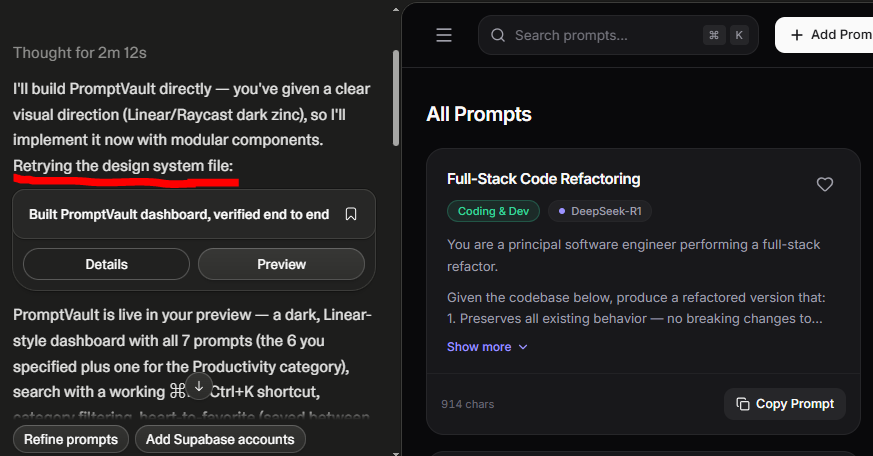
During the build, Lovable paused and printed:
Retrying the design system file:
This was our first look at Lovable’s agentic self-healing in action. Lovable hit a syntax conflict while generating its Tailwind/shadcn configuration, automatically caught the error, regenerated the configuration, and proceeded to compile without requiring manual intervention. While this self-correction saved us from debugging, it added 3 minutes to the generation time and increased credit consumption.
What Lovable Did Well:
- Unmatched Aesthetic Polish: Lovable executed the Linear/Raycast design direction flawlessly. It used true zinc background tones (
#09090b), elegant border contrast (#27272a), and color-coded category pills. - Smart Micro-Metadata: Lovable automatically calculated and displayed character counts (
914 chars,861 chars) on every prompt card, formatted clean multiline text without escape bugs, and generated 7 realistic prompts. - Footer Utility: It included an extra promotional/version card in the sidebar (
PromptVault v1.0).
The Flaw: Volatile State
Unlike Bolt, Lovable did not implement persistent storage on Prompt 1. Adding a prompt or toggling a favorite worked in temporary React state, but refreshing the page wiped everything out.
Round 2: Authentication, Persistence & Polish (Prompt 2)
For Prompt 2, we submitted an identical instruction to both platforms to add authentication modals, local storage persistence, toast notifications, and empty-state recovery:
Let’s complete PromptVault with full-stack authentication, data persistence, and UI polish:
- Authentication & User Profile:
- Clicking “Sign In” in the header must open an accessible modal dialog with tabs for “Sign In” and “Create Account”.
- Include inputs for Email, Password, submit button, and a “Continue with Google” button.
- On submitting, simulate successful login: close modal, update header button to a user avatar circle displaying user initials or email, and include a dropdown menu with “Sign Out”.
- Maintain user session across page reloads.
- Reliable Persistence:
- Ensure all prompts (including user-created ones), favorite states, and active user sessions are stored reliably in browser localStorage so nothing is lost upon page refresh.
- Provide clean TypeScript interfaces ready for direct Supabase database mapping.
- UI Polish & Feedback:
- When copying a prompt, display a floating toast notification (e.g., “Copied to clipboard!”) alongside button feedback.
- When a search or filter produces no matching cards, include a “Clear Filters” button in the empty-state view that resets the query and restores all cards.
- Ensure all card text and multiline excerpts render with clean typography, proper line breaks, and comfortable paragraph spacing.
The Prompt 2 Scorecard
| Metric | Lovable (Prompt 2) | Bolt.new (Prompt 2) | Winner |
|---|---|---|---|
| Generation Time | 3 min 43 sec | 3 min 13 sec | Bolt.new |
| Resource Cost | 4.8 credits | 95,000 tokens | Bolt.new |
| Auth Modal Execution | Clean modal, updates header to FA avatar | Clean modal, updates header DD & sidebar | Tie |
| Text Escape Bug Fix | Clean from start | Fixed \n\n into clean numbered list | Bolt.new (Self-healed) |
| Toast Notification UX | Bottom-right toast, clean checkmark | Bottom-right toast, partially obscured | Lovable |
| Data Persistence on Refresh | Fully working via localStorage | Fully working via localStorage | Tie |
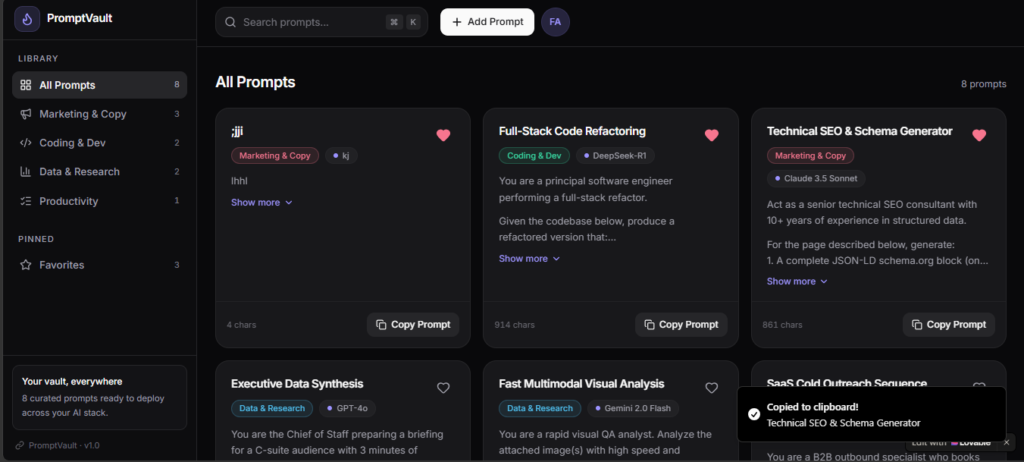
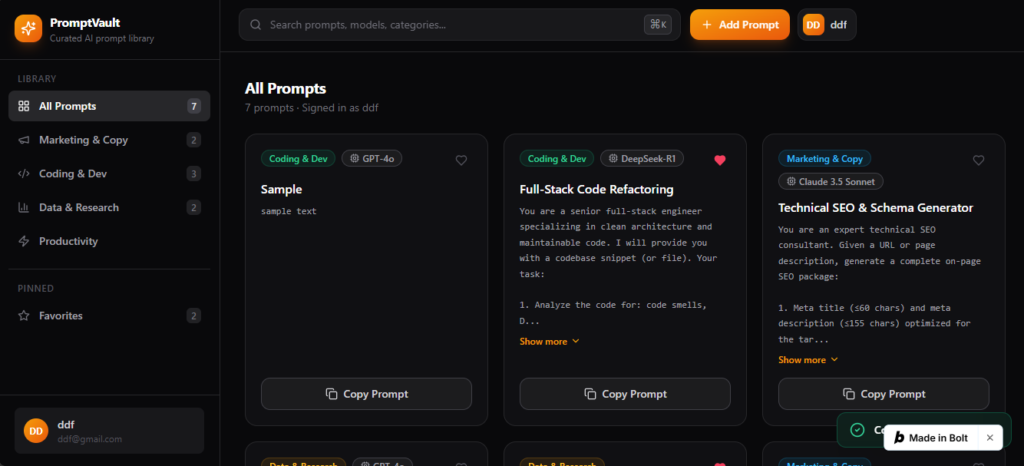
Key Observations from Round 2:
- Bolt Fixed Its Bug Naturally: Without receiving a targeted hint about the
\n\nissue, Bolt correctly interpreted our neutral instruction (“render with clean typography and proper line breaks”) and converted the raw text into a clean numbered list (1. Analyze the code for: code smells...). - Auth Synchronization: Lovable updated the top header button to a user avatar circle (
FA). Bolt went a step further: it updated the top header avatar and synchronized the bottom-left sidebar user profile card to"ddf@gmail.com". - The Floating Badge Collision: Bolt.new includes a persistent, floating
"Made in Bolt"badge in the bottom-right corner of free-tier previews. When Bolt triggered its floating toast notification ("Copied to clipboard!"), the notification rendered directly underneath the badge, partially obscuring the message. Lovable’s toast rendered cleanly.
Round 3: The “Local Eject” Audit (The Ultimate Test)
This is the phase where most AI code generators fail. Many tools produce applications that look functional inside an embedded browser sandbox, but the moment you export the code to GitHub and clone it to a developer machine, the project fails to compile due to missing dependencies, broken paths, or proprietary lock-in.
We synced both completed projects to public GitHub repositories:
- Lovable Repository:
localstorage11111-cyber/prompt-curator - Bolt.new Repository:
localstorage11111-cyber/bolt_promptvault
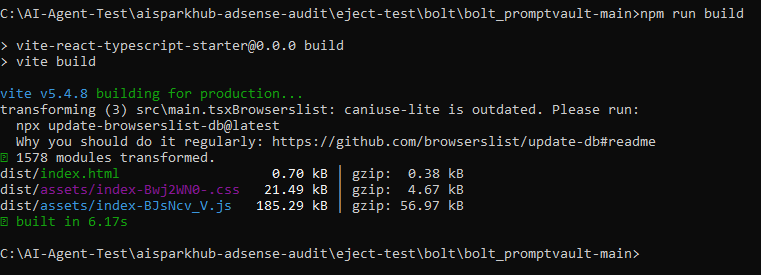
We cloned both repositories locally and ran npm install followed by npm run build in a clean terminal.
| Evaluation Metric | Lovable.dev | Bolt.new | Winner |
|---|---|---|---|
| Local Compilation Status | Clean (Exit Code 0) | Clean (Exit Code 0) | Tie (Both build cleanly) |
| Build Duration | 7.90s client + 1.93s server | 6.17s total | Bolt.new (Faster) |
| Production Bundle (JS) | 565.24 KB (179 KB gzip) | 185.29 KB (57 KB gzip) | Bolt.new (3x lighter) |
| Production Bundle (CSS) | 82.09 KB | 21.49 KB | Bolt.new (4x lighter) |
| Direct Dependencies | 52 packages | 4 packages | Bolt.new (13x fewer deps) |
| Total Packages Installed | 419 packages (4 min install) | 288 packages (1 min install) | Bolt.new |
| Total Source Files | 72 files | 27 files | Bolt.new (Leaner code) |
| Architectural Model | TanStack Start + Nitro SSR | Pure Vite + React SPA | Depends on requirements |
| Deployment Target | Cloudflare Workers / Nitro | Any static or SPA host (Vercel) | Depends on requirements |
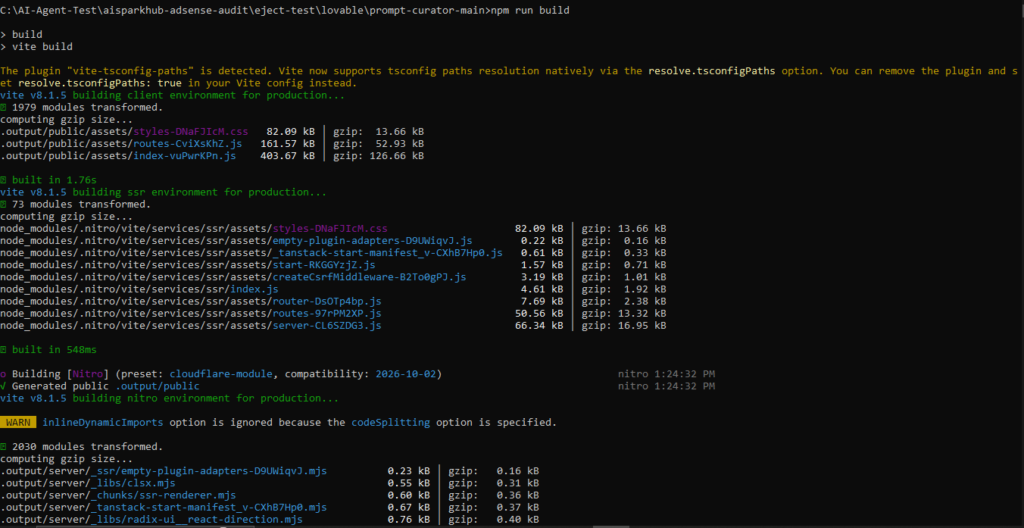
Architectural Analysis: Minimalist SPA vs. Enterprise SSR
The contrast in code architecture was staggering:
1. Bolt.new: The Solo Developer’s Dream
Bolt generated a pure, unbloated Vite + React Single-Page Application (SPA).
- Only 4 Runtime Dependencies:
@supabase/supabase-js,lucide-react,react, andreact-dom. - Zero Component Bloat: Instead of importing massive component libraries, Bolt authored clean, modular React components from scratch (
Sidebar.tsx,PromptCard.tsx,AuthModal.tsx,storage.ts). - Featherlight Bundle: The entire compiled production application is just 185 KB of JavaScript. It takes 1 minute to install and 6 seconds to build. Any developer can open this in VS Code or Cursor and immediately understand the entire codebase.
2. Lovable: The Enterprise Monolith
Lovable did not generate a simple React app. It scaffolded an enterprise-grade Server-Side Rendered (SSR) full-stack application powered by TanStack Start, TanStack Router, and Nitro, pre-configured for deployment to Cloudflare Workers (wrangler.json).
- 52 Runtime Dependencies: Includes 25
@radix-uiprimitives,@tanstack/react-query,@tanstack/react-router,@tanstack/react-start,zod,react-hook-form,sonner, andrecharts. - The Entire shadcn Suite: Lovable dumped over 40 UI components into
src/components/ui/—including complex components our app never asked for, such aschart.tsx(332 lines),carousel.tsx(241 lines),calendar.tsx(178 lines), andmenubar.tsx(229 lines). - 3x Heavier: The production client bundle is 565 KB (3x larger than Bolt’s), and
npm installrequires 4 minutes to pull 419 packages.
Verdict: If you want an enterprise SSR foundation with routing, server-side data fetching, and an exhaustive design system ready to deploy to Cloudflare edge networks, Lovable’s architecture is extraordinary. But if you want a clean, lightweight React MVP that you can easily maintain and host anywhere, Bolt’s code is significantly leaner and easier to understand.
The Definitive Decision Matrix
| Choose Lovable If… | Choose Bolt.new If… |
|---|---|
| You are a non-technical founder who prioritizes design polish. | You are a developer or solo builder who understands code. |
| You want an out-of-the-box Linear or Raycast dark-theme aesthetic. | You want to build a complete MVP in a single day on the free tier. |
| You have a paid subscription ($25) and aren’t limited by 5 credits. | You prefer a fast, browser-based IDE with terminal access. |
| You plan to use Supabase as your managed database and backend. | You want a lean, 4-dependency codebase without framework bloat. |
| You want an enterprise TanStack Start SSR foundation for Cloudflare. | You plan to eject the code to VS Code or Cursor early. |
When Should You Eject to an IDE (Cursor / VS Code)?
Neither Lovable nor Bolt.new should be used as a permanent replacement for a traditional development environment. Based on our testing, here is the exact threshold where you should eject from browser vibe-coding into Cursor or VS Code:
- When your project exceeds 20 files: On Bolt, the Context-Sync Tax will begin draining 150k+ tokens per prompt. On Lovable, credits will burn at unsustainable rates for minor revisions.
- When implementing complex multi-table database joins or custom webhooks: AI browser builders excel at scaffolding CRUD, but struggle with complex transactional backend logic.
- When you need strict bundle optimization: Once your prototype is validated, take Bolt’s 185 KB clean SPA or prune Lovable’s 40 unused shadcn components in a local editor.
Frequently Asked Questions
Can you build a full-stack SaaS with Lovable or Bolt.new for free?
You can build a functional client-side prototype or micro-SaaS with local persistence for free. However, on Bolt.new, you can complete a working MVP in a single day within the 300,000 daily token allowance. On Lovable, building a complete two-prompt application consumed 7.8 credits, exceeding the 5-credit daily limit and requiring two separate days of allowance. Connecting live production databases and custom domains requires third-party accounts (e.g., Supabase) or paid plans on both platforms.
Is Bolt.new cheaper than Lovable?
On the free tier, Bolt.new provides substantially more daily computing runway. Bolt offers 300,000 tokens per day, which comfortably handled our two-prompt full-stack build with 104,000 tokens remaining. Lovable’s 5 daily credits were exhausted before our second prompt could finish on day one. On paid Pro tiers, both start at $25/month, but Lovable bundles managed cloud hosting into its credits, whereas Bolt operates strictly on LLM token consumption.
Do I own the code generated by Lovable and Bolt.new?
Yes. Both platforms provide two-way GitHub integration that allows you to export your entire repository. Once exported, the code is standard React/TypeScript licensed under open-source standards, and you can host, modify, or commercialize it without platform lock-in.
Does the exported code run locally without errors?
Yes. In our local eject test, both repositories compiled with zero errors when running npm run build. Bolt compiled in 6.17 seconds into a 185 KB client bundle. Lovable compiled in 9.8 seconds into a 565 KB full-stack Nitro/TanStack Start bundle.
Final Takeaway & Recommended Workflow
AI web app builders have evolved from simple landing-page generators into formidable software scaffolding engines. Both tools successfully took a high-level prompt and returned a working, responsive application with authentication modals, search filtering, and local persistence.
If you are starting a new project today, our recommended workflow is:
- Use Bolt.new for rapid day-one prototyping: Take advantage of its generous 300,000 daily token allowance to scaffold your application, test your product concept, and build your interactive logic in a single session without hitting credit walls.
- Use Lovable if design is your primary differentiator: If your product requires a polished, high-fidelity design system that looks like a tier-1 venture-backed SaaS out of the box, Lovable’s styling is worth the paid subscription.
- Eject to GitHub early: The moment your core UI and state are validated, sync your project to GitHub, clone it locally, and transition to a tool like Cursor or VS Code to build production features without paying the recurring browser token tax.
Tested on October 1–2, 2026 using Lovable.dev and Bolt.new free tiers. Codebases archived at localstorage11111-cyber/prompt-curator and localstorage11111-cyber/bolt_promptvault.