
━━━━━━━━━━━━━━━━━━━━━━━━━━━━━━
Last updated: August 28, 2026
This guide was reviewed and updated to reflect current tool features, pricing, free-plan limits, and our hands-on testing. Some details may change as these services update their plans and features.
━━━━━━━━━━━━━━━━━━━━━━━━━━━━━━
Introduction
Affiliate marketing sounds simple on paper: recommend a product, send people to it through your affiliate link, and earn a commission when someone makes a qualifying purchase. In practice, there’s a lot more involved. You need to find topics people actually care about, research products and competitors, create useful content, produce visuals, promote what you publish, build an audience, and track whether any of it is working. Doing all of that manually can become a lot of repetitive work—especially if you’re running a website on your own.
That’s where AI can help. But after experimenting with different AI tools, I’ve found that the goal shouldn’t be to automate affiliate marketing completely. AI is much more useful when you give it specific jobs: researching a topic, organizing information, helping with a first draft, creating a visual, repurposing content, or handling repetitive workflow tasks.
And you don’t necessarily need a huge stack of paid subscriptions to get started.
In this guide, I’ll walk through the AI tools I’d actually use or consider using across an affiliate marketing workflow—from research and content creation to promotion, email, automation, and measurement. I’ll also point out where these tools fall short, what I’d keep under human control, and when a free tier is enough to get started. The goal isn’t to find the tool with the most features. It’s to build a workflow where each tool solves a real problem without making the process more complicated than it needs to be.
What an AI-Assisted Affiliate Marketing Workflow Actually Looks Like
Affiliate marketing can look complicated when you view it as a list of separate tasks: finding products, researching topics, writing content, creating visuals, promoting it, building an email list, and tracking results.
I find it easier to think of it as a loop:
Research → Create → Publish → Promote → Capture → Measure → Improve
AI can help at almost every stage, but that doesn’t mean you need a separate AI tool for every step. In fact, adding too many tools can make the workflow harder to manage.
A better approach is to identify the task that is slowing you down and choose a tool that solves that specific problem.
Here’s how I would break the workflow down:
🔎 Research
Find useful topics, products, competitors, questions people are asking, and reliable sources before creating content.
✍️ Create
Turn your research into useful reviews, comparisons, tutorials, emails, or social content—with human editing and fact-checking.
🌐 Publish
Get the content onto your website or other platforms in a format that’s genuinely useful to the audience.
📣 Promote
Repurpose existing content into social posts, graphics, short videos, newsletters, or other distribution formats.
📧 Capture
Give interested visitors a reason to join your email list so your relationship with them doesn’t end after one visit.
📊 Measure
Look at impressions, clicks, traffic sources, engagement, and eventually affiliate conversions to understand what’s working.
🔄 Improve
Use what you learn from the data to update old content, test new topics, improve calls to action, and decide where your time is actually worth spending.
The important part is that AI doesn’t need to run this entire loop for you. It is more useful as a collection of assistants that speed up specific parts of the process while you remain responsible for the decisions.
That’s also the approach I prefer for AI-assisted affiliate marketing. Current affiliate-tool guides tend to focus heavily on producing content faster or scaling automation, but a useful workflow also needs research, distribution, measurement, and human review.
The goal isn’t to automate affiliate marketing. It’s to remove repetitive work so you can spend more time on the parts that actually require judgment.
That idea will guide the rest of this guide.
Research: Find Topics, Products & Evidence
Before creating an affiliate article, you need to know what you’re actually going to recommend and why someone would care about it.
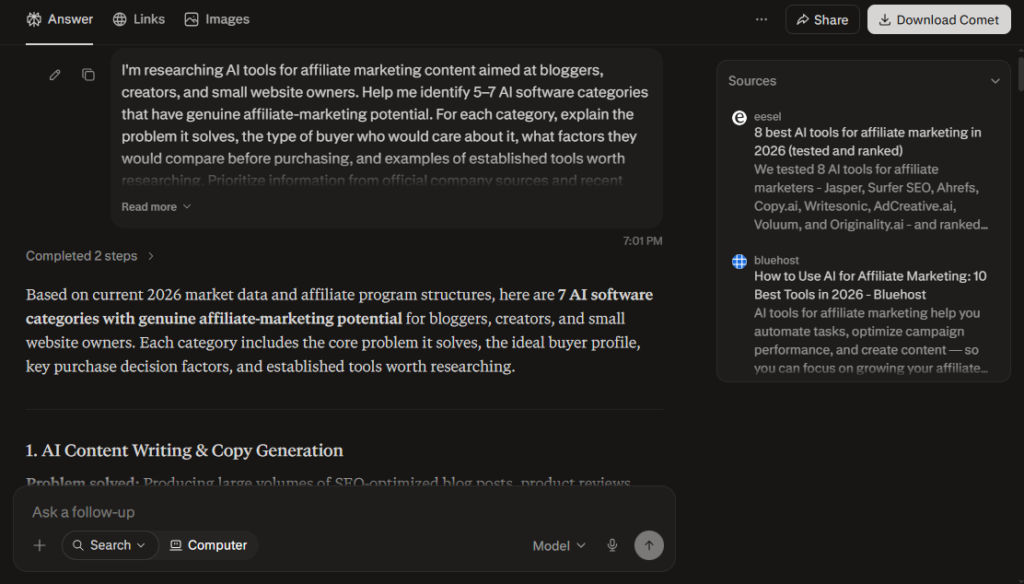
This is where I find Perplexity particularly useful.
Instead of opening ten tabs and manually piecing together information, I can use Perplexity to explore a topic, compare products, find recent developments, and locate sources worth checking. Its answers are backed by citations and links to the original sources, while its Research mode can go much deeper by searching across multiple sources and synthesizing the findings into a report.
But I wouldn’t use it simply to ask:
“What’s the best affiliate product to promote?”
That’s too broad. I’d use it to build the research behind the recommendation.
A workflow I’d actually use
Suppose I wanted to create an affiliate article about AI writing tools.
I’d start with something like:
I’m researching AI writing tools for bloggers and small content websites. Identify the main problems these users are trying to solve, the types of tools available, and the factors they should compare before choosing one. Prioritize recent information and cite your sources.
Then I’d narrow the research:
Now identify 5–7 AI writing tools that are relevant to this audience. For each one, compare its main use case, pricing, free access, key limitations, and target user. Use official sources wherever possible and clearly flag anything that needs further verification.
And finally, I’d ask:
Which claims from this research should I verify directly on the companies’ official websites before publishing an affiliate article?
That last step matters.
Perplexity can make research considerably faster, but I wouldn’t treat its summary as the final source of truth. Perplexity itself recommends checking the linked sources, and its current search system provides direct citations so you can trace claims back to their origins.
Where Perplexity fits in affiliate marketing
I would mainly use it for:
- Niche research — understanding a market before creating content
- Product research — identifying products worth investigating
- Competitor research — finding what other websites are covering
- Buyer questions — discovering problems and comparison factors
- Source gathering — finding primary and secondary sources
- Fact-checking — identifying claims that need verification
- Content planning — turning research into potential article angles
And there’s an important distinction here:
Researching a product isn’t the same as recommending it.
If I’m going to put an affiliate link next to a product, I want to know more than whether an AI search tool says it’s popular. I’d want to check the company’s own documentation, pricing, terms, important limitations, and—where possible—actually use the product myself. That keeps the affiliate recommendation grounded in something more useful than a generated list.
My take
Perplexity is most valuable to me before the writing starts. It can shorten the research process and help me discover information I might otherwise spend hours collecting manually. But I treat it as a research assistant, not a replacement for verification. For important claims—especially pricing, affiliate terms, product capabilities, and anything that could affect a buying decision—I still open the original source and check it myself.
That’s the first stage of the workflow: research enough to know what you’re recommending before you start trying to sell it.
Content: Turn Research Into Useful Affiliate Content
Once the research is done, the next challenge is turning it into something people actually want to read. This is where I would use ChatGPT and Claude, but not as a “write me an affiliate article” button.
The better workflow is:
Research notes → angle → outline → draft → fact-check → human editing → publish
ChatGPT: Build the content around the reader’s problem
I find ChatGPT particularly useful for taking scattered research and turning it into a workable content plan.
For example, if I’ve researched several AI writing tools, I could give ChatGPT my notes and ask it to:
Based on this research, help me plan an affiliate article for bloggers choosing an AI writing tool. Identify the main decision factors, organize them into a useful comparison structure, and suggest what a beginner would need to know before choosing a tool. Don’t invent product claims that aren’t supported by my research.
That gives me a starting structure rather than a generic article.
From there, I can use it for things like:
- creating article outlines
- finding gaps in my research
- developing comparison criteria
- brainstorming headlines and angles
- turning one article into social or email content
- reviewing whether the article actually answers the reader’s question
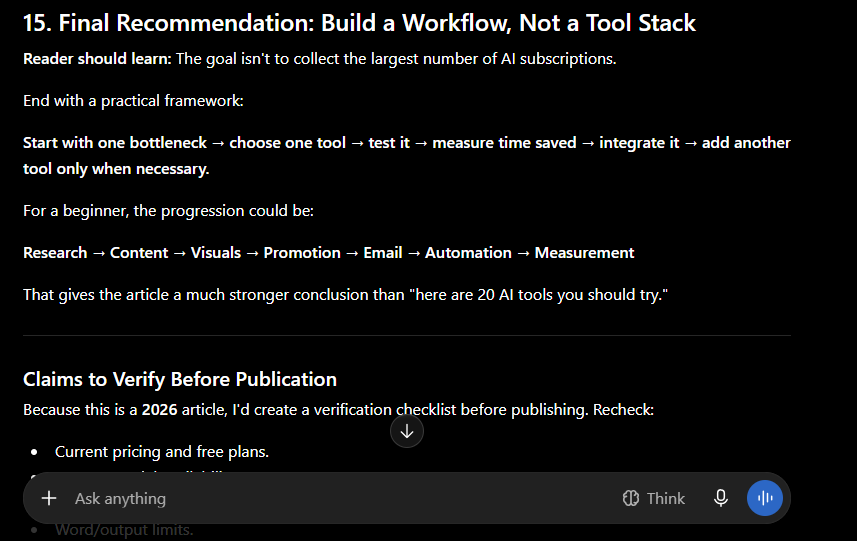
OpenAI’s current marketing guidance similarly positions ChatGPT around campaign briefs, content calendars, audience insights, copy variations, data analysis, and adapting content across channels.
But there’s an important distinction:
I don’t want ChatGPT deciding what I recommend. If I’m writing an affiliate review, the recommendation should come from my research, product experience, and understanding of the audience—not simply because an AI model says one product is “the best.”
Claude: Work with the details
I would use Claude a little differently. When I have a large amount of research, notes, product information, or an existing draft to work through, Claude can be useful for organizing that material and helping me turn it into a coherent piece.
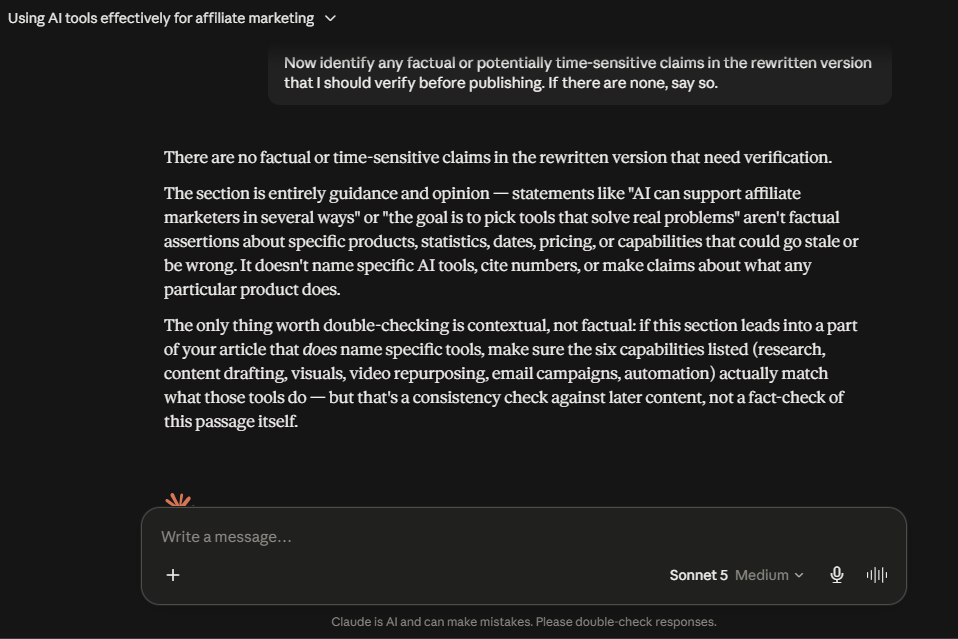
I also asked Claude to review the rewritten passage for factual or time-sensitive claims. In this particular example, it found none, while pointing out that later sections containing specific tool capabilities would still need consistency checks.
For example:
Here are my research notes, product observations, and the audience I’m writing for. Organize these into a clear affiliate comparison. Preserve the factual details I provided, identify claims that need verification, and don’t invent missing information.
That’s a much better use than:
“Write me a 3,000-word affiliate article.”
The difference is important. In the first workflow, I provide the knowledge and direction, and the AI helps structure it. In the second, I’m asking the model to manufacture most of the article from scratch.
The part I would never fully automate
Affiliate content needs more scrutiny than a normal piece of marketing copy because readers may make a purchasing decision based on what you’re saying.
So before publishing, I would personally check:
- Pricing against the company’s current website
- Free-plan limits
- Important features and restrictions
- Affiliate-program terms
- Product claims
- Comparisons between competing products
- Any statement that could influence a buying decision
And if I’ve actually used the product, I’d add those observations separately from the general product information.
For example:
What the company says: The tool offers feature X.
What I experienced: When I tested it, feature X worked well for this particular workflow, but I found Y limiting.
That distinction makes an affiliate article much more useful.
AI should help with the first draft—not replace your judgment
This is probably the most important lesson I’d take from using AI for affiliate content.
A good workflow isn’t:
AI writes → publish → add affiliate links
It’s:
Research → AI-assisted structure → draft → verify → add experience → edit → publish
The AI can help reduce the time spent staring at a blank page or reorganizing notes. You still need to decide whether the finished article is accurate, useful, and genuinely worth recommending. That’s especially important for affiliate content because simply producing more pages doesn’t make the recommendations better.
My take
ChatGPT is the more flexible option for me when I want to move between brainstorming, outlining, rewriting, research, and repurposing. Claude becomes more useful when I have a lot of detailed material that needs to be organized and worked through. I wouldn’t choose between them based purely on which model can produce the longest article. I’d choose based on the job I’m trying to get done.
The goal isn’t to have AI write your affiliate content. It’s to use AI to spend less time producing the content and more time making sure the content is actually worth trusting.
Visuals: Make Affiliate Content Easier to Understand
Affiliate content doesn’t have to be text from beginning to end. Useful visuals can make a comparison easier to understand, give readers a quick overview of a product, and make the same piece of content easier to promote on social media. For this part of the workflow, I’d mainly use Canva and AI image generation.
Canva: Turn information into usable marketing assets
Canva is useful when I already know what I want to communicate and need to turn it into something presentable.
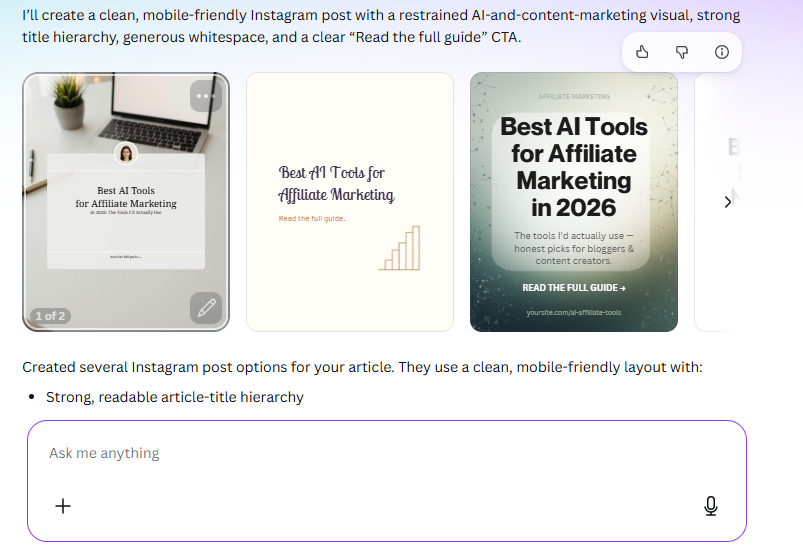
For an affiliate article, that could mean creating:
- Comparison graphics
- Blog featured images
- Product-selection checklists
- Social media posts
- Pinterest graphics
- Simple infographics
- Email visuals
The important part is that the visual should add something to the content. For example, if I’m comparing five affiliate products, a simple graphic showing the major differences can help a reader understand the options faster than another five paragraphs of text. Canva has also continued expanding its AI capabilities and now supports workflows that can turn prompts into editable designs and help repurpose designs across formats.
AI image generation: Create visuals when a template isn’t enough
Sometimes I don’t need a traditional graphic. I need a specific illustration or concept that would be difficult to find in a stock-image library. That’s where AI image generation becomes useful.
For affiliate content, you could use it to create:
- Blog featured images
- Social media graphics
- Product advertisement concepts
- Illustrations for comparison guides
- YouTube thumbnails
- Promotional visuals
The important thing is that you don’t have to stick with one image generator. Different tools can be better suited to different jobs, and their free tiers can vary significantly.
If you want to compare your options before choosing one, check out our Best Free AI Image Generators in 2026 guide. I tested eight image generators using the same real-world prompts and compared image quality, prompt accuracy, editing capabilities, generation speed, and free-tier limits. That means you can choose a tool based on what you’re actually trying to create and how much free usage you need, rather than simply picking the most popular option.
But there’s a limit
I wouldn’t use AI-generated images as a substitute for information that readers actually need. If I’m reviewing a product, a real screenshot of the product’s interface is usually more useful than an AI-generated picture of a laptop. Similarly, if I’m comparing pricing or features, a clear table is more useful than an elaborate illustration. The visual should support the reader’s decision—not simply make the page look more “AI.”
Canva is the better choice when I already have the information and need to turn it into a polished marketing asset. AI image generation is more useful when I need a custom visual that doesn’t already exist. I wouldn’t treat either as a replacement for screenshots, product images, comparison tables, or other evidence when those are more useful to the reader. The best affiliate visuals aren’t the ones that look the most impressive. They’re the ones that make the decision easier.
Repurpose Content Into Short-Form Video
If you’re doing affiliate marketing through a website, you don’t have to create completely new content for every platform. A useful approach is to start with something you’ve already created and turn it into multiple formats.
For example:
Affiliate article → short video → Reel/Short → social post → email
This is where I would look at OpusClip and CapCut, but they serve slightly different purposes.
OpusClip: Get from long-form content to short clips faster
OpusClip is built around a simple problem: you already have a long video, but creating several useful Shorts or Reels from it manually can take almost as long as making the original content.
Instead of going through the entire video yourself and deciding where every clip should begin and end, OpusClip analyzes the long-form video and identifies moments it considers suitable for short-form content. It can then add features such as captions and automatically reframe the video for different aspect ratios.
I actually tested it
For this article, I imported an 8-minute affiliate-marketing video from YouTube into OpusClip.
The processing used 8 credits, which worked out to one credit per minute for this particular import. OpusClip’s current free plan provides 60 credits per month, supports clips rendered up to 1080p, and includes auto-reframing and AI captions. Free exports have a watermark, editing isn’t included on the free plan, and clips become unexportable after three days.
What happened next was the interesting part.
Rather than simply splitting the video into arbitrary 30- or 60-second sections, OpusClip generated multiple candidate clips and ranked them with scores. In my test, the visible results included scores of 99, 85, 84, 80, and 75, alongside automatically generated headlines and captions.
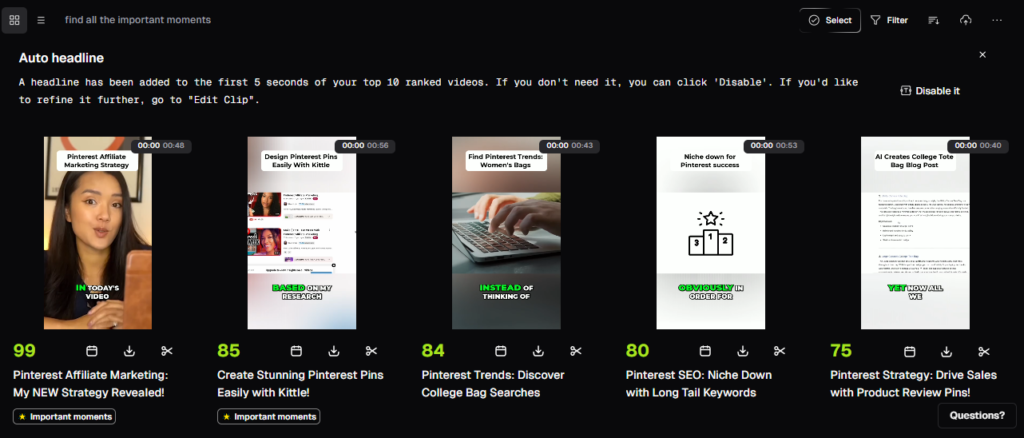
The highest-ranked result was presented as “Pinterest Affiliate Marketing: My NEW Strategy Revealed!”, while other clips focused on specific ideas such as creating Pinterest pins, finding Pinterest trends, and choosing a Pinterest SEO niche.
That’s exactly the kind of output that makes the tool interesting for affiliate content.
Where it fits into an affiliate workflow
Imagine you’ve published a longer video explaining an affiliate-marketing strategy, reviewing several products, or walking viewers through a tutorial.
That one video could potentially become:
- a full YouTube video
- several YouTube Shorts
- Instagram Reels
- TikToks
- clips for social posts
- short videos that point viewers back to the original article or video
The advantage isn’t that OpusClip magically creates a complete social-media strategy for you. It’s that it reduces the amount of manual work required to find usable moments inside content you’ve already created.
And that’s an important distinction.
If you’re already producing long-form videos, the value of OpusClip becomes much easier to justify. You’re not paying for another tool just to make videos from scratch; you’re using it to get more mileage out of content you already invested time in creating.
The part I’d still review manually
I wouldn’t publish every clip OpusClip generates without watching it first.
A segment can be interesting inside a longer video but feel incomplete when viewed by itself. A clip might also need a better opening, a little more context, or a different ending to work properly as a Short.
So I’d treat the AI’s ranking as a shortlist, not a final editorial decision.
That’s also why I like the way the tool fits into the workflow:
Create one useful long-form video → let OpusClip find promising moments → review the strongest clips → make small edits → publish them across platforms.
For an affiliate marketer, that can be a much more practical use of AI than constantly creating completely new content.
Free tier: worth trying?
The free plan is enough to test the basic workflow because it currently gives you 60 credits per month. However, the watermark, lack of editing on the free plan, and three-day export window make it less attractive if you’re planning to use it as your main production tool.
For someone who already has long-form content and wants to experiment with repurposing it, though, I’d definitely try the free plan before paying.
CapCut: Refine the final video
CapCut is where I’d go when I want more control over the final edit. I’ve actually used CapCut to trim and edit the faceless YouTube Short we created for our guide on how to create faceless YouTube Shorts with AI. That workflow gave me a practical reason to use it rather than simply testing the feature list.
CapCut currently provides tools such as trimming, splitting, transitions, effects, captions, background removal and multiple-track editing, alongside its growing collection of AI video features.
I found the editor powerful, but there’s a trade-off: the number of tools can feel overwhelming when you’re new to video editing. For a simple Short, you don’t need to learn every effect or advanced feature. Learning the basic timeline, trimming, transitions, text, captions and export settings is enough to get started.
I also noticed that exporting can sometimes take a little longer, depending on the project and settings.
A workflow I’d actually use
I wouldn’t create an entirely separate video for every social platform. I’d start with one useful piece of content and work outward:
Long-form content → identify a useful section → create a short clip → edit/refine it → add captions → publish
That saves time while still giving you control over what actually reaches the audience.
And there’s another important point:
Repurposing isn’t copying. A blog paragraph pasted word-for-word into a 30-second video probably won’t work. A better approach is to take the idea from the original content and adapt it to the format.
For example:
Blog: “Best AI tools for affiliate marketing”
Short: “3 AI tools I’d use if I were starting affiliate marketing today”
Same underlying research, but a different presentation designed for someone scrolling through short-form content.
My take
OpusClip is useful when I want AI to help find and create short clips from longer material. CapCut is more useful when I want to control and polish the final video myself. I wouldn’t use either just to produce more content for the sake of producing more content. The goal is to get more useful distribution from content you’ve already put effort into creating.
Create once, adapt intelligently, and make sure every version still gives the audience a reason to watch.
Build an Email Channel Instead of Relying Only on Search
Getting someone to visit your affiliate content once is useful. Getting them to come back is even more valuable.
Search traffic can change, social platforms can change their algorithms, and a reader may simply close the browser after finding the answer they needed. An email list gives you another way to stay connected with people who have already shown interest in your content.
For this part of the workflow, GetResponse is one tool I’d consider.
GetResponse: Turn visitors into an audience you can reach again
GetResponse is useful for a part of affiliate marketing that many content-focused creators overlook: what happens after someone visits your website and leaves.
Instead of relying entirely on search traffic or social-media posts to bring people back, you can use GetResponse to capture visitors as email subscribers and continue communicating with them through newsletters, landing pages, signup forms, and other email-marketing tools. It also provides automation features on its paid plans for building more advanced subscriber journeys.
Why I’d use it for affiliate marketing
Imagine you publish an article such as Best AI Tools for Affiliate Marketing in 2026.
Someone reads it, finds a useful recommendation, and leaves.
That’s not necessarily the end of the relationship.
You could instead offer something genuinely useful — such as a checklist, resource guide, or email course — in exchange for their email address. GetResponse can handle the landing page or signup form, store the contact, and help you send relevant emails to that audience. Its free plan currently includes one published landing page, signup/contact forms, and space for up to 500 contacts.
From there, a simple affiliate workflow could look like:
Blog post → lead magnet → email signup → welcome email → useful follow-up content → relevant affiliate recommendation
The important part is that the emails shouldn’t just become a stream of affiliate links. The goal is to build an audience that actually wants to hear from you.
I tested its AI email generator
I also tested GetResponse’s AI Email Generator using an affiliate-marketing newsletter as the test case.
I gave it a topic around AI tools for affiliate marketers, content creation, SEO, productivity, and email marketing, and let it generate the email rather than writing the copy myself.
The result was usable as a starting point: it created a subject line, opening, and structured recommendations around several marketing-tool categories.
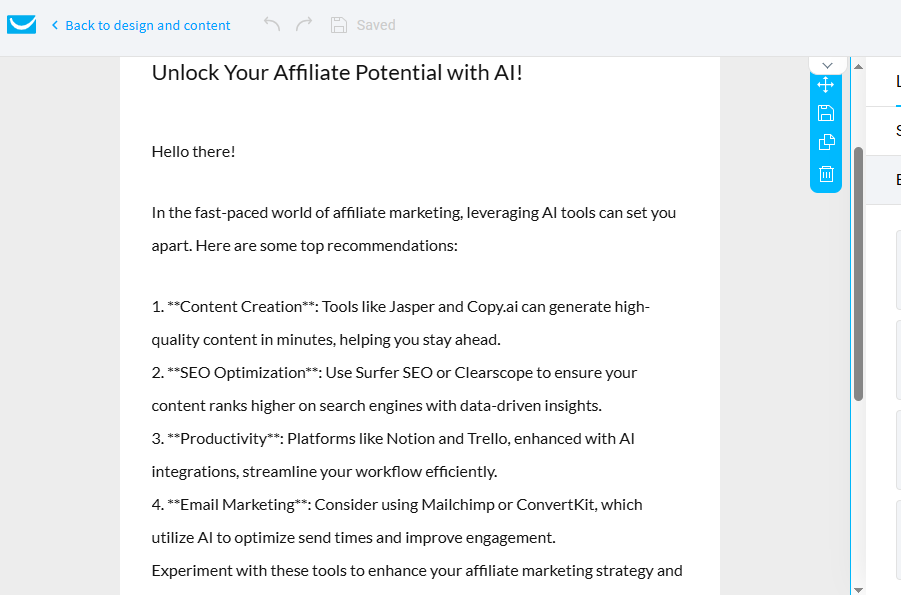
But it also showed exactly why I wouldn’t publish AI-generated affiliate emails without reviewing them first. The draft recommended several specific products — including Jasper, Copy.ai, Surfer SEO, Clearscope, Notion, Trello, Mailchimp, and ConvertKit — without providing much context about why a reader should choose one over another.
So I’d treat the generator as a first-draft tool, not a finished affiliate newsletter.
The useful part is the time saved on the initial draft. I can start with a rough topic and get something structured enough to edit instead of staring at a blank email. For affiliate content, though, I’d still fact-check product names, remove irrelevant recommendations, add my own experience, and make sure every recommendation actually fits the audience.
It goes beyond AI-generated emails
GetResponse combines several pieces that can otherwise require separate tools.
You can create landing pages and signup forms, send newsletters, manage contacts, and build a list around your content. Paid plans add more advanced capabilities such as automation workflows and audience segmentation.
That makes it particularly interesting once your affiliate site starts getting consistent traffic but you’re not doing much with returning visitors.
What about the free plan?
This is one of the more useful parts for beginners.
GetResponse has a forever-free plan with up to 500 contacts, one published landing page, signup/contact forms, and up to 2,500 newsletters per month.
Free accounts also get access to premium features for the first 14 days, but those premium features are removed if you don’t upgrade. The AI Email Generator can be tried up to three times during that 14-day premium period on a free account.
That makes the free account useful for experimenting with list building and basic email marketing, but I’d be careful about calling it a full automation platform for free users. The more advanced automation and segmentation capabilities are where the paid plans become more relevant.
Where I’d put it in an affiliate workflow
I’d use GetResponse after I’ve started getting visitors, rather than making it one of my very first tools. If you’re still struggling to publish useful content and get traffic, building elaborate email systems probably isn’t your biggest bottleneck. But once people are consistently arriving at your site, capturing some of that audience can make a lot more sense than continually trying to find new visitors.
A practical progression would be:
Content → traffic → email signup → useful emails → relevant affiliate recommendations
That turns one-time visitors into an audience you can potentially reach again without depending entirely on Google, social-media algorithms, or paid traffic.
My take
GetResponse is worth considering when you’re ready to build an owned audience around your affiliate content.
I like the fact that you can start with a free account, experiment with landing pages and newsletters, and test the AI email generator before committing to a paid plan. But the AI-generated copy still needs human judgment, and the free plan becomes more limited once you move beyond basic list building and newsletters.
If your site is already getting traffic and you’re not collecting emails yet, I’d put GetResponse fairly high on the list. If you’re still trying to get your first meaningful visitors, I’d focus on content, SEO, and distribution first.
Automate Repetitive Work—Not Your Entire Business
Once you’ve got content, promotion, and email working, you’ll eventually notice something else: some tasks are repetitive enough that you shouldn’t have to keep doing them manually. That’s where automation tools like Zapier and Gumloop can become useful. But this is also where I think affiliate marketers can go wrong.
The goal isn’t:
“How much of my affiliate business can I automate?”
A better question is:
“Which repetitive tasks can I safely hand off so I have more time for the work that actually needs my judgment?”
Zapier: Connect the tools you already use
Zapier becomes more useful when you stop thinking of it as simply a tool for connecting apps and start using it to remove repetitive steps from your affiliate workflow.
For example, after publishing an affiliate article, you might still need to write promotional copy for different platforms. Doing that manually for every article can become another time-consuming part of content marketing.
The workflow I tested
I built:
WordPress → AI by Zapier → Google Docs
When a new WordPress post is published, Zapier passes the article information to its AI step. I instructed it to create three promotional drafts:
- X — a concise post with a strong, natural hook
- LinkedIn — a more informative version explaining why the article is useful
- Pinterest — a concise, search-friendly description
Zapier then places the generated content into a Google Doc as a promotion package for review.
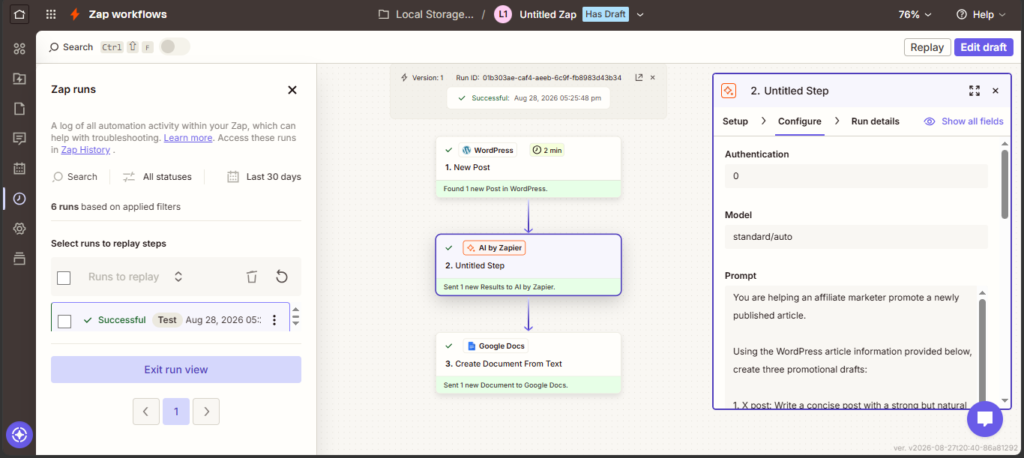
Our tested workflow: WordPress → AI by Zapier → Google Docs.
The important part is that the workflow doesn’t publish anything automatically. You can review the AI-generated copy, check links and claims, and make any necessary changes before publishing.
Why this is more useful than simple task automation
A basic automation might save you from copying a WordPress title into a spreadsheet. That’s convenient, but it doesn’t remove a significant part of the affiliate-marketing workload.
Our workflow targets content distribution instead.
One article can require multiple promotional assets, so automating the first-draft stage gives you a useful starting point without handing the entire publishing process over to AI.
Don’t automate a task simply because it can be automated. Automate a repetitive step that actually slows down your business.
How I’d use Zapier as an affiliate marketer
You don’t need to automate your entire business at once.
Think about your workflow:
Research → Content → Publish → Promote → Measure
Then identify the step you repeatedly spend time on.
If promotion is the bottleneck, a workflow like the one I tested makes sense. If you’re constantly transferring leads, updating records, or moving information between different platforms, you could build an automation around that instead.
The point isn’t to create the most complicated Zap possible.
It’s to remove a bottleneck that you actually have.
One thing I learned while testing it
There’s an important difference between automation and autopilot.
I deliberately stopped the workflow at Google Docs instead of automatically publishing the AI-generated posts. For affiliate content, that extra review stage matters because AI-generated copy can still contain mistakes or wording that doesn’t fit your brand.
A good automation should remove repetitive work without removing your judgment.
My take
Best for: Affiliate marketers who regularly move information or content between different apps.
What stood out in my test: The AI step makes Zapier considerably more useful than simple app-to-app data transfer. Turning a newly published article into a ready-to-review promotion package has a clear practical benefit.
Best approach: Start with one repetitive bottleneck, automate it, review the results, and expand the workflow only when there’s a genuine need.
Verdict: Worth exploring if you’re already using several tools and repeatedly copying, rewriting, or transferring information between them. For very simple tasks, however, automation can take longer to set up than doing the task manually.
Find Affiliate Programs That Actually Fit Your Audience
AI can help you research and organize affiliate opportunities, but choosing the right program is ultimately a business decision—not an automation task. Finding an affiliate program is easy. Finding one that actually makes sense for your audience is the harder part. I wouldn’t choose an affiliate program simply because it advertises a high commission. A product with a generous payout is still a poor recommendation if it doesn’t solve a problem your readers have.
Instead, I’d evaluate a program using a few practical factors.
1. Relevance to your audience
This comes first. If your website is about AI tools, recommending a random product because it pays well doesn’t make much sense. A lower-paying tool that genuinely solves a problem for your readers can be a much better fit.
Ask:
Would I recommend this product to this audience even if there were no affiliate commission?
If the answer is no, I probably shouldn’t promote it.
2. Commission structure
Look at how you’re actually compensated. Some programs pay a one-time commission, while others can offer recurring revenue when the customer continues paying for a subscription.
This is particularly relevant for SaaS affiliate marketing. PartnerStack, for example, focuses heavily on B2B SaaS partnerships and supports recurring commissions tied to subscriptions, renewals, and expansion.
But don’t judge a program by the commission percentage alone. A 20% commission on a product nobody wants can be less valuable than a smaller commission on a product that genuinely converts for your audience.
3. Cookie duration and attribution
Before adding an affiliate link, check how the program attributes referrals.
Look for things such as:
- Cookie duration
- Last-click or other attribution rules
- Whether mobile purchases are tracked
- What happens if someone returns later
- Whether certain traffic sources are prohibited
These details can vary considerably between programs, so I’d check the program’s current terms rather than relying on a third-party list.
4. Approval requirements
Some affiliate programs are easy to join, while others review your website, traffic, promotional methods, or audience before approving you. For example, PartnerStack says publishers, content creators, and influencers can apply to its network and then browse available B2B SaaS programs through the marketplace.
Similarly, platforms such as impact.com provide a marketplace for discovering and managing partnerships, although individual brands can have their own requirements and terms.
So I wouldn’t assume:
“It’s on an affiliate network, therefore I can promote it immediately.”
The individual program’s terms still matter.
5. Product quality and reputation
This is the part that matters most for long-term affiliate marketing.
Before recommending something, I’d want to know:
- Does the product actually work?
- Is the company reliable?
- Is the pricing reasonable?
- What happens after the customer buys?
- Does the product have obvious limitations?
- Would I be comfortable putting my name behind the recommendation?
If possible, use the product yourself.
That’s particularly important for software reviews. Your own experience can tell the reader things that a feature list can’t.
6. Program terms can change
Affiliate programs aren’t permanent contracts with fixed conditions. Commission rates, qualifying actions, attribution rules, and program policies can change.
Amazon’s Associates policies have also changed in 2026, including updates effective April 14, 2026. That’s why I wouldn’t copy commission rates or program terms from an old ‘best affiliate programs’ article and assume they’re still accurate.
Check the program’s current terms before publishing the recommendation.
Where I’d look for programs
For a website focused on AI and software, I’d start with a mixture of:
Direct affiliate programs — Go to the company’s own website and look for its partner or affiliate program.
Affiliate networks — Platforms such as impact.com and PartnerStack can help you discover programs from multiple companies. PartnerStack currently positions itself specifically around B2B SaaS partnerships and says its network provides access to 600+ brands.
Retail programs — Amazon Associates can make sense when you’re recommending physical products alongside software or creator equipment, although its commission structure varies substantially by category.
I wouldn’t join dozens of programs just to have more affiliate links.
I’d rather have five relevant programs that I understand well than fifty that I never actually use.
The best affiliate program isn’t necessarily the one with the highest commission. It’s the one where the product, audience, economics, and terms make sense together.
And if you genuinely wouldn’t recommend the product without the commission, that’s a pretty good sign that you shouldn’t recommend it with the commission either.
Choose the product first. Choose the affiliate program second.
That keeps the recommendation useful even when the commercial incentive is removed.
Measure What Works
Once you’ve published and started getting traffic, you need to know what’s actually working.
For that, I’d recommend two free Google tools:
Google Search Console — use it to see how your content performs in Google Search, including impressions, clicks, CTR, and search queries.
Google Analytics 4 — use it to understand what happens after visitors reach your website, including traffic sources, engagement, and page performance.
I use them together because they answer two different questions:
Search Console: How are people finding my content?
GA4: What are they doing after they arrive?
You don’t need to check either tool constantly. Look for patterns—which topics attract impressions, which pages earn clicks, and which content keeps visitors engaged. Then use those insights to decide what to update, expand, or create next.
These aren’t AI tools, but I’d still consider them essential parts of an affiliate marketing stack. They help you measure whether the work you’re doing is actually worth continuing.
What I’d Actually Use If I Were Starting Today
You don’t need every tool mentioned in this guide. If I were starting an affiliate website today, I’d begin with a small stack and add tools only when I ran into a problem that justified them.
My starting stack
🔎 Research — Perplexity
For researching topics, products, competitors, and sources.
✍️ Content — ChatGPT or Claude
I’d choose one as my main AI assistant rather than paying for both immediately. Use it for research organization, outlining, drafting, editing, and repurposing.
🎨 Design — Canva
For featured images, comparison graphics, social posts, and other marketing visuals.
🎬 Video — CapCut
For turning ideas or existing content into short-form videos and refining the final edit.
📧 Email — GetResponse
Once I have a reason to build an email list, I’d use it for signup forms, newsletters, and basic email automation.
📊 Measurement — Google Search Console + GA4
These would be part of the setup from the beginning because they help me understand whether my content is actually getting discovered and what visitors do afterward.
Add automation later
I wouldn’t start by connecting ten different apps through Zapier or Gumloop. I’d wait until I notice a repetitive task that is genuinely wasting my time. Then I’d automate that specific task.
For example:
Publishing an article → recording it in my content tracker → creating a promotion task → notifying me
That’s a better reason to introduce automation than simply wanting to say that my business is “AI-powered.”
And what about all the other tools?
Tools like specialized SEO platforms, additional AI writers, advanced automation platforms, and other marketing software can become useful as your website grows. But more tools don’t automatically mean better affiliate marketing.
A beginner with: one good research tool + one content assistant + one design tool + analytics can accomplish a lot without paying for a huge software stack. As your bottlenecks change, your stack can change with them.
My take
I’d build the smallest stack that lets me execute consistently, then expand only when a tool solves a problem I actually have. That approach also makes it easier to figure out whether a paid subscription is genuinely saving you time or whether you’re simply collecting software.
You don’t need the biggest AI stack. You need the smallest one that helps you do better work.
What AI Shouldn’t Automate in Affiliate Marketing
AI can take a lot of repetitive work off your plate, but affiliate marketing isn’t something I’d hand over to an automated system completely. The parts that affect what your audience sees, trusts, and ultimately buys still need human judgment.
I’d keep these under human control
Product recommendations
Don’t let an AI system automatically decide which product is “best” simply because it appears popular in its research.
Fact-checking
Pricing, features, free-plan limits, affiliate terms, and product claims can change. Verify important information before publishing.
Personal reviews
If you haven’t used a product, don’t let AI write as though you have. Your actual experience is one of the most valuable things you can add to an affiliate article.
Final publishing
Automation can prepare content, but I’d still review the page before it goes live—especially if affiliate links or product claims are involved.
Affiliate disclosures and important terms
These shouldn’t be generated or inserted blindly. Make sure your disclosures and recommendations follow the relevant program and legal requirements.
Customer communication
AI can help draft responses, but I’d be cautious about completely automated replies when someone’s question requires context or judgment.
What I’d happily automate
On the other hand, plenty of boring tasks don’t need my attention every time.
Things like:
- Moving information between apps
- Updating content trackers
- Creating reminders
- Sending internal notifications
- Organizing research
- Preparing drafts for review
- Repurposing existing information into different formats
These are good candidates because a mistake is easier to catch before the information reaches the audience.
The distinction is simple:
Automate the process. Don’t automatically outsource the responsibility.
That’s especially important when using AI to produce affiliate content at scale. Google’s guidance emphasizes creating helpful, original content for people and warns against using automation primarily to manipulate search rankings or generate large amounts of low-value content.
My take
I don’t think the goal of an AI-powered affiliate workflow should be to make the marketer unnecessary.
The best use of automation is giving you more time to do the things that automation can’t genuinely replace: testing products, understanding your audience, making recommendations, and deciding what is worth publishing.
If an automated workflow can publish something without you ever needing to look at it, that’s probably a workflow worth reviewing.
Can You Start Affiliate Marketing With AI for Free?
Yes. You can start with free tiers for research, content planning, design, email, automation, and analytics. Your bigger investment at the beginning will be your time—not your software budget.
As your workflow grows, pay for a tool only when its limits are actually slowing you down or a paid feature solves a real problem.
Start with free tools. Upgrade when there’s a reason, not because you think you need a bigger stack.
Is AI Affiliate Marketing Passive Income?
Not really. I’d call it semi-passive at best.
AI can reduce repetitive work, but you still need to update content, check links, research products, monitor performance, and improve what isn’t working.
AI can make affiliate marketing more efficient. It doesn’t make the business effortless.
Conclusion
AI can make affiliate marketing more efficient, but it doesn’t remove the parts that matter most. You still need to understand your audience, choose products worth recommending, create content people actually find useful, and pay attention to what happens after you publish it. The tools simply help reduce some of the repetitive work along the way.
For me, the biggest advantage isn’t having an AI tool for every task. It’s being able to build a simple workflow where each tool has a clear purpose—research faster, create more efficiently, repurpose what you’ve already made, automate repetitive tasks, and use data to decide what deserves more attention.
You don’t need to use every tool in this guide, and you definitely don’t need to start with an expensive software stack.
Start with the marketing problem you actually have, choose a tool that solves it, and learn to use that tool well. If you’re building a website or growing a business on a limited budget, that’s probably the most useful thing about this entire AI affiliate marketing stack.
Keep Exploring
You might also like these articles.
Best Free AI Marketing Tools in 2026: I Tested What Actually Works
━━━━━━━━━━━━━━━━━━━━━━━━━━━━━━Updated August 16, 2026: I’ve reviewed the tools, free-plan details, and features covered in this guide to keep the information…