
When we published our comprehensive benchmark of the 8 best free AI video generators—evaluating 37 standardized video generations across Runway Gen-2, Luma Dream Machine, and Pika—the generative video landscape had clear boundaries. Models either struggled with severe warping, melted human limbs into liquid plastic, or imposed paid paywalls after two renders.
Over the past few months, two artificial intelligence powerhouses completely upended that hierarchy: Hailuo AI (developed by MiniMax, now powered by the H3 architecture) and Kling AI (developed by Kuaishou, operating on Video 3.0).
If you browse generative video forums or creator communities on Reddit, you will see bold claims. Some creators claim Hailuo is an untouchable “physics simulation engine” that makes Hollywood-grade b-roll on a free account. Others insist Kling AI is the undisputed champion of directable camera movement and character consistency.
Almost all of the top-ranking comparisons on Google come from tool aggregators or SaaS landing pages that haven’t spent ten minutes actually testing either platform on a free tier. They repeat outdated credit allowances, ignore brutal queue bottlenecks, and refuse to show side-by-side renders of the exact same prompt.
To separate marketing hype from production reality, we ran an empirical, head-to-head benchmark on both platforms using an identical stress-test prompt. We tracked actual generation latency, calculated the true $0 credit economy, evaluated physical interaction and volumetric steam, and tested the newly integrated native audio engines.
Here is what actually happened when we put Hailuo AI and Kling AI head-to-head.
The $0 Creator Reality: Quotas, Hidden Nerfs, and the Credit Economy
Before comparing visual fidelity or physics engines, we need to address the most urgent question for independent creators and video editors: Can you actually use either of these tools for free in a real project?
The short answer is no. Neither platform offers an ongoing, sustainable free production workflow. However, the exact way they restrict free users differs dramatically—and almost every comparison currently ranking on Google gets these numbers wrong.
| Metric | Hailuo AI (MiniMax H3) | Kling AI (Video 3.0) |
|---|---|---|
| Free Credit Model | One-Time Welcome Grant | Monthly Renewable Allocation |
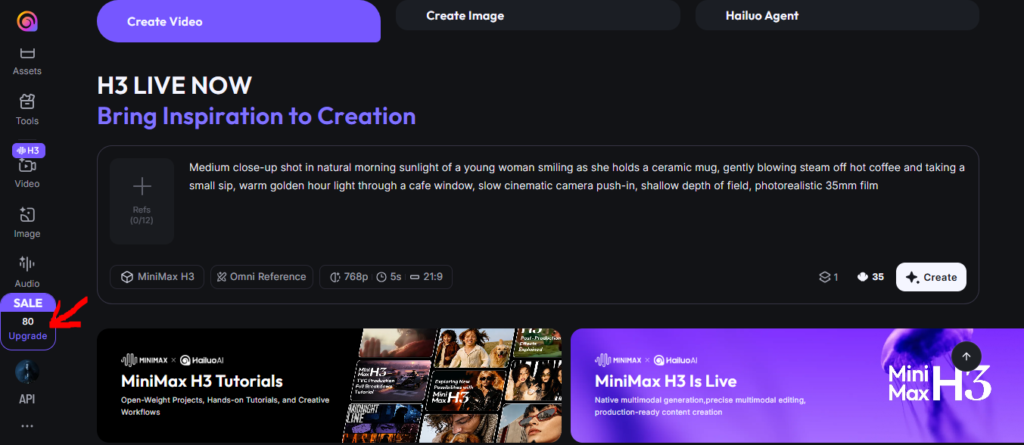
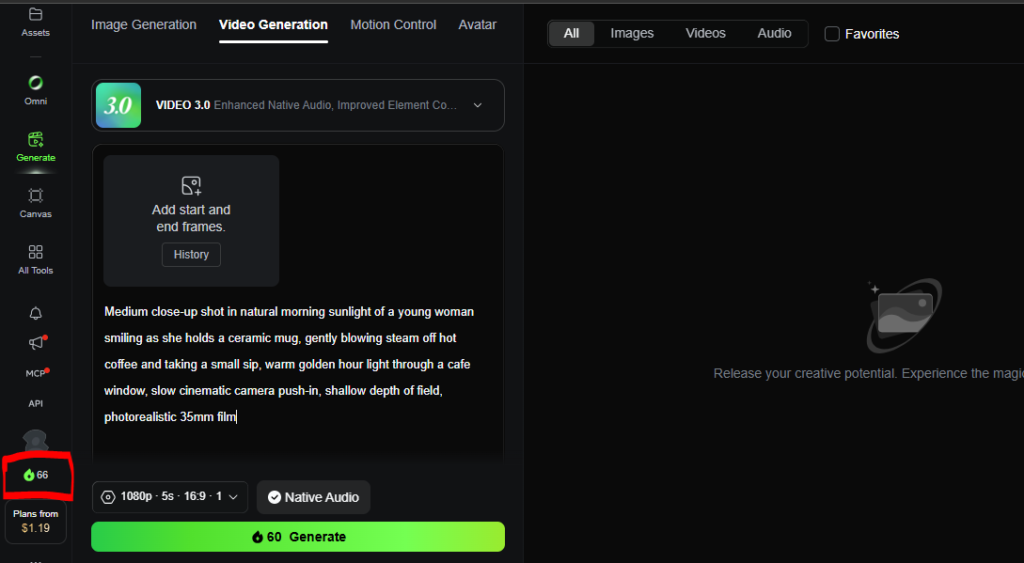
| Live Tested Balance | 80 Credits (Quietly cut from 100) | 66 Credits per Month |
| 5-Second Generation Cost | 35 Credits (Standard 768p) | 45 Credits (720p) / 60 Credits (1080p) |
| Native Audio Included? | Yes (Integrated) | Yes (Toggleable feature) |
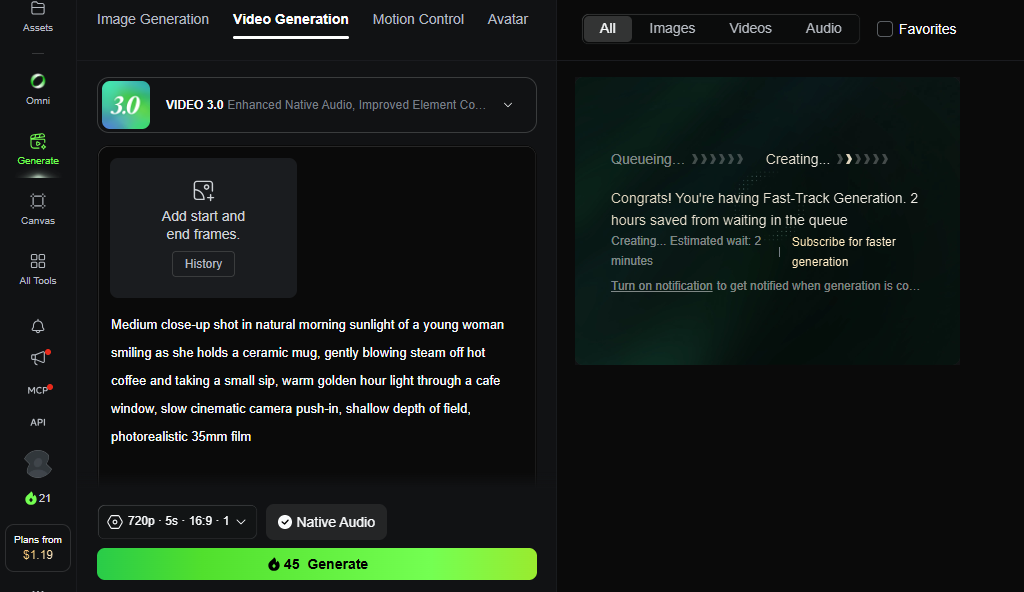
| Balance After 1 Test | 45 Credits remaining | 21 Credits remaining (at 720p) |
| Total Free Clips Yield | Exactly 2 Clips LIFETIME | Exactly 1 Clip per MONTH |
| The Commercial Reality | A 10-second teaser trial | A slow-motion monthly sample |
The Hailuo AI Credit Nerf: From 100 to 80 Credits
When Hailuo AI first gained global viral traction, new accounts received a modest welcome pool of 100 credits. During our live audit, MiniMax quietly nerfed this initial grant down to 80 credits.
On the newly deployed MiniMax H3 engine, rendering a single 5-second video at 768p resolution consumes 35 credits.
Here is the simple arithmetic that marketing blogs hide:
- You register an account and start with 80 credits.
- You run your first 5-second video test. Your balance immediately drops to 45 credits.
- You run a second 5-second video test. Your balance drops to 10 credits.
- A single render requires 35 credits. With 10 credits remaining, your account is permanently locked out of video generation unless you pull out a credit card.
Hailuo does not replenish these credits daily or weekly. For free creators, Hailuo AI is an ephemeral, two-clip trial, not a free software tier.
The Kling AI Credit Myth: 66 Credits per Month, Not per Day
A widespread myth circulating on Reddit and technical blogs claims that Kling AI gives users 66 free credits every single day.
Our live account verification proves the actual policy: Kling provides 66 credits per month.
Furthermore, credit consumption on Kling scales dynamically based on your chosen output settings:
- 720p at 5 seconds (with Native Audio): Consumes 45 credits.
- 1080p at 5 seconds (with Native Audio): Consumes 60 credits.
If you generate a high-definition 1080p clip with audio, you burn 60 out of your 66 credits in one click, leaving a useless balance of 6 credits for the remainder of the 30-day billing cycle. Even if you step down to 720p (burning 45 credits), you have 21 credits left—not enough to render a second 5-second video.
The Bottom Line: Hailuo AI gives you two clips ever. Kling AI gives you one clip per month. If you plan to produce complete YouTube Shorts, TikToks, or documentary sequences, both platforms require paid subscription plans.
Generation Latency: The 11-Minute Queue Reality Gap
For video editors on tight deadlines, render latency matters almost as much as visual fidelity. If a tool takes fifteen minutes to generate five seconds of video, iterative creative direction becomes practically impossible.
Both platforms route free-tier accounts through shared public compute clusters. However, the accuracy of their queue estimators could not be more different.
| Tool | Interface Estimated Queue | Actual Logged Render Latency |
|---|---|---|
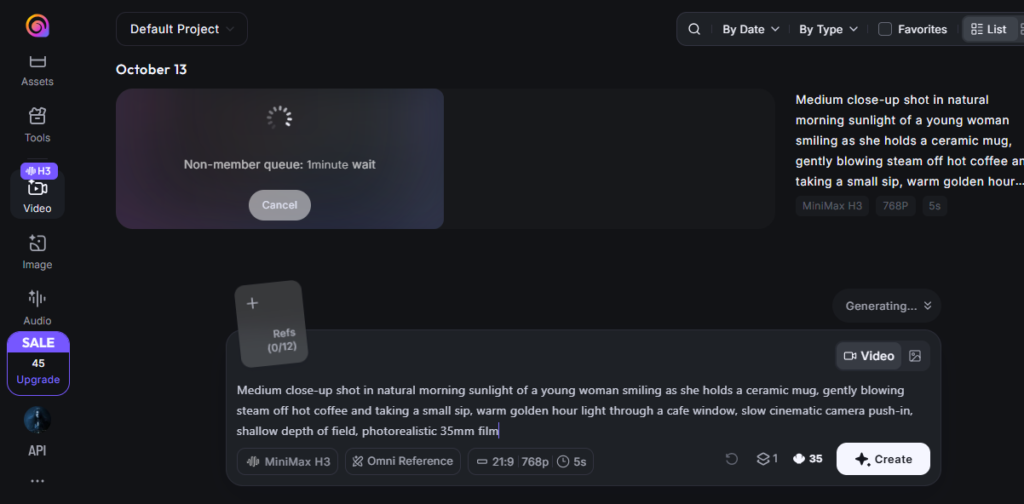
| Hailuo AI (MiniMax H3) | “1 minute wait” | 11 minutes 20 seconds (11.3x delay) |
| Kling AI (Video 3.0) | “Estimated wait: 2 minutes” | 2 minutes 22 seconds (Accurate) |
Hailuo’s 11x Queue Illusion
When you click “Create” in Hailuo AI on a free tier, the interface displays an optimistic loading card: "Non-member queue: 1minute wait".
In our live testing, that progress wheel spun for 11 minutes and 20 seconds before returning a finished video. During peak server load, free requests on MiniMax are frequently deprioritized behind enterprise API calls and paying subscribers. Waiting over eleven minutes for a 5-second clip means that testing three prompt variations requires over half an hour of idle screen-watching.
Kling’s Fast-Track Predictability
Kling AI’s free server management was far more disciplined. Upon submission, the platform alerted us: "Congrats! You're having Fast-Track Generation. Estimated wait: 2 minutes".
The generation completed and rendered the final 720p file in 2 minutes and 22 seconds—a negligible 22-second variance from its initial estimate. For quick testing and immediate feedback, Kling AI proved roughly 4.8 times faster than Hailuo AI.
The Benchmark: Why We Chose the “Cafe Sip” Stress-Test
When amateur reviewers compare AI video models, they almost always reach for flashy visual clichés: cyberpunk warriors sprinting through neon-drenched rain, explosive spaceship dogfights, or fire-breathing dragons inside dark caverns.
At first glance, those prompts look impressive. In reality, dark neon lighting and hyper-kinetic motion are masking crutches. Heavy shadows, rainy reflections, and rapid camera shake conceal warped fingers, melting jaws, missing teeth, and plastic textures. Any mid-tier diffusion model can make an armored cyborg look passable in the dark.
To conduct a genuine editorial stress test, you have to strip away the cinematic disguises. You have to force the model into a calm, daylight scene containing the exact physical elements that break AI video models.
Here is the standardized prompt we submitted to both engines:
Medium close-up shot in natural morning sunlight of a young woman smiling as she holds a ceramic mug, gently blowing steam off hot coffee and taking a small sip, warm golden hour light through a cafe window, slow cinematic camera push-in, shallow depth of field, photorealistic 35mm filmThe 5 Failure Points Embedded in This Prompt
- Natural Morning Sunlight (The Skin Texture Test): Direct sunlight exposes skin texture. Mannequin-like, airbrushed Midjourney skin looks immediately artificial in daylight. The model must render realistic pores, stray hairs, and natural facial symmetry without sliding into the uncanny valley.
- Fine-Motor Hand Anatomy (The Contact Test): Generating hands in static images is difficult; animating hands interacting with an object is notoriously harder. The model must animate fingers gripping a ceramic handle without melting the ceramic into the knuckles or sprouting extra digits.
- Volumetric Thermodynamics (The Steam Test): Steam is neither solid nor uniform smoke. It requires semi-transparent fluid dynamics that curl, dissipate, and respond to the character’s breath.
- Coordinated Oral Interaction (The Sip Test): As the character blows on the coffee and brings the cup to her lips, the lips, teeth, and rim of the mug must maintain structural integrity. In poorly optimized models, the cup frequently merges into the character’s lower jaw.
- Intentional Camera Choreography (The Push-In Test): Most AI video generators default to static framing with random subject movement. Requesting a “slow cinematic camera push-in” tests whether the model can execute a deliberate, steady focal dolly without warping background geometry.
Head-to-Head Visual Analysis: Hailuo H3 vs Kling 3.0
Both models succeeded in generating a cohesive, professional 5-second video, but their visual rendering philosophies, physics handling, and composition could not be more distinct.
| Evaluation Category | Hailuo AI (MiniMax H3) | Kling AI (Video 3.0) |
|---|---|---|
| Native Aspect Ratio | 21:9 Ultrawide Cinematic | 16:9 Standard Widescreen |
| Aesthetic Palette | Warm, golden-hour, indie editorial | Naturalistic, clean commercial palette |
| Facial & Skin Fidelity | Visible freckles, hair rim-lighting | Smooth skin, realistic facial geometry |
| Liquid & Mug Handling | Cup held tight, steam emphasized | Dark coffee liquid visible inside cup |
| Camera Movement | Smooth, subtle cinematic push-in | Steady, deliberate camera push-in |
| Watermark Signature | Discrete bottom-right badge | Clean bottom-right “KlingAI 3.0” logo & text |
| Integrated Audio | Soft breathing, steam, ambient cafe | Realistic cafe room tone, gentle sip |
1. Hailuo AI (MiniMax H3): The Cinematic Atmosphere Specialist
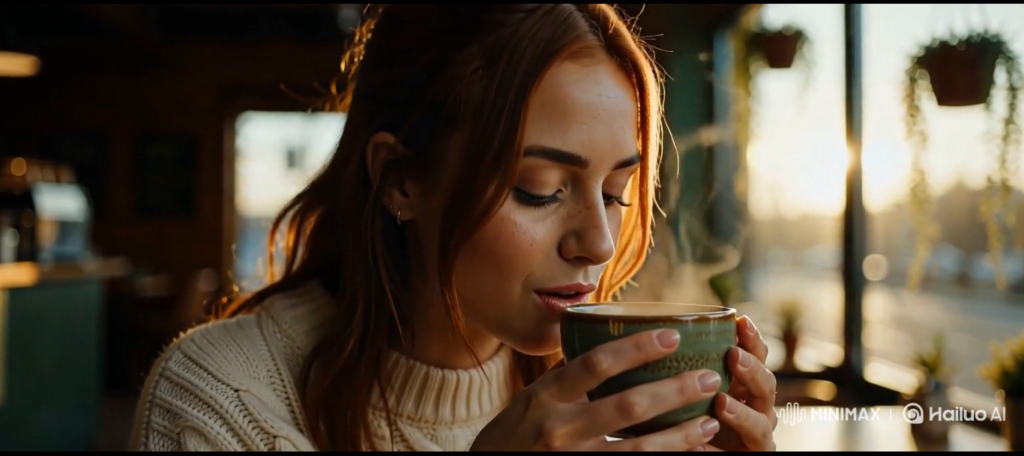
Hailuo AI opted for a widescreen 21:9 anamorphic aspect ratio, instantly giving the output an indie film aesthetic.
What Hailuo Got Right:
- Exceptional Skin Realism: Hailuo completely avoided the plastic AI sheen. The subject’s cheeks feature delicate freckles, natural skin folds around the pursed lips, and authentic morning light catching individual flyaway hairs.
- Textile & Environmental Lighting: The texture of her cream cable-knit sweater is rendered with photorealistic tactile depth. The sunlight passing through the cafe window creates authentic optical rim-lighting along her jawline and shoulders.
- Fluid Steam Dispersion: The steam curling off the coffee cup is semi-translucent, twisting organically into the cooler morning air without clumping into dense smoke.
- Camera Direction: Hailuo followed the instruction for a slow cinematic push-in. The camera advances smoothly toward the subject across the 5-second run without background distortion or focal jitter.
Where Hailuo Struggled:
- Liquid Representation: While the mug and steam were rendered cleanly, the coffee itself remained hidden beneath the rim. Hailuo prioritized the exterior silhouette of the cup over internal fluid interaction.
2. Kling AI (Video 3.0): The Structural Precision Specialist
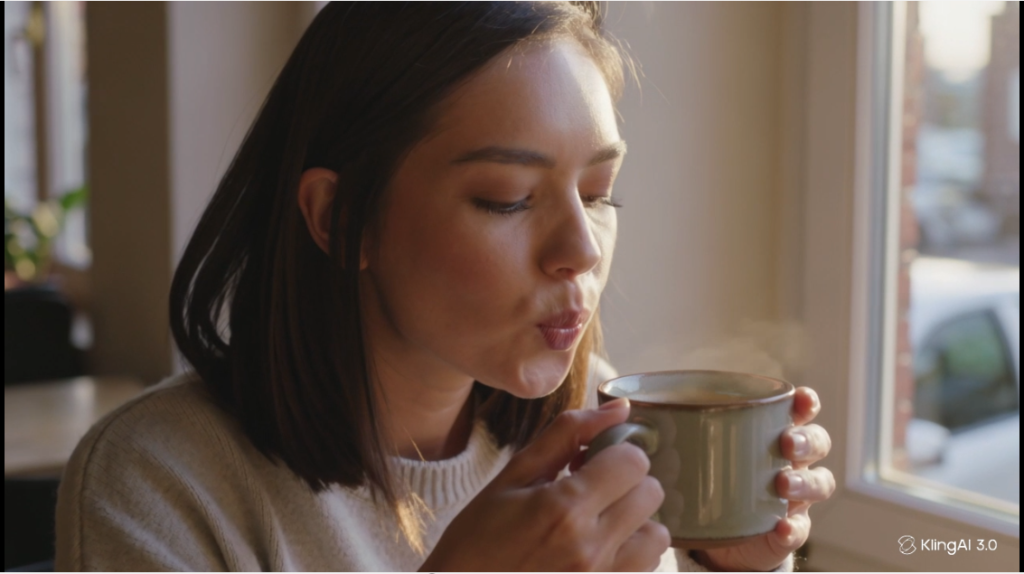
Kling AI rendered the prompt in a standard 16:9 widescreen ratio, framing the shot like a high-end commercial television advertisement.
What Kling Got Right:
- Liquid & Mug Interior Rendering: Unlike Hailuo, Kling clearly rendered the dark coffee liquid resting inside the ceramic mug, complete with soft surface reflections from the cafe window.
- Flawless Hand Anatomy: Hand-to-object contact was structurally rock-solid. Both hands gripped the sides of the ceramic cup with distinct knuckles, natural fingernails, and zero blending between her fingers and the ceramic surface.
- Mechanical Action Fidelity: Kling nailed the physical interaction of drinking. Her lips pressed against the rim of the cup in a realistic sipping motion without any warping or clipping.
- Camera Choreography: Kling executed the requested slow camera push-in with mechanical smoothness. The perspective narrowed evenly, maintaining depth of field across the cafe background.
Where Kling Struggled:
- Slightly Smoother Skin Grading: While Kling’s output looks clean and professional, the subject’s skin texture exhibits slightly less organic irregularity (fewer micro-pores and freckles) compared to Hailuo’s raw 35mm film aesthetic.
3. The Audio Revolution: Native Sound Generation Compared
One of the most consequential advancements in late-2026 AI video is the shift from silent video rendering to native multimodal audio synthesis.
Historically, creators had to take silent video files and manually source audio clips in editors like CapCut or Premiere Pro. Both Hailuo H3 and Kling 3.0 now generate synchronized audio tracks natively within the render pipeline.
- Hailuo AI’s Audio: Generated subtle room tone, the quiet whoosh of air as the subject blew across the cup, and soft background cafe murmurs. The audio had surprising stereo separation that matched the 21:9 cinematic tone.
- Kling AI’s Audio: Delivered crisp foley sound effects, capturing the gentle ceramic tap and the quiet acoustic environment of a cafe window seat.
Both audio outputs were remarkably coherent and required zero manual desync correction in post-production.
Direct Video Comparison
To verify these observations yourself, compare both 5-second outputs below. Pay close attention to the slow camera push-in, the behavior of the steam, and the hand-to-cup contact in both renders.
Feature-by-Feature Scorecard
If you are deciding which platform deserves your subscription budget, here is how both tools compare across core production categories:
| Feature / Metric | Hailuo AI (MiniMax H3) | Kling AI (Video 3.0) | Editorial Advantage |
|---|---|---|---|
| Photorealistic Lighting | Warm, atmospheric, filmic rim-light | Clean, naturalistic daylight | Hailuo AI (More cinematic) |
| Object & Hand Physics | Excellent exterior grip | Flawless grip + visible liquid interior | Kling AI (More precise) |
| Camera Control Accuracy | Follows push-in prompts accurately | Follows push-in + dedicated motion brush | Kling AI (Deeper control) |
| Free Queue Speed | 11 minutes 20 seconds | 2 minutes 22 seconds | Kling AI (4.8x faster) |
| Free Tier Value | 80 one-time credits (2 clips lifetime) | 66 credits/mo (1 clip per month) | Tie (Both are strictly trials) |
| Native Audio Engine | Atmospheric room tone & breath | Crisp foley and ambient presence | Tie (Both perform well) |
| Default Aspect Ratio | 21:9 Ultrawide | 16:9 Standard | Context dependent |
Creator Decision Matrix: Which Tool Should You Use?
Neither Hailuo AI nor Kling AI is an outright replacement for the other. Each model has gravitated toward a distinct creative niche.
Choose Hailuo AI If:
- You Produce Cinematic, Narrative B-Roll: Hailuo’s default aesthetic leans heavily toward dramatic 35mm film stock, golden-hour warmth, and textured character faces. If you produce documentary segments, aesthetic video essays, or mood boards, Hailuo delivers immediate visual atmosphere without extensive color grading.
- You Rely on Text-to-Video Prompt Adherence: MiniMax H3 interprets subtle atmospheric adjectives (“warm golden hour light”, “dust motes”, “shallow depth of field”) with remarkable fidelity.
- You Prefer Widescreen Composition: If your workflow targets 21:9 ultrawide or theatrical formats, Hailuo’s native horizontal framing saves you from cropping and re-scaling.
Choose Kling AI If:
- You Need Rapid Iteration and Reliable Queues: If you cannot afford to wait eleven minutes between prompt adjustments, Kling’s 2-minute fast-track queue makes creative iteration significantly more practical.
- You Require Complex Object and Liquid Interaction: Kling is noticeably superior at keeping hands, utensils, cups, and liquid surfaces structurally consistent during physical action.
- You Need Directable Camera Trajectories: While both tools followed our prompt’s push-in instruction, Kling features dedicated camera control modules (pans, tilts, dollies, and motion brushes) that allow you to dictate camera speed and axis direction directly.
- You Target Standard 16:9 YouTube / Broadcast Formats: Kling defaults to clean 16:9 television and web aspect ratios that drop directly into standard editing timelines.
The Broader Landscape: Where Do They Rank in 2026?
When we initially evaluated the generative video ecosystem in our best free AI video generators guide, platforms like Runway and Luma set the early benchmarks for AI camera movement.
The arrival of MiniMax H3 and Kling Video 3.0 marks a definitive generational leap:
- The “Melting Human” Era is Officially Over: Both tools handled natural daylight, fingers gripping ceramic, and lips touching a cup without the horrific anatomical warping that defined early 2024 video generators.
- Integrated Native Audio is Now Mandatory: Any AI video generator launching in late 2026 without native, synchronized foley audio is already obsolete. Both Hailuo and Kling prove that audio and video should render in a unified pass.
- The Death of True Free Tiers: The computational cost of running dense multimodal video diffusion models has made generous free tiers economically impossible. Hailuo’s quiet reduction from 100 to 80 credits and Kling’s strict 66-credit monthly budget confirm that serious creators must treat these platforms as paid professional utilities.
Final Verdict
If we have to pick an overall winner for raw visual beauty, Hailuo AI (MiniMax H3) edges ahead. Its filmic color grading, natural skin freckles, and warm rim lighting produce an image that looks less like synthetic AI generation and more like high-end 35mm cinematography.
However, as a functional production tool, Kling AI (Video 3.0) takes the practical crown. It generates four times faster, maintains superior physical integrity over internal liquid surfaces and hands, and provides reliable 16:9 framing with accurate queue estimates.
For creators looking to experiment today:
- Use your 80 welcome credits on Hailuo AI to generate two visually stunning, cinematic master shots for your next project.
- Use your monthly 66 credits on Kling AI when your scene demands precise physical action, complex hand interaction, or fast 2-minute turnaround times.
Frequently Asked Questions
Is Hailuo AI completely free to use?
No. Hailuo AI provides new accounts with 80 one-time welcome credits (recently lowered from 100). Generating a standard 5-second video on the MiniMax H3 model consumes 35 credits. This means free users can render exactly two 5-second videos before their credits are depleted. Credits do not reset daily.
How do Kling AI’s free credits work?
Kling AI grants free users 66 credits per month (not daily). Generating a 5-second video at 720p with native audio costs 45 credits, while a 1080p generation costs 60 credits. Because of these credit costs, free users can generate only one high-definition video per month on a free tier.
Can you remove the watermark from Hailuo AI and Kling AI?
Both platforms attach a discreet watermark to videos generated on their free tiers (Hailuo places a `MINIMAX | Hailuo AI` badge in the lower-right corner, while Kling places a combined `KlingAI 3.0` logo icon and text watermark in the lower-right corner). Removing these watermarks natively requires upgrading to a paid subscription plan.
Which model is better for faceless YouTube channels?
For YouTube creators requiring standard 16:9 b-roll clips, Kling AI is generally more practical due to its faster 2-minute render queue and standard widescreen framing. However, if your channel focuses on moody video essays or cinematic documentaries, Hailuo AI offers superior organic film grading and daylight skin realism.